WhatsApp is rolling out a new Contacts tab on Android beta
WhatsApp is finally introducing a new tab to see online contacts from the bottom navigation bar on Android. The new tab allows users to manage their contacts, sort them, and start a new conversation. WhatsApp is replacing the Communities tab with the new Contacts tab in this initial phase.
| Key Points | Details |
|---|---|
| Feature: | Contacts tab |
| Status: | Rolling out |
| Compatibility: | WhatsApp beta for Android 2.26.45.1 is a compatible update. |
| Availability info: | This feature is available to some beta testers, and it's rolling out to more users over the coming weeks. |
| Thanks: | Sc, for testing and reporting. |
| Previous news: | WhatsApp introduces smart message text actions for chats! |
WhatsApp was testing a new Contacts tab on Android
In the post about the WhatsApp beta for Android 2.26.40.3 update, we announced a dedicated tab for contacts. With this feature, WhatsApp is developing a tab where users can see their contacts and when they're online. The tab includes a Favorites section, a full contact list, and some options to sort the list. By introducing this tab, WhatsApp also wanted to make it faster for users to search for recently active contacts without scrolling the chat list.
WhatsApp is introducing a new Contacts tab on Android
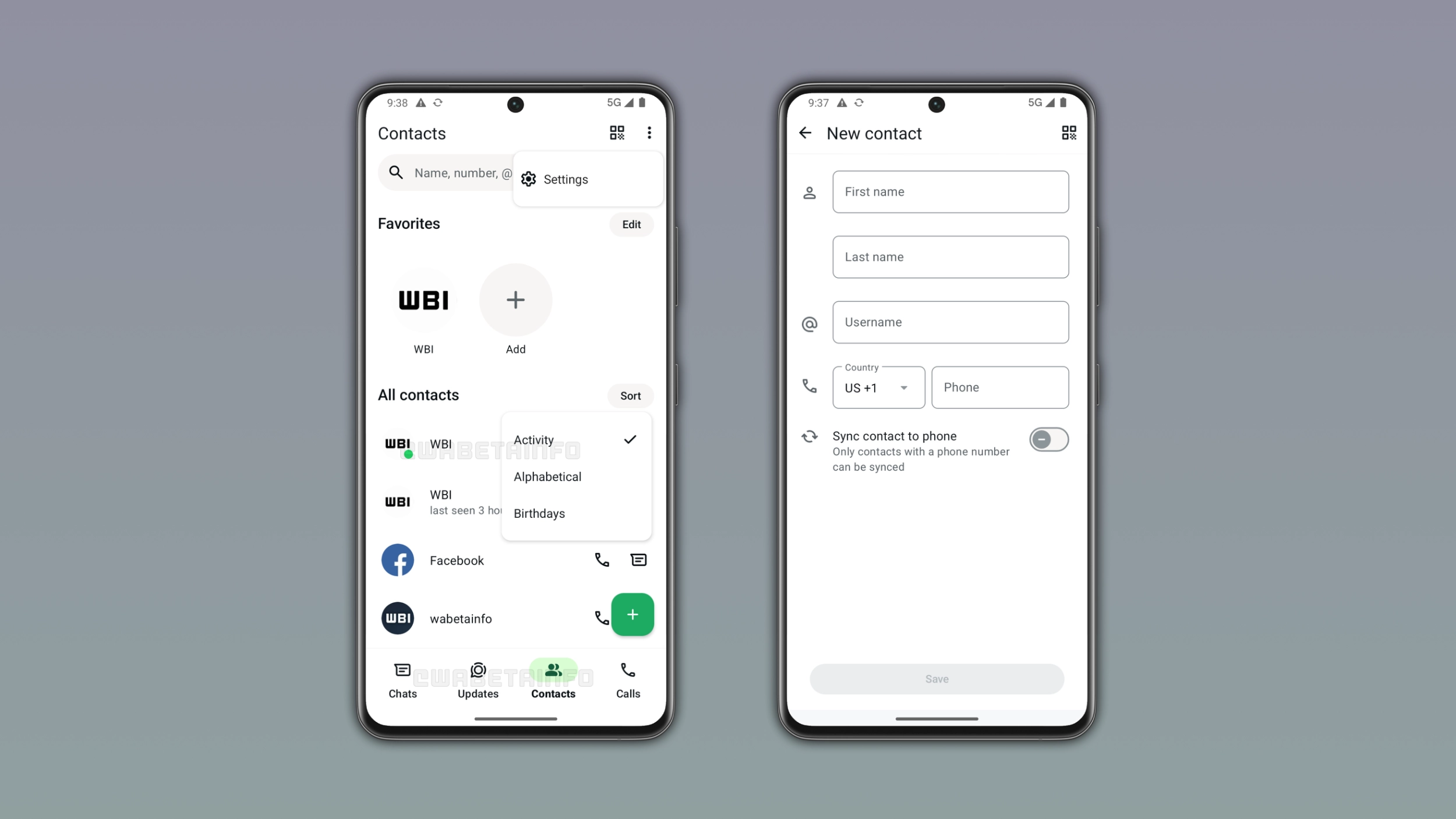
WhatsApp is bringing the Contacts tab to the bottom navigation bar on Android. The tab replaces Communities to give users quick access to their contact list. We discovered this with the WhatsApp beta for Android 2.26.45.2 update, which is available on the Google Play Store. With this update, WhatsApp is rolling out a new Contacts tab to some beta testers. Users can see their contacts in the new tab organized in a familiar layout.
What the Contacts tab shows on Android
At the top of the Contacts tab, WhatsApp shows contacts users marked as their favorites. This section allows users to see and manage their pinned contacts to start a conversation with them faster. Below the Favorites section, WhatsApp displays the contact list. Users can easily sort the list to change how it appears. Specifically, they can sort it by alphabetical order, birthdays, and activity. By selecting "activity", users can see who is online at the top of the list, marking them with a green dot. For contacts who are not online, WhatsApp sorts them by last seen. This information is visible only when the user shares their last seen and online status.
WhatsApp shows Meta AI and options to invite contacts
At the bottom of the list, WhatsApp added a shortcut to open a conversation with Meta AI. Meta AI is always available, so the app will show the green dot over its icon. WhatsApp also added some shortcuts to share an invite link to other apps. In addition, users can invite their followers on Instagram to chat with them on WhatsApp.
How to add a new contact from the Contacts tab
Users can add a new contact by tapping the floating action button at the bottom right of the screen. This action presents the new contact screen, where users can enter the first name, last name, username, and phone number. This section still offers a feature to sync the new contact to the phone. However, WhatsApp can only sync contacts with a phone number to the address book on the device.
Why WhatsApp replaced the Communities tab
WhatsApp introduced a filter in the chat list that lets users access their communities without opening the tab. With this filter, WhatsApp makes the Communities tab in the bottom navigation bar redundant. As a result, WhatsApp is replacing the communities tab with a new hub where users can see who is online. This makes it easier for users to find who is available without opening every conversation.
WhatsApp is testing different configurations for the Contacts tab
WhatsApp is working on different configurations for the Contacts tab, and they depend on Meta AI, status updates, and channels. Previously, WhatsApp moved status updates to the top of the Chats tab. WhatsApp is also developing a feature that will let users migrate their channels to the chat list. This means that we may see a configuration where WhatsApp replaces the Updates tab. In addition, some users already have a tab for Meta AI that replaced Communities, so their navigation bar already look different. For these users, WhatsApp may test the Contacts hub that replaces the Meta AI tab with the Contacts tab, or involve them in a separate test where the Updates tab disappears instead. WhatsApp is testing different configurations, so the bottom navigation bar may look different based on the account. For now, WhatsApp focuses this initial phase on the Communities tab.
WhatsApp is rolling out the Contacts tab to Android beta testers
The Contacts tab is available to some users who install the latest update from the Google Play Store. WhatsApp is rolling it out gradually, so not every beta tester will see it immediately. If the Contacts tab does not appear yet, it should become available to more accounts over the coming weeks. WhatsApp has not announced when this feature will be available to everyone.
Connect with WABetaInfo
Follow WABetaInfo on X and visit our About page to learn more about what we do. We always appreciate your feedback on posts like this one.