WhatsApp expands emoji reactions for messages on Apple Watch
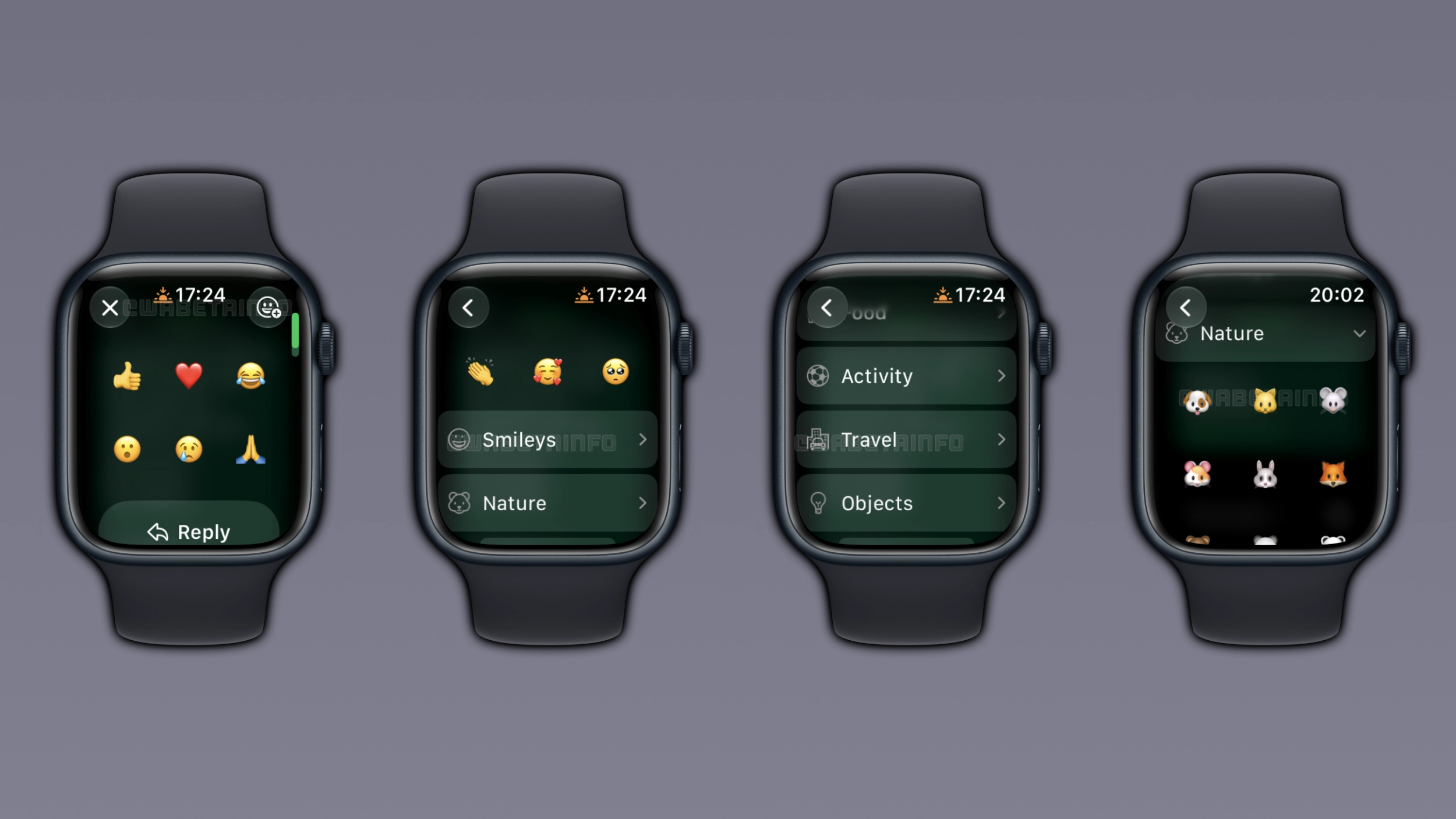
WhatsApp is improving message reactions on Apple Watch, making it possible for users to choose any emoji. Previously, WhatsApp limited reactions on Apple Watch to 6 emojis. Users can explore any category and choose the emoji they want to use.
| Key Points | Details |
|---|---|
| Feature: | Full emoji keyboard for reactions on Apple Watch |
| Status: | Rolling out |
| Availability info: | This feature is available after installing the latest versions of WhatsApp for Apple Watch. |
| Previous news: | WhatsApp lets users bookmark their favorite status music! |
WhatsApp launched the Apple Watch app last year
In the post about the WhatsApp for iOS 25.34.75 update, we announced the official companion app for Apple Watch. WhatsApp for Apple Watch lets users read their messages and reply directly from their wrist. In the first version, the app also supported emoji reactions. However, only 6 emojis were available in the reaction tray. Users who wanted to react with a different emoji were forced to use their iPhone.
WhatsApp introduces full emoji reaction support on Apple Watch
6 emojis are enough for many situations, but users may need more for specific messages. With the latest updates, WhatsApp is introducing the full emoji set on Apple Watch. Users are no longer restricted to 6 emojis when they want to react to a message on their wrist. This means that it is finally possible to react using any emoji from the full set.
How to access the full emoji grid on Apple Watch
When users tap and hold a message, WhatsApp shows the reaction grid with 6 emoji. The interface also includes a button to open the full emoji keyboard, which shows recently used emojis at the top. Users can also explore all categories to find the emoji they want to use. WhatsApp adapts the interface for the small screen of Apple Watch, making it easier for users to scroll the list.
How emoji categories work on Apple Watch
WhatsApp organizes emojis into 8 categories: Smileys, Nature, Food, Activity, Travel, Objects, Symbols, and Flags. Users can scroll through these to find the emoji they want to use as a reaction. They can tap any emoji category to expand the list. It is also possible to choose a recent emoji from the top of the list.
How the Apple Watch reaction experience compares to iPhone
On iPhone, users can react with any emoji by tapping the "+" button in the reaction tray. The latest updates bring the same experience to Apple Watch. WhatsApp adapts the interface for a smaller screen, with a scrollable list instead of a tab bar. On the recipient's side, a reaction from Apple Watch and one from iPhone are the same.
Why expanding emoji reactions is important on Apple Watch
Reactions allow users to quickly respond to a message without typing. This is even more important on Apple Watch, since users have fewer ways to respond quickly from their wrist. 6 emojis work for many situations, but users may need something more specific for certain messages. With the full set available, users can express exactly what they want without reacting from their iPhone.
WhatsApp brings expanded emoji reactions to Apple Watch
The full emoji set for reactions is available on Apple Watch. WhatsApp is expanding it gradually, so not every user will see the emoji category button. If this feature is not visible, the feature should become available to more users over the coming weeks. WhatsApp has not announced this feature in the official changelog.
Connect with WABetaInfo
Follow WABetaInfo on X and visit our About page to learn more about what we do. We always appreciate your feedback on posts like this one.