WhatsApp is developing an update that will refresh the design of the settings page on Android. The new style will group options into rounded sections, making the layout more modern. In a future update, WhatsApp will adopt the Material Design 3 Expressive segmented list pattern for the settings interface.
| Key points | Details |
|---|---|
| Feature: | New settings interface |
| Feature availability: | Some features may be under development, so they are not available to beta testers. Others may become available to users over time. If you're unable to access a certain feature, you will need to wait for a future update. |
| News shared last week: | WhatsApp is working on an adaptive bottom navigation bar! |
| Previous article: | WhatsApp is rolling out profile cover photos on iOS beta! |
Weekly WhatsApp beta updates: new features and improvements
This new weekly roundup brings together all the latest updates about WhatsApp beta shared this week. As a result, you can finally catch up on everything you might have missed from our past announcements. You can consider this summary as a way to keep up new features, improvements, and fixes. This week's highlight focuses on a refreshed design for the settings interface on Android. See what else we announced this week.
WhatsApp is rolling out a redesigned chat backup screen
WhatsApp is redesigning the interface for the chat backup screen on both Android and iOS. The new design separates the main backup screen from other options, so the main screen focuses on the backup status and the option to start a backup manually. WhatsApp displays more settings in a separate screen instead of showing everything in the same page. Users can see the auto backup frequency, the option to back up videos, and they can enable end-to-end encryption. The Backup settings screen on Android also includes a new section called "Previous backups", which may let users delete old and duplicate backups to save storage space. Users on iOS can disable their backups on iCloud.
WhatsApp is testing a new settings design on Android
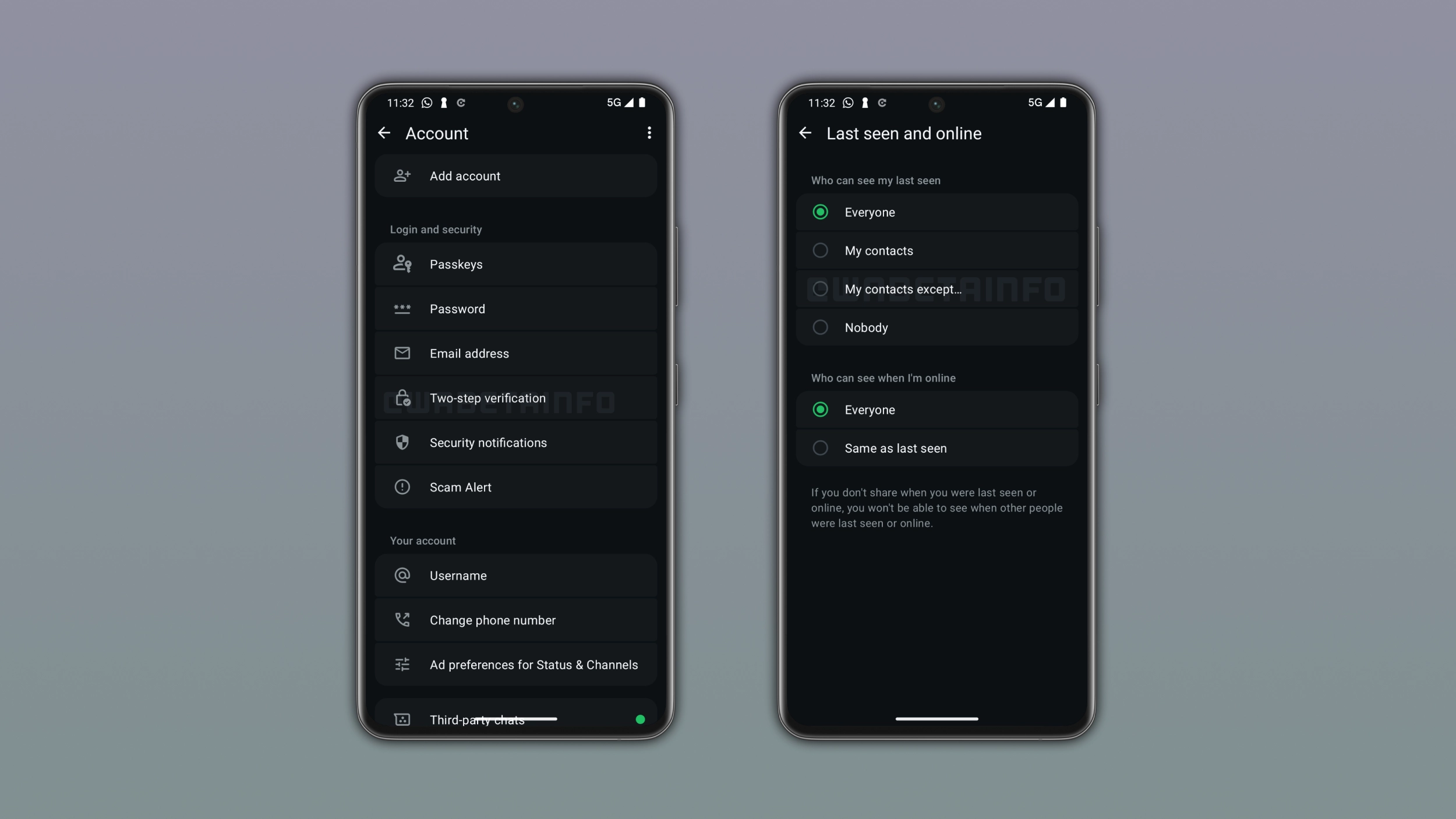
In the post about the WhatsApp beta for Android 2.26.43.3 update, we announced a redesigned page for the settings screen. With this update WhatsApp is working on how the app displays the settings screen. Instead of a flat layout, WhatsApp will group items into different sections with rounded corners. With this interface, WhatsApp will adopt the Material Design 3 Expressive segmented list pattern for a more structured appearance.
What the new settings design looks like
With the new design, WhatsApp will show settings items within the same section grouped within a rounded container. The first item in a section has more rounded corners at the top, and the last item has more rounded corners at the bottom. WhatsApp will apply this style to the entire settings interface. This includes Account settings, Privacy, Notifications, and every other settings page in the app.
WhatsApp may expand payments to more countries on Android
WhatsApp is working on bringing a new section to manage Payments to the Android app. When users open the new payments screen from the app settings, they will immediately see a button to add a payment method through Accounts Center. They will also be able to save their shipping info right within this page. WhatsApp Payments are currently available in four countries: India, Brazil, Singapore, and Mexico. By developing the payments section on both iOS and Android, we can understand that WhatsApp will introduce the infrastructure needed to support more markets.
WhatsApp launches four updates to help users catch up in groups
WhatsApp just announced four updates for group chats on both Android and iOS. The update introduces new features to pin messages, send message history, share a group status, and filter chats by mentions and replies. Users can now pin a message at the top of the interface forever, so they do not need to decide whether 24 hours, 7 days, or 30 days is the right choice. They can share the chat history with a new member by tapping their name in the conversation. Group status allows users to share content with a specific group instead of all their contacts. Everyone in the group can view the update, react to it, and add their own status.
WhatsApp is rolling out profile cover photos on Android beta
WhatsApp is introducing a feature that lets users personalize their profile with a cover photo. Users can set a cover photo by tapping the Edit button on their profile page, and they can take a new photo, choose it from the gallery, or use Meta AI to generate one. The cover photo appears at the top of the profile page and at the top of the app settings. When other users open the chat info screen, they will also see the cover photo at the top of the interface. Users can choose who can see their cover photo from their privacy settings.
WhatsApp is rolling out profile cover photos on iOS beta
Now, WhatsApp is also bringing profile cover photos to the iOS app. With the WhatsApp beta for iOS 26.43.10.70 update, users can choose a cover photo by opening their profile. Here, they need to tap the edit button to take a new photo, pick one from the gallery, or create an image using Meta AI. Both the profile photo and the cover photo are visible at the same time, and the cover photo also appears at the top of the app settings. The layout on iOS is consistent with Android, so the experience is the same regardless of which platform the viewer uses.
WhatsApp is testing a new media hub for the iOS app
WhatsApp is developing a feature that will let users see shared media from their chats. In a future update, WhatsApp will add a new media hub to the app settings. Here, users will be able to see photos, videos, and links without opening their conversations. In the new media hub, WhatsApp will show only media that users received. Note that WhatsApp won't show disappearing media files in the hub. Users will be able to search by the caption attached to a photo or video.
WhatsApp is refining the channel migration tool on Android
With the WhatsApp beta for Android 2.26.43.2 update, WhatsApp is working on improving the feature that will let users migrate their channels to the Chats tab. With this feature, users will be able to choose where they want to see their channels after removing them from the Updates tab. WhatsApp will suggest the most active channels for the chat list. Instead, WhatsApp will suggest channels the user rarely interacts with for the archive. Users will be able to accept all suggestions by tapping "Move now" to complete the migration.
WhatsApp is testing Organizations to manage large communities
WhatsApp is working on a new feature called Organizations to help community admins manage their communities. An Organization is a dedicated space where community admins can organize their community and its members. Once admins tap "View all", they will be able to see the full member list and which sub-groups they belong to. An Organization is different than a community since it's a tool for admins to manage its members.
Connect with WABetaInfo
Follow WABetaInfo on X and visit our About page to learn more about what we do. We always appreciate your feedback on posts like this one.