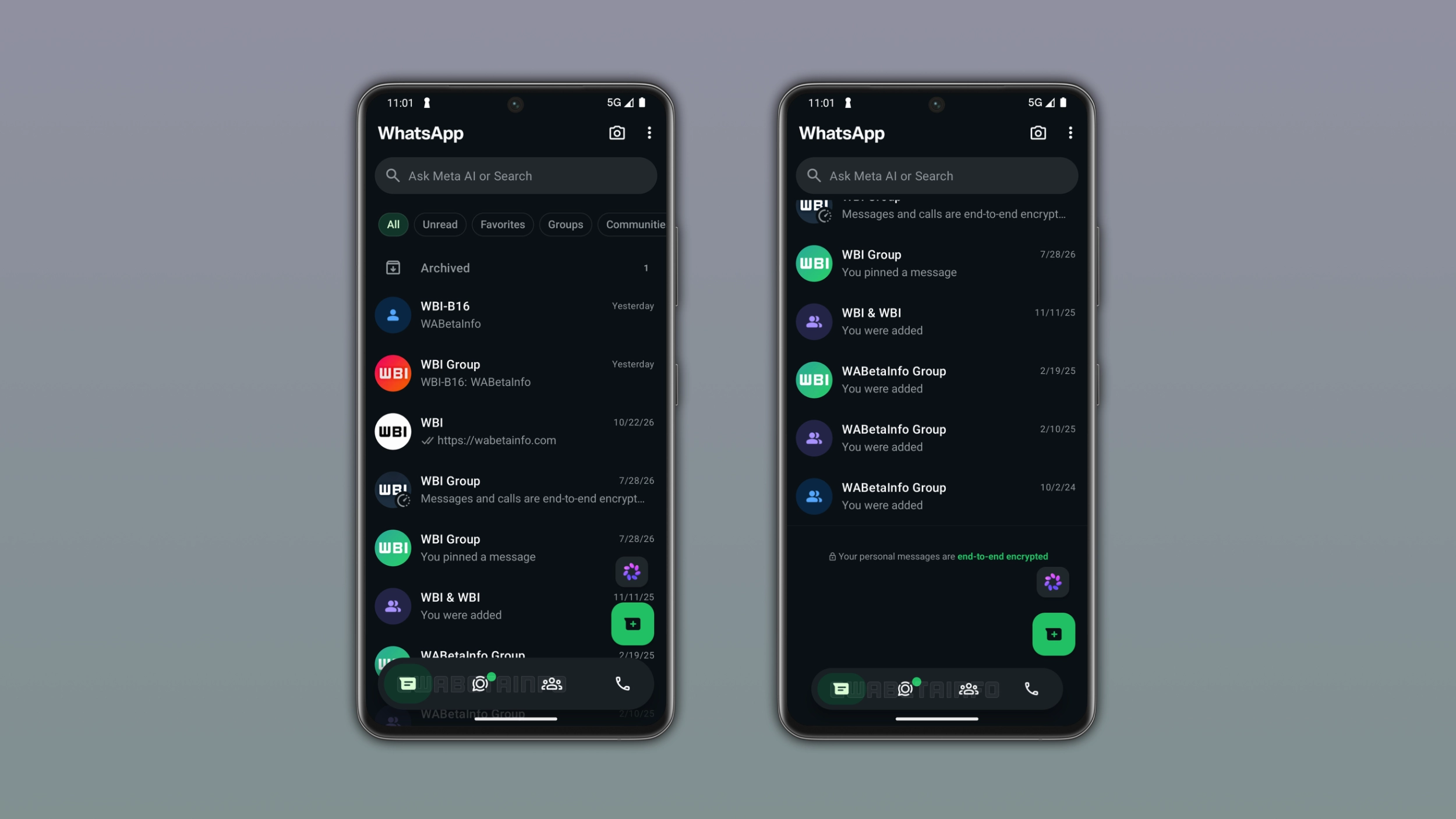
WhatsApp keeps working on the bottom navigation bar for Android, and the latest change is about how it responds to scrolling. WhatsApp will shrink it when users scroll down and bring it back to full size when they scroll up. This will make the design feel more dynamic and less intrusive.
| Key points | Details |
|---|---|
| Feature: | Adaptive bottom navigation bar |
| Feature availability: | Some features may be under development, so they are not available to beta testers. Others may become available to users over time. If you're unable to access a certain feature, you will need to wait for a future update. |
| News shared last week: | WhatsApp is rolling out a chat list to track mentions and replies! |
| Previous article: | WhatsApp is working on two new interface updates for Android! |
Weekly WhatsApp beta updates: new features and improvements
This new weekly roundup brings together all the latest updates about WhatsApp beta shared this week. As a result, you can finally catch up on everything you might have missed from our past announcements. You can consider this summary as a way to keep up new features, improvements, and fixes. This week's highlight focuses on an adaptive bottom navigation bar for the Android app. See what else we announced this week.
WhatsApp is rolling out scheduled messages on iOS beta
WhatsApp is bringing scheduled messages to the iOS app. Users can schedule a message by tapping and holding the send button. This action presents the schedule message screen, where users can choose the date and time. The minimum scheduling time is 10 minutes from the current time, and the maximum is two weeks in advance. Once users schedule a message, it appears in a dedicated scheduled messages section within the chat info screen. In this section, users can manage and delete their scheduled messages at any time before WhatsApp sends them.
WhatsApp is testing an adaptive bottom navigation bar on Android
WhatsApp is testing a new bottom navigation bar that changes its size depending on the direction of the scroll. When users scroll down through their chat list, the bar will shrink into a compact floating pill. When they scroll back up, WhatsApp will restore its original size. In its full form, WhatsApp expands the bottom navigation bar to the full width of the screen, but when users scroll down, WhatsApp gradually reduces the bar in both width and height. The icons are still visible in the compact form, but the bar takes up less space than before.
This behavior is not new to Meta's apps
The bottom navigation bar available on Instagram works like the one under development on WhatsApp. Specifically, Instagram shrinks it into a compact pill when users scroll down the feed and expands it again when they scroll up. This is the fourth change WhatsApp introduced to the bottom navigation bar, after refining the layout, removing the tab labels, and improving the tab indicator. Note that WhatsApp is still experimenting with the bottom navigation bar, so the final design may still look different.
WhatsApp is testing an in-app browser for chats on iOS
With the WhatsApp beta for iOS 26.41.10.72 update, WhatsApp is developing an in-app browser that will let users open any link right within the conversation screen. Users will be able to enable the in-app browser from the app settings, where they can see a new option called "In-app browser". When users enable this option for the first time, WhatsApp will show a bottom sheet that explains how the feature works. The browsing session is separate from the chat, so users can browse without affecting the conversation. If users prefer to open links in the default browser, they can select the option available in the three-dot menu. WhatsApp will store browsing data locally on the device, so WhatsApp cannot see which links you open. In addition, users will be able to clear cookies and cache from the websites they visited while using WhatsApp.
WhatsApp introduces a new shortcut to share Reels in chats
With the WhatsApp beta for Android 2.26.42.9 update, WhatsApp is introducing a shortcut to share Reels in chats. The shortcut is available in the chat attachment menu. When users tap it, WhatsApp opens a dedicated screen with three tabs: Recents, Saved, and Liked. The shortcut is not visible to everyone, as WhatsApp only shows it to users who linked their account to Accounts Center. Users who have not connected their accounts cannot see the Reels button in the chat attachment menu. However, Accounts Center is still optional, so it's up to users to decide if they want to link their accounts and use this feature.
WhatsApp is developing a call filtering feature for the Android app
In the post about the WhatsApp beta for Android 2.26.41.4 update, we announced a new call filtering feature. The update will offer three different option. The first option disables call filtering, so WhatsApp notifies any call regardless of whether the phone number is saved. The second option silences calls from unknown numbers automatically, but WhatsApp prevents the phone from ringing. With the third option, WhatsApp will answer the call to ask the caller why they are calling. In this case, WhatsApp will generate a private transcript of the caller's response so the user can read it and decide whether to answer. For this option, WhatsApp will generate the transcript locally on the device using language packs.
WhatsApp is rolling out a chat list to track mentions and replies
WhatsApp is bringing a new filter to track mentions and replies to the chat list. In particular, WhatsApp places the new filter at the top of the Chats tab, where users can find other filters like Unread, Favorites, and Groups. When users tap it, WhatsApp shows only the conversations where someone mentioned them or replied to their message. The filter also includes community chats, so users who joined a community can see its group chats in the list when someone mentions them or replies to their message. The filter is optional, so users can disable it from the app settings or move it to the separate "More" section.
Connect with WABetaInfo
Follow WABetaInfo on X and visit our About page to learn more about what we do. We always appreciate your feedback on posts like this one.