WhatsApp is rolling out profile cover photos on iOS beta
WhatsApp is bringing the ability to choose a cover photo to the iOS app. The feature allows users to add a landscape image at the top of their profile. Users can choose a cover photo using the camera, an image from the library, or use Meta AI to create a new one.
| Key Points | Details |
|---|---|
| Feature: | Profile cover photos |
| Status: | Rolling out |
| Compatibility: | WhatsApp beta for iOS 26.43.10.70 is a compatible update. |
| Availability info: | This feature is available to some beta testers, and it's rolling out to more people over the coming weeks. |
| Previous news: | WhatsApp is rolling out profile cover photos on Android beta! |
WhatsApp rolled out cover photos on Android beta
In the post about the WhatsApp beta for Android 2.26.43.4 update, we announced cover photos for personal profiles. The cover photo is a landscape image that appears at the top of the profile page. Users can take a new photo, pick one from their gallery, and use Meta AI to create a cover photo. When other users open the chat info screen, they can see the cover photo at the top of the interface.
WhatsApp is introducing cover photos on iOS beta
WhatsApp is not limiting the ability to choose a cover photo to the Android app. With the latest updates, WhatsApp is bringing the same functionality to the iOS app as well. We discovered the news with the WhatsApp beta for iOS 26.43.10.70 update, which is available on TestFlight. In particular, WhatsApp is rolling out profile cover photos to some beta testers. Just like Android users, it's now possible to make the profile page more complete by adding a cover photo.
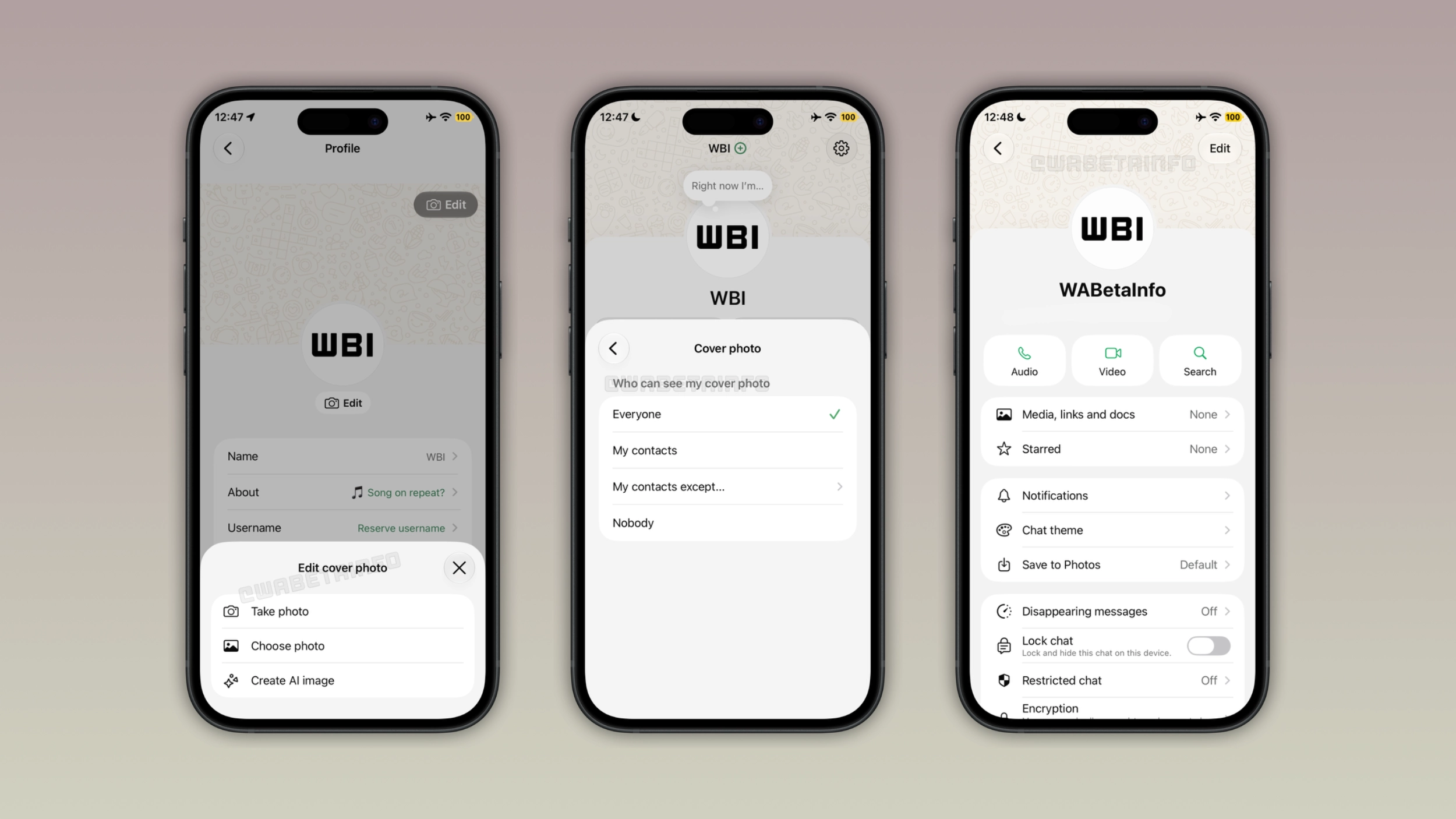
What the cover photo looks like
WhatsApp places the cover photo as a landscape banner at the top of the profile page. Here, users can get a preview of how their profile looks with the cover photo. Both the profile photo and the cover photo are visible at the same time. As a result, users can achieve a more complete look for their profile. The cover photo also appears at the top of the app settings. Users who don't have a cover photo yet will see a default one.
How to set a cover photo
Users can choose a cover photo by opening their profile. Here, they need to tap the edit button. At this point, WhatsApp asks them how they want to choose the cover photo. They can take a new photo from the camera or choose something they already have from the gallery. In addition, users can create an image using Meta AI in case they want something more creative. Once users choose their favorite cover photo, WhatsApp will crop the selected image and users can save the changes.
How to manage privacy settings for cover photos
Users can already decide who can see their profile photo. With this update, WhatsApp is bringing the same control to cover photos. Users can manage the visibility of their cover photos from the privacy screen. The default option is "everyone" that makes the cover photo public. If users want to use a cover photo without sharing it with everyone, they can choose "My contacts". Instead, "My contacts except" is the perfect option for users who want to prevent specific contacts from viewing it. Users can completely disable the visibility of their cover photo by choosing "Nobody".
Where the cover photo appears to other users
When someone opens the chat info screen, they will see the cover photo at the top of the page. This is exactly what users see when they choose a cover photo from the profile screen. Note that the layout on iOS is consistent with Android. This means that the experience is the same regardless of which platform the viewer uses.
WhatsApp is rolling out cover photos to iOS beta testers
Cover photos are available to some users who install the latest update from TestFlight. At the moment, WhatsApp is rolling it out gradually. This means that not every beta tester will be able to choose a cover photo. If the feature does not appear in the profile settings yet, it should become available to more accounts over the coming weeks. Similar to the update available on Android, WhatsApp has not announced when cover photos will be available to everyone.
Connect with WABetaInfo
Follow WABetaInfo on X and visit our About page to learn more about what we do. We always appreciate your feedback on posts like this one.