WhatsApp is rolling out profile cover photos on Android beta
WhatsApp is introducing a feature that lets users personalize their profile with a landscape image. The cover photo appears at the top of the app settings, profile page, and the chat info screen when other users open the conversation. Users can control who can see their cover photo from their privacy settings.
| Key Points | Details |
|---|---|
| Feature: | Profile cover photos |
| Status: | Rolling out |
| Compatibility: | WhatsApp beta for Android 2.26.43.11 is a compatible update. |
| Availability info: | This feature is available to some beta testers, and it's rolling out to more people over the coming weeks. |
| Previous news: | WhatsApp launches four updates to help users catch up in groups! |
WhatsApp lets business accounts configure a cover photo
In the post about the WhatsApp beta for Android 2.25.32.2 update, we announced that WhatsApp was working on cover photos for personal profiles. Previously, cover photos were already available for WhatsApp Business accounts, where businesses could upload a banner image to personalize their profile page. With the update we announced, WhatsApp was planning to bring the same feature to all users. This would let users give a personalized look to their profile screen.
WhatsApp is introducing cover photos for personal profiles
WhatsApp is now making it easier for all users to personalize their profile. This means that they do not need a business account to set a cover photo anymore. We discovered this with the WhatsApp beta for Android 2.26.43.11 update, which is available on the Google Play Store. With this update, WhatsApp is rolling out profile cover photos to some Android beta testers. The feature allows personal accounts to enable the same customization available on business accounts.
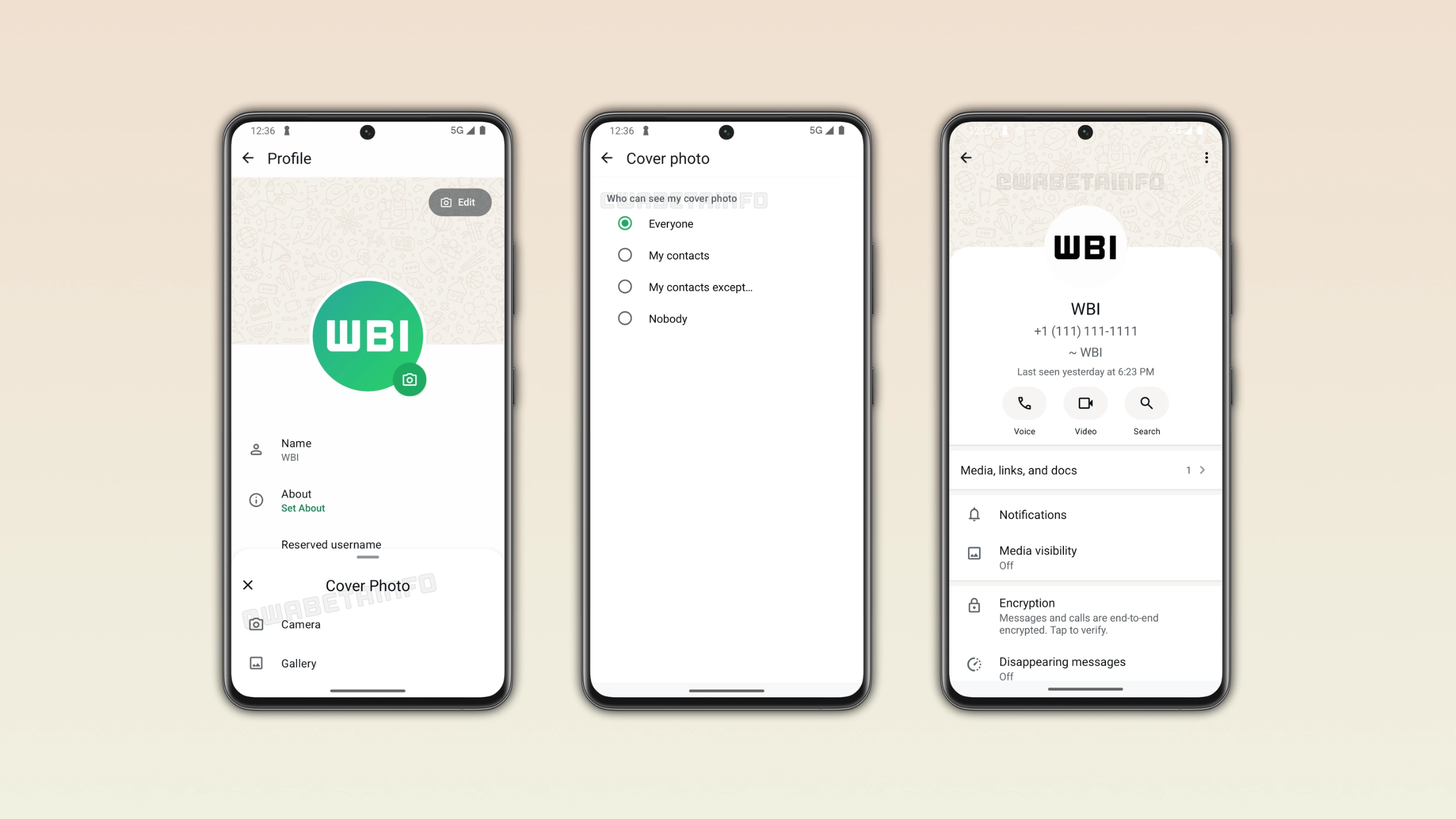
What the cover photo looks like
The cover photo appears as a landscape banner at the top of the profile page. The update does not replace the profile picture, as users can keep both at the same time. The cover photo also appears at the top of the app settings, so users can see it every time they open this section. When users do not choose a cover photo, WhatsApp shows a default image until they set one.
How to set a cover photo on Android
Users can set a cover photo by tapping the Edit button on their profile page. This action presents a menu where users can choose how to set up the cover photo. Specifically, users can take a new photo, choose it from the gallery, or use Meta AI to generate one. Once users select a photo, WhatsApp will automatically crop it to fit the landscape format.
Who can see the cover photo
WhatsApp gives users full control over who can see their cover photo. The update introduces new privacy settings in the same screen users can find other options. When setting up privacy settings for cover photos, users can choose between 4 different options: Everyone, My contacts, My contacts except, and Nobody. The default option is "Everyone", so any user can see the cover photo. My contacts limits visibility to people the user saved. Users can exclude someone from viewing their cover photo by choosing "My contacts except". Finally, users can hide the cover photo without removing it by selecting "Nobody".
Where the cover photo appears to other users
When other users open the chat info screen, they will see the cover photo at the top of the interface. The cover photo appears above the profile picture, the name, and the phone number. With the cover photo, users can give their profile a more personalized look when others view it. WhatsApp won't show the cover photo in the chat info screen if privacy settings do not allow it.
WhatsApp is rolling out cover photos to Android beta testers
Cover photos are currently available to some users who install the latest update from the Google Play Store. WhatsApp is rolling it out gradually, so not every beta tester will see it immediately. If the option to choose a cover photo does not appear yet, it should become available to more accounts over the coming weeks. WhatsApp has not announced when cover photos will be available to everyone.
Connect with WABetaInfo
Follow WABetaInfo on X and visit our About page to learn more about what we do. We always appreciate your feedback on posts like this one.