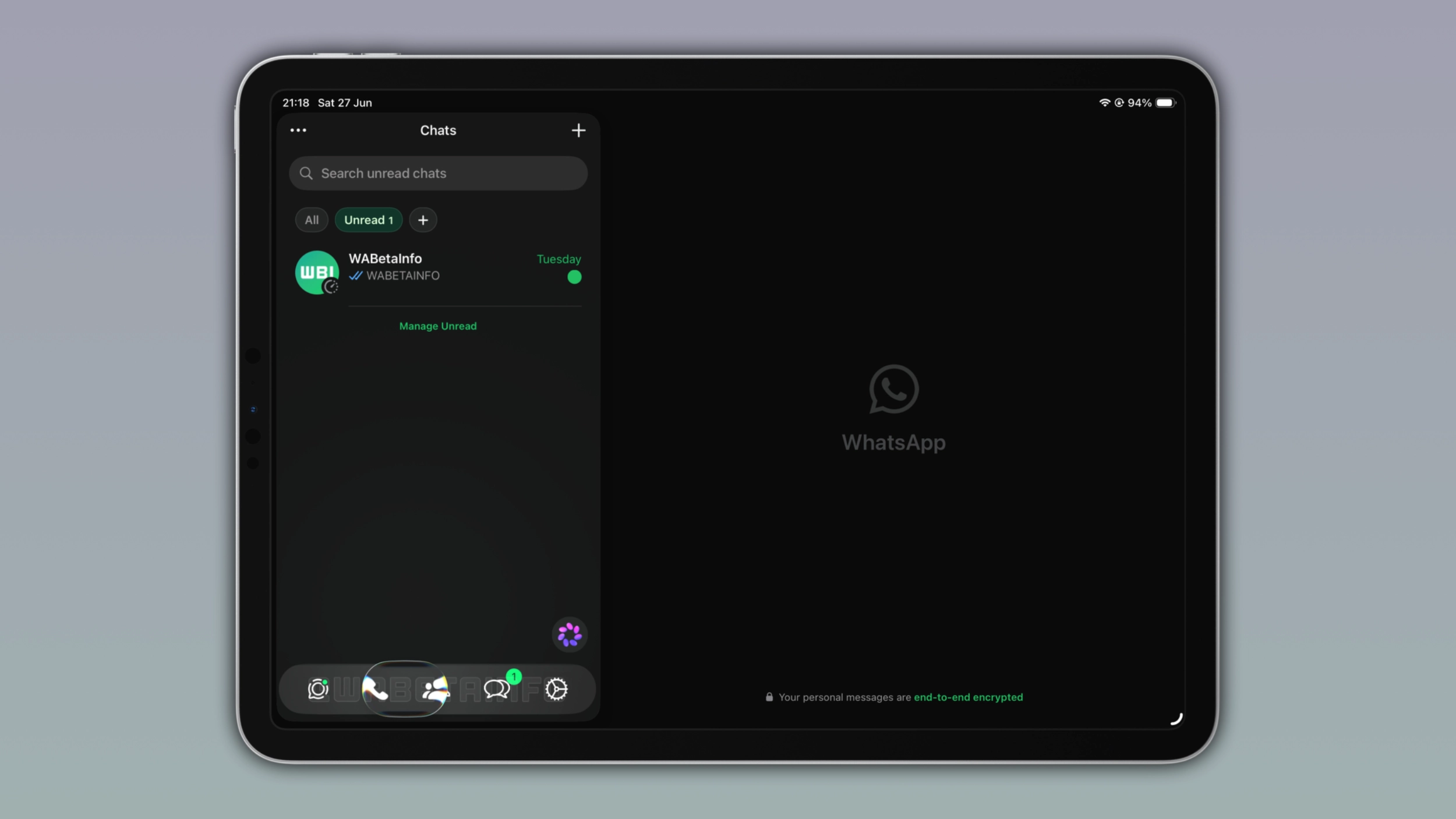
WhatsApp's Liquid Glass design is making its way to the iPad app on iPadOS 26. The tab bar floats above the interface with a translucent look, while the navigation bar and buttons pick up the same frosted style. With this interface, WhatsApp is giving the iPad app a more modern and consistent look.
| Key points | Details |
|---|---|
| Feature: | Liquid Glass for iPad |
| Feature availability: | Some features may be under development, so they are not available to beta testers. Others may become available to users over time. If you're unable to access a certain feature, you will need to wait for a future update. |
| News shared last week: | WhatsApp introduces a redesigned About section for Android! |
| Previous article: | WhatsApp is testing a private Side Chat feature with Meta AI! |
Weekly WhatsApp beta updates: new features and improvements
This new weekly roundup brings together all the latest updates about WhatsApp beta shared this week. As a result, you can finally catch up on everything you might have missed from our past announcements. You can consider this summary as a way to keep up new features, improvements, and fixes. This week's highlight focuses on the Liquid Glass interface, now available on WhatsApp for iPad. See what else has been announced this week.
WhatsApp is rolling out Liquid Glass for the chat interface on iOS
With the WhatsApp beta for iOS 26.25.10.16 update, WhatsApp is introducing the Liquid Glass design for the chat screen. The update refreshes the chat bar, which now appears as a floating element instead of a fixed bar. At the top of the chat screen, the navigation bar is now transparent as well. A subtle fade effect sits behind the navigation bar, so messages and the wallpaper remain faintly visible underneath. With the chat bar and the navigation bar now updated, the chat screen catches up with the rest of the app.
WhatsApp launches Liquid Glass for the iPad app
WhatsApp is finally rolling out the first version of the Liquid Glass design to the iPad app. Liquid Glass on iPad gives the tab bar, navigation bar, and buttons the same look iPhone users already have. The chat bar no longer has text labels, and it floats above the interface as a semi-transparent element. The navigation bar now responds to scrolling in the chat list. Additionally, buttons throughout the interface now use the same frosted glass appearance introduced on iPhone.
WhatsApp keeps working on improving the visual experience on iPad
WhatsApp for iPhone, iPad, and Mac share the same underlying app code. However, updates are released separately. After refining the experience with Liquid Glass on WhatsApp for iPhone, WhatsApp is finally introducing the same changes to the iPad app. However, WhatsApp for iPad could receive even more in the future. Specifically, more improvements regarding Liquid Glass, a redesigned sidebar, and a dedicated section for locked chats.
Will Cathcart is stepping down as head of WhatsApp
Will Cathcart announced that he is leaving his role as head of WhatsApp after almost seven years. However, Cathcart is not leaving Meta. He will move into a new role focused on building products from the ground up. Zuckerberg also said he is grateful for Cathcart's partnership over the years. Kunal Shah will be WhatsApp's next leader. He is the founder of the Indian fintech company CRED, one of India's most important technology companies. As part of the transition, Meta is also investing in CRED, taking a minority stake reportedly worth around $900 million.
How to check if someone blocked you on WhatsApp
There's a trick that allows users to check whether they have been blocked by a specific contact. The trick involves WhatsApp's encryption verification, the feature that people can use to confirm that their messages are protected. Open the chat with the person you want to check. Tap their name at the top of the chat interface to open the contact info screen. Now tap "Encryption". Finally, WhatsApp will try to verify the encryption automatically, and you just need to wait a few seconds for the result. If the contact blocked you, WhatsApp won't be able to complete the process.
Users can join a second WhatsApp beta channel on WhatsApp
WhatsApp has a second beta channel where users can download beta versions. After enabling "Early access to features" from the app settings, users can install updates from this second channel. Users also need Meta App Installer, a package developed by Meta that can install updates for WhatsApp outside of Google Play. With a second beta channel, WhatsApp can release updates when Google Play needs more time to approve them.
WhatsApp brings channel update search to iPhone
With the WhatsApp for iOS 26.24.72 update, WhatsApp is introducing the ability to search for channel updates. With this feature, users can type the keyword related to the update they're looking for. Since channels on WhatsApp can accumulate a large number of updates over time, a feature like that can be more than useful. Users won't need to scroll through the channel history just to find a specific update.
WhatsApp tests Side Chat with a limited number of users
A limited number of users can now experiment with a feature called Side Chat. With Side Chat, users can invoke the Incognito Chat with Meta AI directly into their conversations. By using Side Chat, it understand the context of the conversation where it was open. The feature is powered by Private Processing, which secures your messages. When Meta AI uses Private Processing, it processes the request inside a secure, isolated environment, and neither Meta nor WhatsApp can read your messages.
WhatsApp brings mentions to text status updates on Android
The WhatsApp beta for Android 2.26.25.2 update introduces the ability to mention contacts in text status updates. Users can see a new button to mention contacts directly into the text status interface. Once users choose the contact to mention, WhatsApp automatically sends them a private notification. The mention never appears as visible text inside the status. As a result, other people who view the update have no way to know that the status update includes a mention.
WhatsApp reduces scams by showing a security warning
WhatsApp shows a security warning built into the device-linking process with the aim to reduce scams. When someone tries to link a new device to your account, WhatsApp checks the request for anything unusual. If something looks suspicious, you will get a warning that marks the attempt as a scam. The warning also includes the rough location of the device that's trying to connect. It is possible to can cancel the request or go ahead if you're sure it's something you started yourself.
WhatsApp adds a new security warning earlier in the process
WhatsApp launched new protections against scammers. With this feature, WhatsApp checks the phone number before someone tries to open a chat with it. When there is a red flag, WhatsApp shows a screen that asks them to confirm whether they actually trust this person. The screen shows where the phone number is registered, whether it's saved as a contact, and if there are any groups in common. Users can then choose Continue to chat or Cancel chat. WhatsApp doesn't wait until the user opens the chat, but the app gets ahead of it before anything happens.
Connect with WABetaInfo
Follow WABetaInfo on X and visit our About page to learn more about what we do. We always appreciate your feedback on posts like this one.