WhatsApp is working on a chat search shortcut for iOS
WhatsApp will add a new button to enter message search mode without leaving the conversation. The button will appear at the bottom of the screen when users scroll up through the chat. This will make searching for a specific message faster than it is today.
| Key Points | Details |
|---|---|
| Feature: | In-chat search button for iOS |
| Status: | Under development |
| Availability info: | This feature is currently in development and not yet available for beta testing. |
| Previous news: | WhatsApp explores new chat themes on Android! |
How users currently search for messages inside a chat on iOS
At the moment, users who want to search for a message within a specific chat need to go through a few steps. Users have to open the chat info screen by tapping the contact or group name at the top of the interface. Here, they need to tap the search button. This action will redirect users to the chat interface, where the search mode is active. Users on iPad can tap the More button and select "Search" without leaving the conversation. But on iPhone, users need to open the chat info screen to activate the search mode. It works, but it takes users away from the chat before they can start searching.
WhatsApp is developing a faster way to reach search mode
WhatsApp is now working on a more direct way to activate search from inside the chat. This would let users enter search mode without ever leaving the chat. We discovered the news with the WhatsApp beta for iOS 26.31.10.70 update, which available on TestFlight. Specifically, WhatsApp is developing a new search button that appears at the bottom of the chat screen.
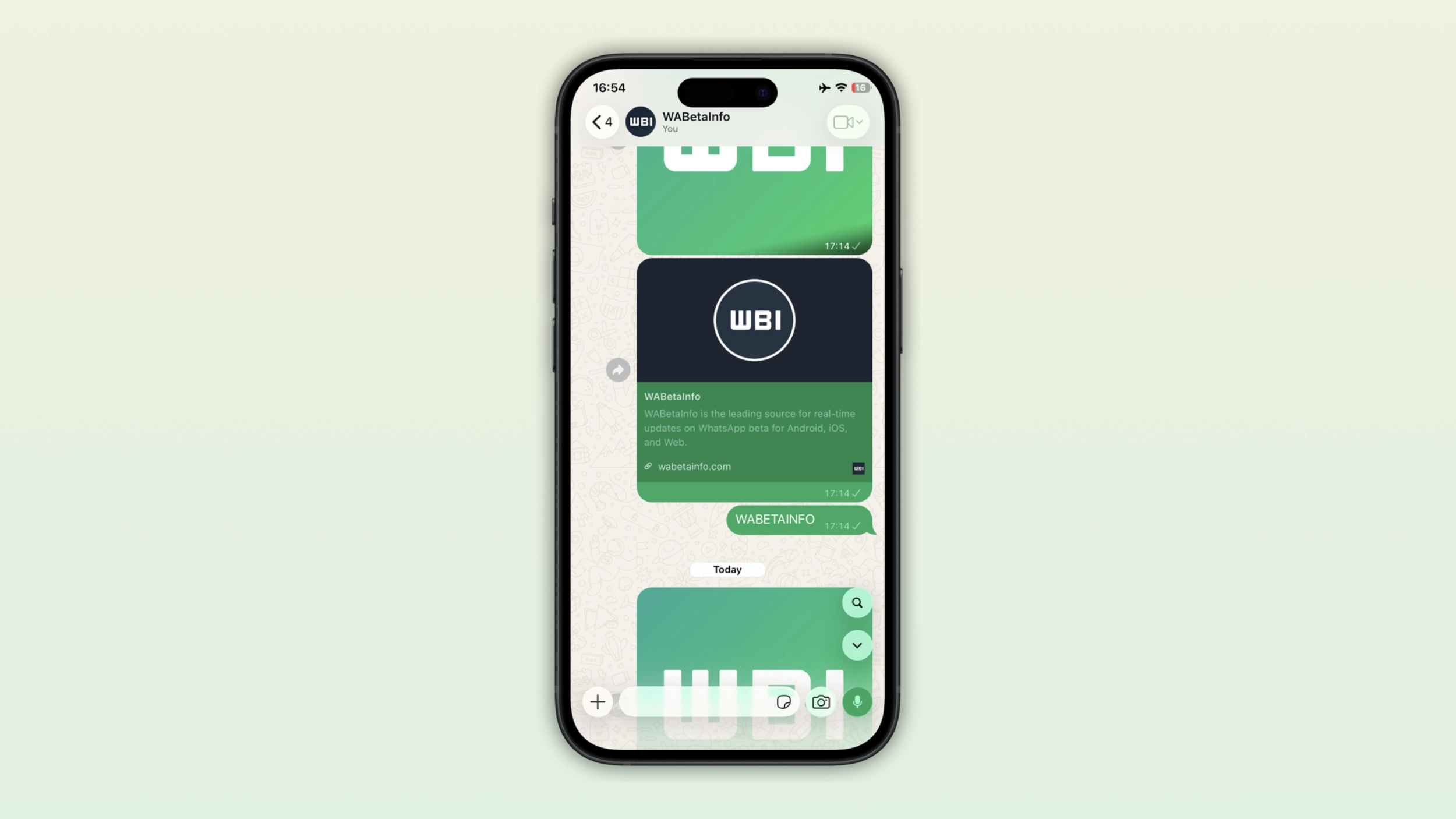
The search button appears only when users scroll up
The new search button does not sit permanently at the bottom of the screen. It only appears when users scroll up through the conversation. This is the same behavior as the button that lets users jump back to the latest message. It shows up contextually, but only when it is useful. When users scroll up to see older messages, the search button appears at the bottom of the screen. Once users return to the bottom of the conversation, the button disappears again.
How the new search button compares to the existing one
Both the current method and the new button activate the same search mode within the chat. The difference is the number of steps it takes to get there. Today, users have to leave the chat interface, open the chat info screen, and then tap the search button. The new button skips those steps entirely as one tap from the chat is enough. Users who are already scrolling through older messages will find the search button right where they need it.
Why a faster search shortcut matters in long conversations
In a chat with only a few messages, users can quickly scroll back to find something specific. In a chat with many messages, users often have to scroll a lot to find what they are looking for. The current option turns a simple search into something more complicated than it should be. A search button that appears while scrolling will make it easier for users to switch to search mode exactly when they need it.
WhatsApp is bringing search closer to where users already are
The current search option is available in the chat info screen, a separate page from the conversation. Users who want to search have to step away from the chat to find it. WhatsApp will improve the experience by adding the search button directly to the chat screen, right where users spend most of their time. The less users have to navigate away from the conversation to get something done, the better the experience gets.
WhatsApp is developing the in-chat search button for a future iOS update
The in-chat search button is currently under development on iOS. WhatsApp has not enabled it for beta testers yet. We expect WhatsApp to roll it out to beta testers in a future update. At the moment, WhatsApp has not shared an official timeline for its public release.
Connect with WABetaInfo
Follow WABetaInfo on X and visit our About page to learn more about what we do. We always appreciate your feedback on posts like this one.