How to join WhatsApp's second beta update channel on Android
Some users may wonder why they don't get updates on Google Play, while others receive them earlier. The answer is that WhatsApp also releases new beta versions through a separate app called Meta App Installer. In this post, you can learn how to join the second beta channel.
| Key Points | Details |
|---|---|
| Feature: | Beta updates via Meta App Installer |
| Status: | Available |
| Compatibility: | The latest versions of WhatsApp for Android are compatible updates. |
| Availability info: | This feature is available to specific users. Read the article to learn more. |
| Previous news: | WhatsApp is rolling out mentions for text status updates! |
WhatsApp introduced early access to beta features on Android
In the post about the WhatsApp beta for Android 2.26.2.11 update, we announced a new option called "Early access to features". Google Play only allows 10,000 beta testers, and that number fills up almost every time. With "Early access to features" turned on, WhatsApp can offer the beta experience to more people even when the official beta program is full. The feature is available to both new testers and people who already use the beta version from Google Play.
Months later, there's still confusion about what this feature actually does
The option "Early access to features" has been live for months now, but many users still aren't sure what it actually changes once they turn it on. Some assume it only matters for people who couldn't join the Google Play beta in the first place. Others have noticed that their friends often have a newer version of WhatsApp, yet Google Play shows no update available for them. The reason for this confusion is simple: many people do not know that the option "Early access to features" even exists and what its purpose is.
Why some beta testers don't see updates on Google Play at all
If you've checked Google Play for an update that you do not have yet, there's a simple explanation. That update may simply not be available on Google Play for you. WhatsApp can deliver new versions through a separate beta channel, so Google Play may tell you that there isn't a new update available. This makes it look like you're missing out, even though you're actually just one update behind through a different channel.
Meta App Installer allows you to install new WhatsApp updates
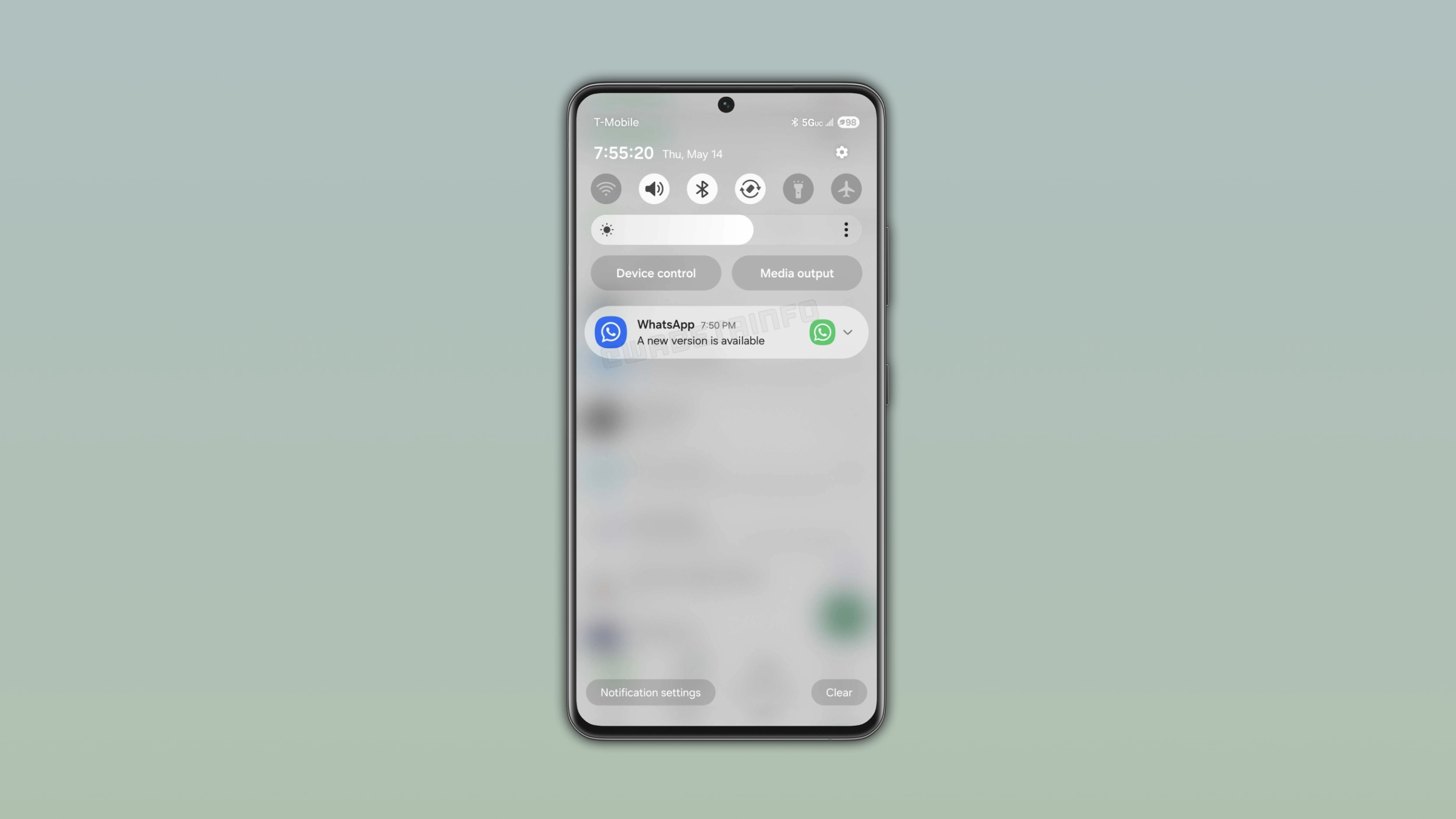
Meta App Installer is an app developed by Meta that can install updates for WhatsApp outside of Google Play. It requires Android 5.0 or higher, and it works silently in the background, so you won't find an icon for it. The app allows you to receive updates through a second beta channel if you've turned on "Early access to features" from WhatsApp settings. Once you enable this option, WhatsApp will deliver you updates from this second channel. Meta App Installer updates WhatsApp as soon as the new version is ready for your account.
Why WhatsApp uses a second release channel for beta versions
There are a few reasons WhatsApp relies on Meta App Installer instead of Google Play alone. Releasing an update to a separate group lets WhatsApp get feedback and analytic data before releasing it via the main channel. Additionally, updates from Meta App Installer are helpful when WhatsApp cannot immediately release them on Google Play. Google usually approves WhatsApp updates quickly, but that hasn't always been the case. In the past, Google has taken between 3 and 7 days to approve some updates, and it is unusual for an app that often ships new beta builds almost daily. Meta App Installer gives WhatsApp a new way to release updates without waiting for Google.
How to enable updates from Meta App Installer
If you also want to receive updates from the second beta channel, open WhatsApp Settings and search for the option "Early access to features". Enabling this feature lets WhatsApp use Meta App Installer as an additional way to deliver updates to your device. Note that you may need to install Meta App Installer separately if you don't see this option within WhatsApp. After that, no further setup is needed.
How you can install updates through Meta App Installer
When a new update is ready, Meta App Installer sends a notification directly to your phone. You need to tap the notification to install the update. You do not need to search for the update manually since this is not possible. Meta App Installer alerts you as soon as an update is ready. If you dismiss the notification by mistake, you will have to wait until Meta App Installer sends you another notification. Alternately, you can enable "Auto-update WhatsApp" from WhatsApp Settings > App Updates to let Meta App Installer download and install the update automatically.
You don't have to choose between Google Play and Meta App Installer
Turning on "Early access to features" doesn't disable updates from Google Play. Both channels are active at the same time, and you can simply install the update from wherever it shows up first. Some updates might be available through Google Play, while others are released through Meta App Installer instead. Either way, you end up on the same version of WhatsApp.
Why some beta testers see an update before others via Meta App Installer
Based on what we've observed, WhatsApp doesn't send updates through Meta App Installer to everyone at once. Beta testers appear to be split into different groups, and they receive the same update at a different time. For example, the first group seems to get it as soon as it's released. The second group may see it roughly an hour after that, and so on. It's not clear how many testing groups exist. In some cases, the last group may not receive the update until around 8 hours later. However, WhatsApp may change this configuration at any time.
If you're in a later group, it usually doesn't last
If you are in one of the last groups, you shouldn't worry about it. From what we've seen, WhatsApp often reshuffles these groups. Being last this week doesn't mean you will be last next week. Over several updates, most testers end up experiencing both faster and slower updates at different points. It usually balances out over time.
Why these groups probably exist in the first place
WhatsApp splits testers into different groups to catch bugs early, so a bad update would only hit a small group instead of everyone at once. This also gives WhatsApp time to monitor crash reports before other testers get it. If something goes wrong, WhatsApp can stop the rollout immediately. This would explain why updates through Meta App Installer aren't available to everyone at the same time.
You can opt out of Early access to features anytime
It is possible to disable "Early access to features" at any time. However, this doesn't downgrade WhatsApp to an earlier version. You simply keep the latest update installed by Meta App Installer on your phone. After that, updates will be available from Google Play, either through the beta program or the stable version. Users who disable "Early access to features" can then uninstall Meta App Installer manually.
WhatsApp isn't replacing the Google Play beta program
WhatsApp is not moving away from the Google Play beta program. The 10,000 spots there still exist, and people can still join through Google Play exactly as before. Meta App Installer simply works alongside it, and it gives WhatsApp another way to release updates to beta testers when the usual program is full. For most users, nothing about how they update WhatsApp through Google Play actually changes.
Why Google Play beta testers should enable this too
Even if you're already in the Google Play beta program, turning on "Early access to features" can still help. If WhatsApp ships an update with a serious bug on Google Play, a bug-fix update might be available via Meta App Installer before Google has a chance to approve it there. As a result, having both channels active means you could get certain bug-fix updates sooner. There is really no downside to turning it on, as it is just one more way to get new updates.
The second channel via Meta App Installer is available to both stable and beta users on Android
This option is available for both stable and beta versions of the app. However, the option "Early access to features" is not visible to everyone, since the rollout targets a limited group rather than all users. Unless WhatsApp has a reason to expand it, the number of users on this second channel probably won't grow much either. If you don't see "Early access to features" in the app settings, it may simply mean WhatsApp isn't planning to offer it to you for now.
Connect with WABetaInfo
Follow WABetaInfo on X and visit our About page to learn more about what we do. We always appreciate your feedback on posts like this one.