A security feature on WhatsApp for iOS and Android makes it harder for scammers to trick people into giving away access. Scammers don't need your password, as they just need you to enter a code yourself or confirm something. WhatsApp steps in right before that code grants them access.
| Key Points | Details |
|---|---|
| Name of the feature: | Scam warning for device linking |
| Status: | Available |
| Compatibility: | The latest versions of WhatsApp for Android and iOS are compatible update. |
| Availability info: | This feature is already available on iOS and Android. |
| Previous news: | WhatsApp is rolling out Liquid Glass for the chat interface on iOS! |
Account takeover scams are a growing problem on messaging apps
Most people think that a hacker must break through some kind of digital wall to take over an account. In reality, that's not how most of these scams work. The person hands over access on their own, because the request came from someone they trust. As a result, many people do not stop to think twice. Once the scammer takes over your account, they can read your new messages, see the groups you're in, and message your contacts. These scams do not require breaking encryption or guessing a password, but they just need your cooperation.
WhatsApp makes unauthorized access harder with a built-in warning
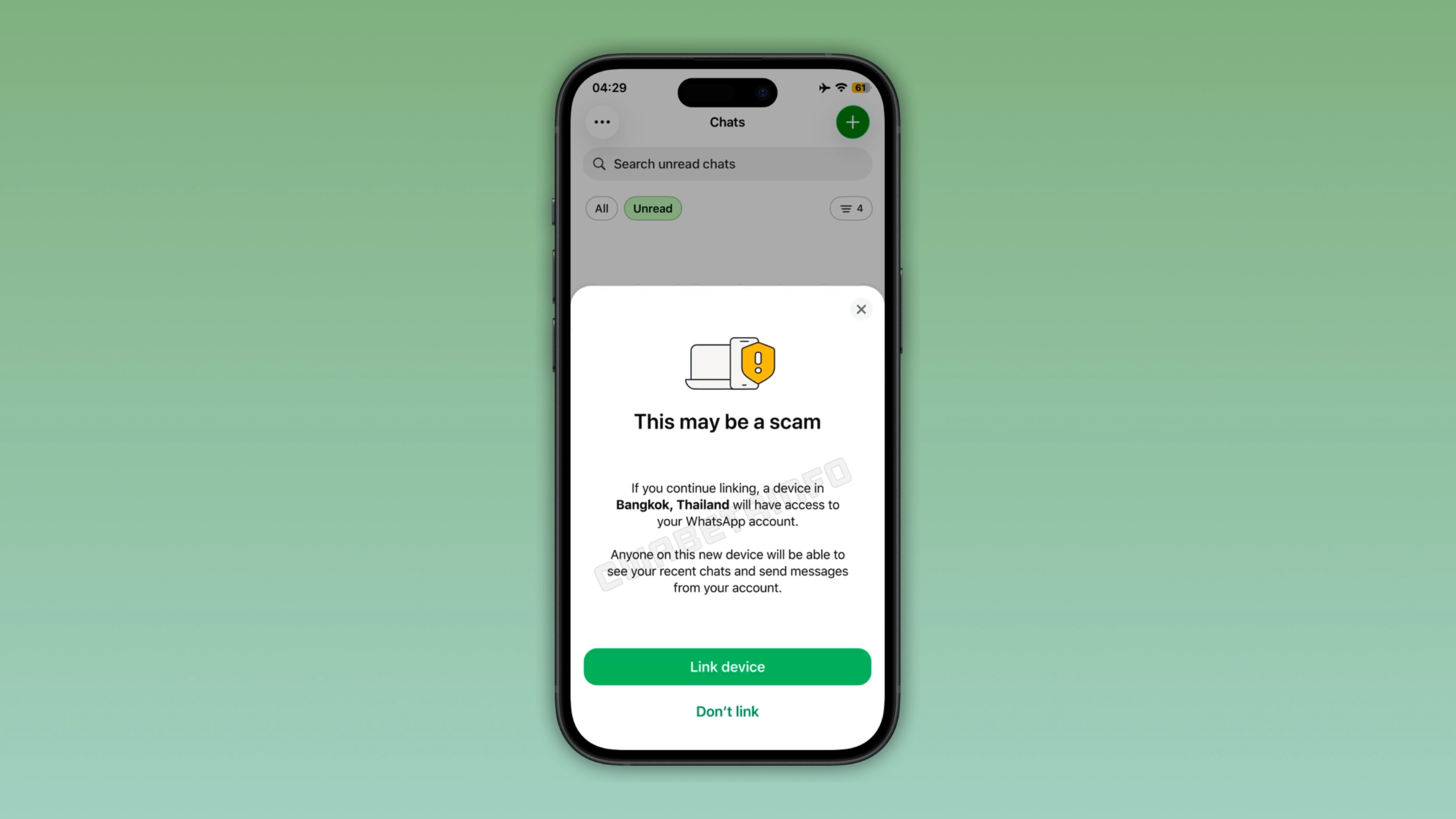
WhatsApp addressed this issue by showing a security warning built into the device-linking process. With this feature, WhatsApp looks at the linking request and flags it if something seems off. In this case, WhatsApp shows the warning before the new device is linked to your account. This gives you a moment to stop and think.
What these scams actually look like
These scams often start with a message from an unknown number. Sometimes, it may also start from a real contact, after their account has been compromised. They might ask you to vote for their dog in some contest, or for their daughter in a dance competition, always through a link. The link takes you to a page that asks for your phone number to "verify" something before you can vote. In reality, the page simulates WhatsApp's real device-linking process. Then, it asks for a code from your phone. Since it feels like part of the voting process, most people just go ahead and do it. The victim usually understands what happened only after the scammer's device is already linked to the account.
How the security warning actually works on WhatsApp
When someone tries to link a new device to your account, WhatsApp now checks the request for anything unusual before letting it go through. If something looks suspicious, you will get a warning that marks the attempt as a scam, along with the rough location of the device that's trying to connect. The warning also explains exactly what that device would be able to do, like reading your recent chats and sending messages as you. At that point, you can cancel the request or go ahead if you're sure it's something you started yourself. Now, there's a pause before WhatsApp links the new device to your account, making it much harder for a scam to go unnoticed.
Why this actually matters
Linking a device gives full access to your account, which is exactly why scammers target it so often. Once it's linked, they can read new messages as they arrive and message your contacts. They can also see your profile photo and every group you're part of. This warning finally closes off one of the easiest ways scammers had to get in. It won't stop every attempt, but it makes it harder for scammers to trick you.
These scams keep changing, so good habits still matter
These aren't really "hacks" as most people usually imagine. For example, people give away access to their account without anyone forcing them to. As people catch on to one version of the scam, attackers just move on to something different. That's why this warning can't completely eliminate the risk.
Enable two-step verification and check your linked devices for added security
Users should enable two-step verification to protect their account from unauthorized access. This feature adds a second layer of protection since WhatsApp asks for another PIN only you know. Users should also monitor the Linked Devices section to catch something unusual. And honestly, just being a little more skeptical of links from "friends" that ask for unusual favors goes a long way too. When in doubt, just call that person to find out the truth.
The warning against scams is available on WhatsApp for iOS and Android
The feature that shows a warning when another device tries to connect to your account is available on both iOS and Android. WhatsApp hasn't said exactly what triggers the warning, but the device's location being different from your own is likely one of the signals it looks at. If you see this warning while you link your own device for a legitimate reason, just double check that the request actually came from you. And as a general rule, never enter a code or scan a QR code because someone else asked you to.
Connect with WABetaInfo
Follow WABetaInfo on X and visit our About page to learn more about what we do. We always appreciate your feedback on posts like this one.