WhatsApp is testing greeting messages for group chats on iOS
WhatsApp is working on a feature that shares a welcome message in group chats. This feature will allow admins to automatically send a message to new members when they join. Group admins will be able to customize the message, and only the new member can see it.
| Key Points | Details |
|---|---|
| Feature: | Greeting messages for group chats |
| Status: | Under development |
| Availability info: | This feature is currently in development and not yet available for beta testing. |
| Previous news: | WhatsApp launches a username field for new contacts! |
WhatsApp is testing greeting messages for group chats on Android
In the post about the WhatsApp beta for Android 2.26.19.2 update, we announced a greeting message feature for group chats. The feature would let admins set up a short welcome message to send to new members when they join the group. WhatsApp plans to introduce the option within the group permissions screen, where admins already manage other features. This functionality would be optional and not active by default. So admins would need to turn it on manually.
WhatsApp is now working on the same feature for the iOS app
We previously reported that WhatsApp is currently developing this feature for the Android app. But now, WhatsApp is finally building it for iOS too. Based on what we observed, the iOS version appears to follow the same structure, with the greeting accessible from the group permissions screen. This is what we discovered with the WhatsApp beta for iOS 26.31.10.73 update, which is available on TestFlight. Specifically, WhatsApp is testing a welcome greeting feature for group chats.
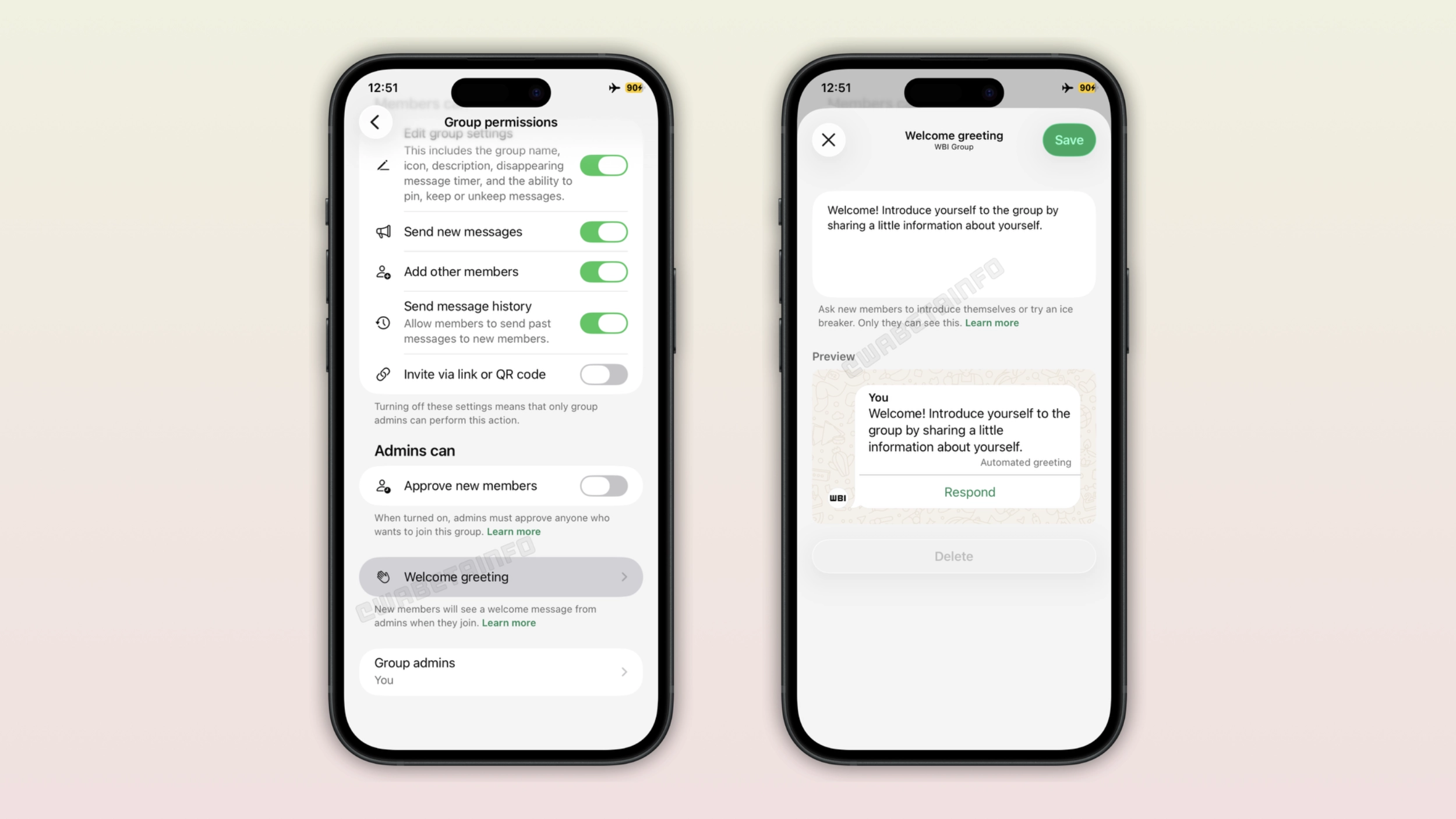
How the welcome greeting works for new members
When someone joins a group that has a greeting set up, WhatsApp will send the welcome message automatically. The message will appear as a bubble labeled "Automated greeting". This makes it clear to the new member that no one typed it manually in that moment. Note that only the new member can see this message. This means that other group members won't see the greeting message. This will keep the greeting personal without cluttering the main conversation for everyone else.
New members can respond to the greeting
The greeting is not just a one-way message. New members who receive it can reply directly. This gives the greeting a conversational feel rather than a static notice that new members might ignore. A greeting that invites a response is also more likely to encourage new members to introduce themselves and start engaging with the group.
How admins can set up the welcome greeting
Admins will be able to find the greeting option in the group permissions screen. Here, they will find the "Welcome greeting" entry. When admins enable it, they will be sable to write or edit the greeting text. WhatsApp provides a default message, but admins can change it to anything that fits the group. The option is not active by default. This means that existing groups will not send a greeting to new members unless an admin turns it on manually.
Only one greeting message per group
Even when a group has multiple admins, only one greeting message exists for the group. All admins share the same welcome text, and any admin can edit it. This keeps the greeting consistent for new members who joins, regardless of which admin originally set it up. No matter who joins or when, everyone will get the same welcome message.
WhatsApp is developing greeting messages for a future iOS update
The welcome greeting feature for group chats is currently under development on iOS. WhatsApp has not enabled it for beta testers yet. This means that the feature is not available after installing the latest TestFlight build. However, we expect WhatsApp to roll it out to beta testers in a future update. At the moment, WhatsApp has not shared an official timeline for its public release.
Connect with WABetaInfo
Follow WABetaInfo on X and visit our About page to learn more about what we do. We always appreciate your feedback on posts like this one.