Users on WhatsApp for Android and iOS have a reliable way to check if someone blocked them in a chat. It involves a feature most people overlook: encryption verification. It's also more discreet than sending a message, since the other person never knows you checked.
| Key Points | Details |
|---|---|
| Story about: | Encryption verification check |
| Availability: | The latest versions of WhatsApp for iOS and Android are compatible updates. |
| Where to find it: | Chat info screen > Encryption |
| Previous news: | WhatsApp introduces a redesigned About section for Android! |
How people usually try to spot a block on WhatsApp
There are a few ways that can help you understand whether someone blocked you on WhatsApp. You cannot see their profile photo, your messages only show one check mark, and you cannot call them. This is the approach people have relied on for years, but it isn't completely reliable. For example, the contact may have switched to a new phone where the contact list is not synced yet. Additionally, they may have removed their profile photo or just adjusted their privacy settings to hide it from you. These do not mean that they blocked you, but simply that something else changed on their end.
The encryption check is a more reliable method right now
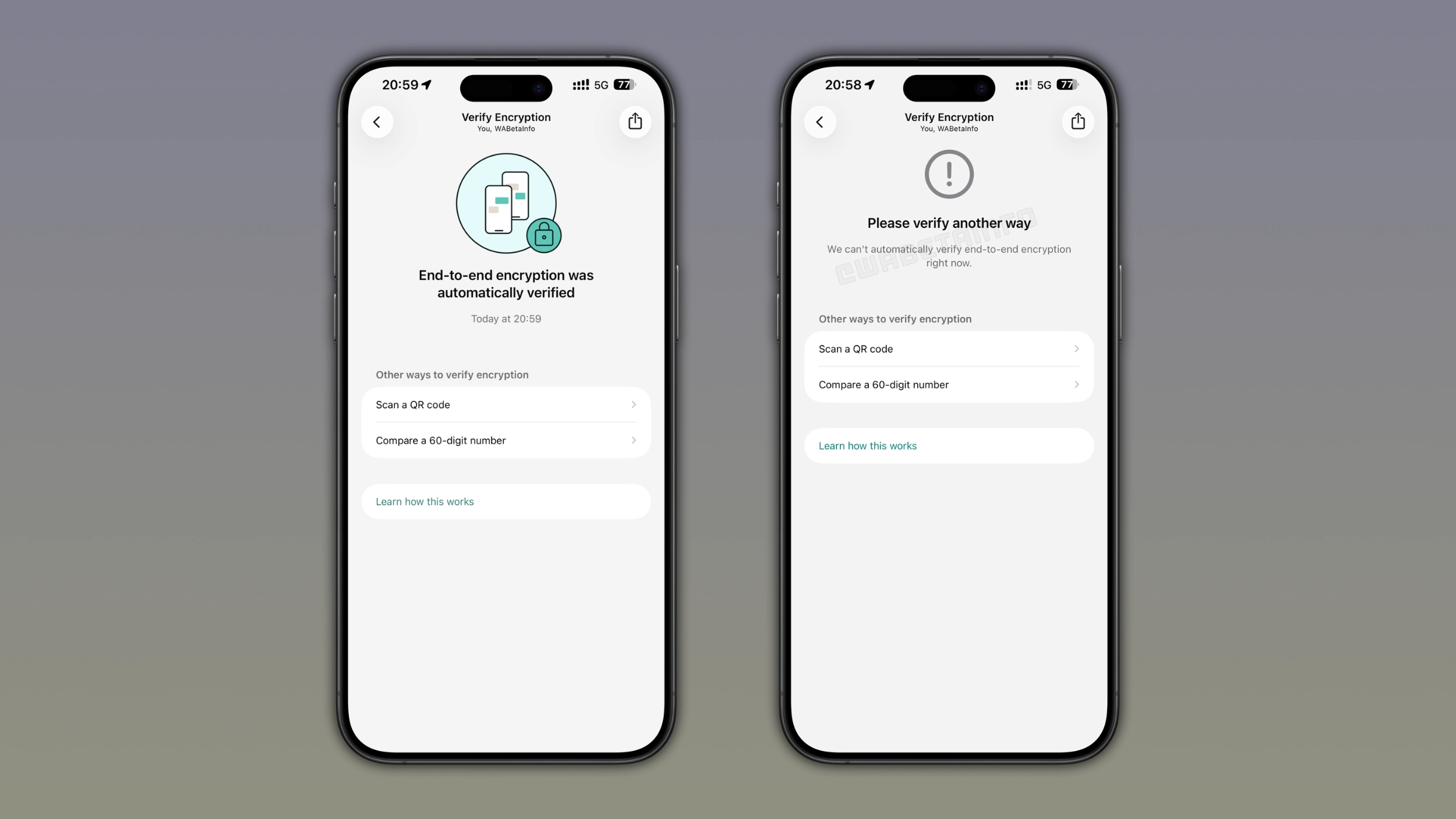
There's a trick that works better, and it doesn't require you to send a message to confirm the block. It uses WhatsApp's encryption verification feature, the same one that people can use to confirm that their messages are protected. This feature allows users to verify if their messages are correctly encrypted, but it can reveal something else too. When someone blocks you, the automatic verification feature stops working for that specific chat. This doesn't affect end-to-end encryption directly, but it makes the verification fail consistently.
How WhatsApp's encryption verification works
Every chat on WhatsApp has its own encryption keys, and WhatsApp updates them in specific situations. For example, this can happen if you reinstall WhatsApp, switch to a different phone, or link your account to another device. This helps WhatsApp keep your messages locked between you and the other person. WhatsApp lets you check encryption manually from the contact info screen. With this feature, participants in the conversation can confirm nobody is intercepting their messages.
Encryption verification used to require manually comparing codes
For years, users could verify encryption by scanning a QR code or comparing a 60-digit number with the other person. While this method worked, users had to ask the other person to compare the code with them. To improve the process, WhatsApp developed a feature that makes it easier for users to verify end-to-end encryption. Specifically, WhatsApp introduced a feature to verify encryption automatically in 2023. With automatic verification, users simply need to open the encryption screen to check if their messages and calls are properly encrypted. The other person doesn't need to do anything on their end.
Step-by-step: how to check if you've been blocked on WhatsApp for iOS and Android
To check if someone has blocked you on WhatsApp, you can use this same automatic verification feature. Open the chat with the person you want to check. Tap their name at the top of the chat interface to open the contact info screen. Look for the option called "Encryption" and tap on it. WhatsApp will then try to verify the encryption automatically, and you just need to wait a few seconds for the result.
What it means if the verification fails
If everything is fine between you and the other person, WhatsApp completes the verification without any error. If WhatsApp cannot verify end-to-end encryption automatically, and the app asks you to verify encryption using another way, something is actually wrong. This does not necessarily mean there is a security problem in your chat. Instead, the automatic verification feature failed because of a "block".
This isn't a method WhatsApp officially shares
WhatsApp has never confirmed that users can rely on this method to detect a block. However, this is something that you can test with your contacts. Open a chat where you know for a fact the other person blocked you. In this chat, try to verify the encryption automatically. You will see that the automatic verification keeps failing. We don't know if WhatsApp will refine the experience with automatic verification just to prevent this trick from working in the future. Until that changes, if it ever does, the trick is a useful way to get a real answer without sending a message.
UPDATE:
After 6 days, WhatsApp has fixed the bug that allowed users to verify whether someone had blocked them. You can learn more in our latest article about the patch.
Connect with WABetaInfo
Follow WABetaInfo on X and visit our About page to learn more about what we do. We always appreciate your feedback on posts like this one.