WhatsApp is introducing a redesigned section to manage your About on the Android app. The update makes it simpler for users to view how others see their about and privacy control over who can see it.
| Key points | Details |
|---|---|
| Name of the feature: | Redesigned About section |
| Feature availability: | Some features may be under development, so they are not available to beta testers. Others may become available to users over time. If you're unable to access a certain feature, you will need to wait for a future update. |
| News shared last week: | WhatsApp is working on scheduled messages on iOS! |
| Previous article: | WhatsApp is rolling out a new message animation on iOS! |
Weekly WhatsApp beta updates: new features and improvements
This new weekly roundup brings together all the latest updates about WhatsApp beta shared this week. As a result, you can finally catch up on everything you might have missed from our past announcements. You can consider this summary as a way to keep up new features, improvements, and fixes. This week's highlight focuses on a redesigned About section that makes it easier for users to control their information. See what else has been announced this week.
WhatsApp is rolling out group voice and video calls on the Web
WhatsApp Web beta now allows users to place group voice and video calls directly from their browser. If users can see the call button in a group chat, the feature is already available their your account. Group calls on WhatsApp Web support up to 32 participants, matching the limit already in place on mobile and desktop. This applies to both voice and video calls. Just like individual calls on the web, group calls are protected by end-to-end encryption. So only the people involved in the group call can listen to its content.
Group calls support call links and screen sharing
Group calls on the web support call links. They are a new way to let other people join the call by opening a link. Every call link has a unique and secure URL, so no one can guess or replicate it. Group calls also offer Screen Sharing. This allows participants to show their screen in real time directly from the browser. However, it is important to be mindful of what is visible on the screen before sharing, since all participants in the call will be able to see everything shared with this feature.
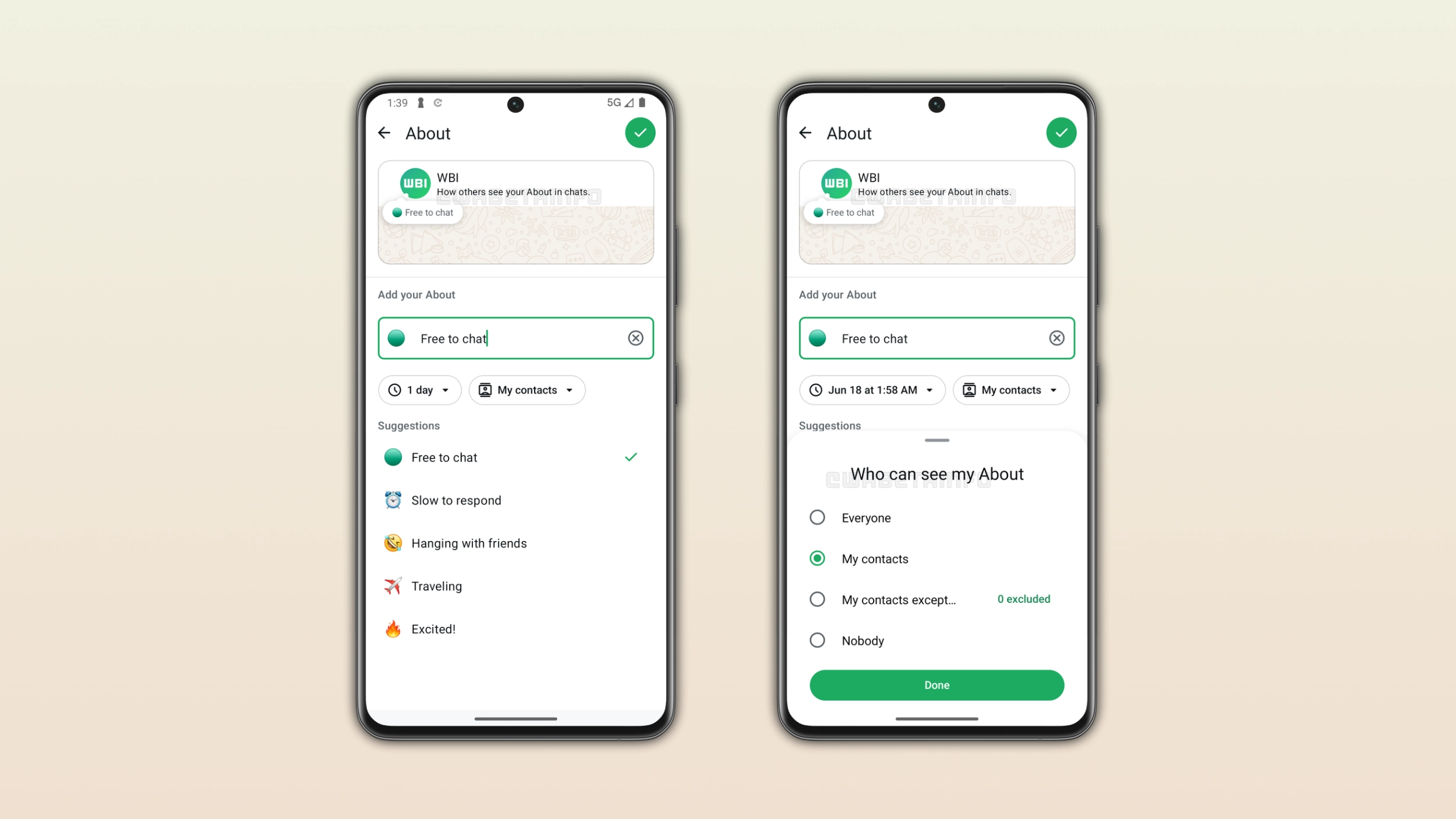
WhatsApp launches a redesigned About section on Android
After installing the WhatsApp beta for Android 2.26.24.1 update, some users can experiment with a redesigned About section. This section offers a dedicated preview at the top of the screen. This makes it easier for users to see how their About looks in the conversation. Users can choose when their About expires as usual among different options. Additionally, privacy controls are finally accessible directly in this screen. This means that users can quickly choose who can see their About without opening their privacy settings separately.
WhatsApp will introduce the view-once option for text messages on iOS
With the WhatsApp beta for iOS 26.24.10.16 update, we discovered that WhatsApp is working on bringing view-once support to text messages. This feature introduces privacy benefits to conversations, as users will be able to share text messages that disappear after being read. Additionally, the recipient won't be able to copy, share, forward, or record the content of the text message. This feature will be available in a future update.
WhatsApp to test a Home Screen widget for voice notes on Android
WhatsApp is testing a widget to let users send voice messages with ease. By tapping on the widget, users will be able to record the voice message. Once it is ready, users will be able to choose who to send the voice note to. This includes choosing multiple contacts at once. Although the feature is currently under development and not yet ready for a public release, it already promises to bring added convenience to the user experience.
WhatsApp reorganizes the group chat info screen with two new sections on Android
In the post about the WhatsApp beta for Android 2.26.24.3 update, we announced changes for the group info screen. Previously, WhatsApp introduced a new tab-based navigation system to help users quickly jump to specific sections. Now, WhatsApp is rolling out two separate sections that bring related settings under the same screen. With this feature, WhatsApp makes the group chat info screen significantly easier to scan.
WhatsApp removes the privacy setting for avatar stickers
WhatsApp released an update for both Android and iOS that removes the privacy setting for avatar stickers. Since WhatsApp is completely removing avatars from the app, this setting is no longer needed. Users can find their old avatar stickers from the recent or starred sections, in case they saved it. Over the coming weeks, WhatsApp will keep removing everything related to avatars.
WhatsApp will make managing old and duplicate backups easier on Android
Following the Google Play Services v26.23 update, WhatsApp is working on making chat backup management easier. In a future update, WhatsApp will introduce a dedicated section inside the app to manage previous backups. It will let users view their existing backups, making it easier to delete old and duplicate ones to free up storage space. In the backup page, users will also find new shortcuts to manage Google Drive storage directly from the browser and WhatsApp backups from the Android device settings.
WhatsApp introduces a green dot for online contacts
In the Android app, WhatsApp is introducing a green dot for online contacts. This feature allows users to understand at a glance when the contact is online. The feature replaces the previous "online" text label under the profile photo with a more modern solution. With this update, WhatsApp is aligning the experience with other messaging and social apps that already rely on a green dot for online contacts.
The green dot is only visible in the chat info screen
Right now, the green dot only shows up in the chat info screen. As a result, you won't find it yet in the chat list or within your conversations. However, WhatsApp has plans to bring it even in these places. This means we may see WhatsApp gradually bring the green dot to the rest of the app over time.
WhatsApp introduce a new message animation on iOS
With the WhatsApp beta for iOS 26.24.10.70 update, WhatsApp is bringing back message animations on iOS. This time, the animation looks different and there is an actual way to turn it off. Messages now fade in with a slight scale-up as they settle into the chat, and this applies to both sent and received messages. It is possible to manage it from WhatsApp Settings > Chats > Animations > Messages. WhatsApp had removed the original animation on iOS a while back, likely because there was no way to disable it for people sensitive to motion. This time around, having that toggle suggests WhatsApp wants to avoid running into the same issue again.
Connect with WABetaInfo
Follow WABetaInfo on X and visit our About page to learn more about what we do. We always appreciate your feedback on posts like this one.