WhatsApp is introducing Side Chat, a feature that lets a limited number of users ask Meta AI for help privately on Android and iOS. With Side Chat, you can open a separate panel where Meta AI understands the context of the conversation, and Private Processing keeps everything secure. This makes it easier for users to ask for private help exactly when they need it.
| Key Points | Details |
|---|---|
| Feature: | Private Side Chat with Meta AI |
| Status: | Rolling out |
| Availability info: | This feature is available to a very small number of users, and it is rolling out to more accounts over the coming weeks. |
| Previous news: | WhatsApp launches Liquid Glass design for the iPad app! |
Mark Zuckerberg announced Incognito Chat with Meta AI
Last month, Mark Zuckerberg revealed Incognito Chat, a new way to talk to Meta AI with a stronger focus on privacy. Messages shared in an Incognito Chat disappear as soon as the user closes the conversation, and Meta AI never stores or saves them. This works thanks to Private Processing, a security architecture that lets AI features run without exposing messages to Meta, WhatsApp, or anyone else. Independent audits from NCC Group and Trail of Bits have confirmed that this system meets strong privacy and security standards.
WhatsApp tests Side Chat to help you inside any chat
When you want to discuss something with Meta AI privately, Incognito Chat is the right choice. However, Incognito Chat cannot access anything that happens in your conversations. To expand its capabilities, WhatsApp is now testing a feature called Side Chat that solves that limitation and keeps the same privacy guarantees. Side Chat allows users to ask Meta AI for private help with a specific conversation, using the context of that chat, without ever exposing it to WhatsApp or Meta. Starting today, WhatsApp is making the feature available to a very small number of users.
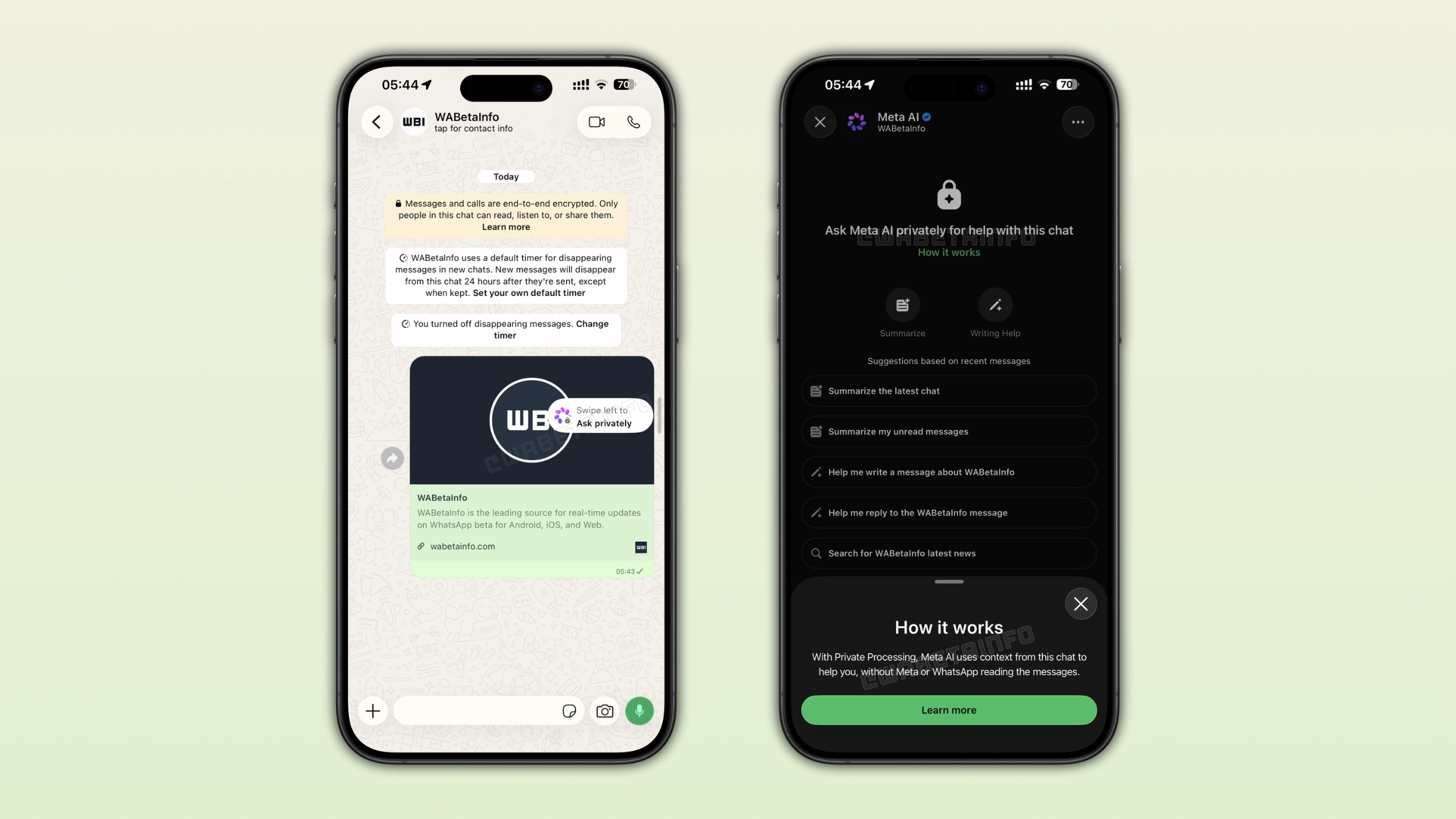
How to open Side Chat in your conversations
Since Side Chat is designed to help you right when you need it, it is available directly within your conversations. Here, users will see an option called "Ask privately". After swiping left on the conversation screen, WhatsApp will open the Side Chat panel. It is a separate screen with a dark design, similar to the Incognito Chat interface, where it is possible to ask Meta AI anything related to that specific chat. In this conversation, users can type a question or pick from a list of suggestions, and the main conversation simply waits in the background.
What Side Chat can do with the context of your conversation
Users can find some quick actions in the Side Chat screen. These include AI-powered features that summarize their recent messages in that conversation and other tools that help them write new ones. With Side Chat, Meta AI can offer relevant help without copying and pasting anything from the conversation. For example, Side Chat can explain you something you do not understand in a specific chat. In any case, Meta AI draws on that specific conversation to give something useful.
WhatsApp offers Web Search capabilities with Side Chat
Side Chat is also compatible with Web Search. Web Search is a feature powered by Private Processing that lets Meta AI search for accurate information. This makes it easier for users to get reliable answers without linking the query to their account. Web Search is turned on by default, but users can choose to disable it from the app settings at any time.
Side Chat runs entirely through Private Processing to secure your messages
Even though Side Chat can understand what you discuss, that access doesn't come at the cost of your privacy. The feature relies on the same Private Processing architecture used by Incognito Chat, Writing Help, and chat summaries. Meta AI processes your request inside a secure, isolated environment, and neither Meta nor WhatsApp can read your messages. Once Private Processing handles the request, nothing from that interaction is stored anywhere.
How Side Chat is different from asking Meta AI directly in a chat
Users already use @Meta AI directly in their chat to interact with the chatbot. However, it works in a very different way from Side Chat. When you mention Meta AI, everyone in the chat can see the question and the response. In addition, that interaction isn't protected by Private Processing. On the other hand, Side Chat happens in a private panel that only you can see, and it's completely protected by Private Processing.
Why context-aware AI help needs this kind of privacy safeguard
When you let an AI assistant see your messages, you might have some questions about privacy. An AI that can help you in a conversation can be useful, but it also has the potential to see far more than a generic chatbot ever would. This is exactly why Side Chat uses Private Processing instead of a standard cloud only. With Private Processing, you can get more helpful answers in your conversations, and nobody can see their content.
Side Chat doesn't replace Incognito Chat: Side Chat complements it
Users can use Incognito Chat and Side Chat for different purposes, even though they share the same underlying technology. Incognito Chat makes more sense when you want to explore a general topic with Meta AI. Instead, Side Chat is better when you need help related to something in a particular chat. For example, when you need help to draft a reply or catch up on messages you missed. Together, they cover most of the situations where privacy matters most when using Meta AI on WhatsApp.
Side Chat isn't available in chats with disappearing messages
Side Chat is not available in your conversations where you enabled disappearing messages. It couldn't keep a copy of those messages even if it wanted to, since Private Processing simply doesn't allow it. It's more about respecting the intent behind disappearing messages. When your messages are set to disappear, WhatsApp keeps Side Chat out of it, even though it doesn't store anything either.
Side Chat isn't available when Advanced Chat Privacy is on
When you enable Advanced Chat Privacy, you cannot use Side Chat. This functionality blocks several interactions, including AI features from using messages in that chat. Side Chat falls under that same restriction. Side Chat would protect your privacy just fine here too. However, it is just about respecting what the user chose when they turned the setting on. If someone enables Advanced Chat Privacy, this means that they don't want AI features in that chat. As a result, disabling Side Chat there honors that decision.
Side Chat is entirely optional
Note that WhatsApp doesn't trigger Side Chat automatically. "Ask privately" is completely optional, and it's up to the user to decide whether to use it. Some people might use it to summarize messages or get help with replies, while others might never open it at all. Either way, the conversation works exactly the same with or without Side Chat, and it doesn't affect the privacy of your messages.
WhatsApp is slowly rolling out Side Chat to a small number of users
Side Chat is currently available to a very small number of users on Android and iOS. WhatsApp has not announced an official timeline for the stable release. Additionally, it may be available only for some accounts in certain regions. It's still unclear what determines who can use Side Chat at this stage.
Connect with WABetaInfo
Follow WABetaInfo on X and visit our About page to learn more about what we do. We always appreciate your feedback on posts like this one.