WhatsApp launches Liquid Glass design for the iPad app
After bringing the Liquid Glass interface to iPhone, WhatsApp is finally rolling out the same design to the iPad app as well. The interface now follows the same design language already available on iOS. This finally gives iPad a similar look iPhone users got months ago.
| Key Points | Details |
|---|---|
| Feature: | Liquid Glass for iPad |
| Status: | Rolling out |
| Availability info: | This feature is available to some users, and it is rolling out to more accounts over the coming weeks. |
| Previous news: | WhatsApp is rolling out channel update search on iOS! |
WhatsApp introduces Liquid Glass on the iOS app
In the post about the WhatsApp for iOS 26.14.76 update, we announced that the Liquid Glass design was widely available. With Liquid Glass, the tab bar appears as a floating, semi-transparent element instead of a solid bar fixed to the bottom of the screen. Buttons and the context menu also adopt the same frosted glass style. If you interact with them, you can notice a fluid animation that makes the interaction feel more refined. iPhone users had this design for months, while the iPad app was still stuck with the old interface.
WhatsApp is now rolling out the Liquid Glass interface to iPad
WhatsApp is currently working on bringing Liquid Glass on its different apps. On iPhone, WhatsApp keeps refining the interface in the conversation screen. At the same time, WhatsApp is also developing an improved version of Liquid Glass for the Mac app. In the meantime, WhatsApp is rolling out the first version of the Liquid Glass design to the iPad app. Liquid Glass on iPad gives the tab bar, navigation bar, and buttons the same look iPhone users already have. With this rollout, some beta testers can finally experience the new design on iPad.
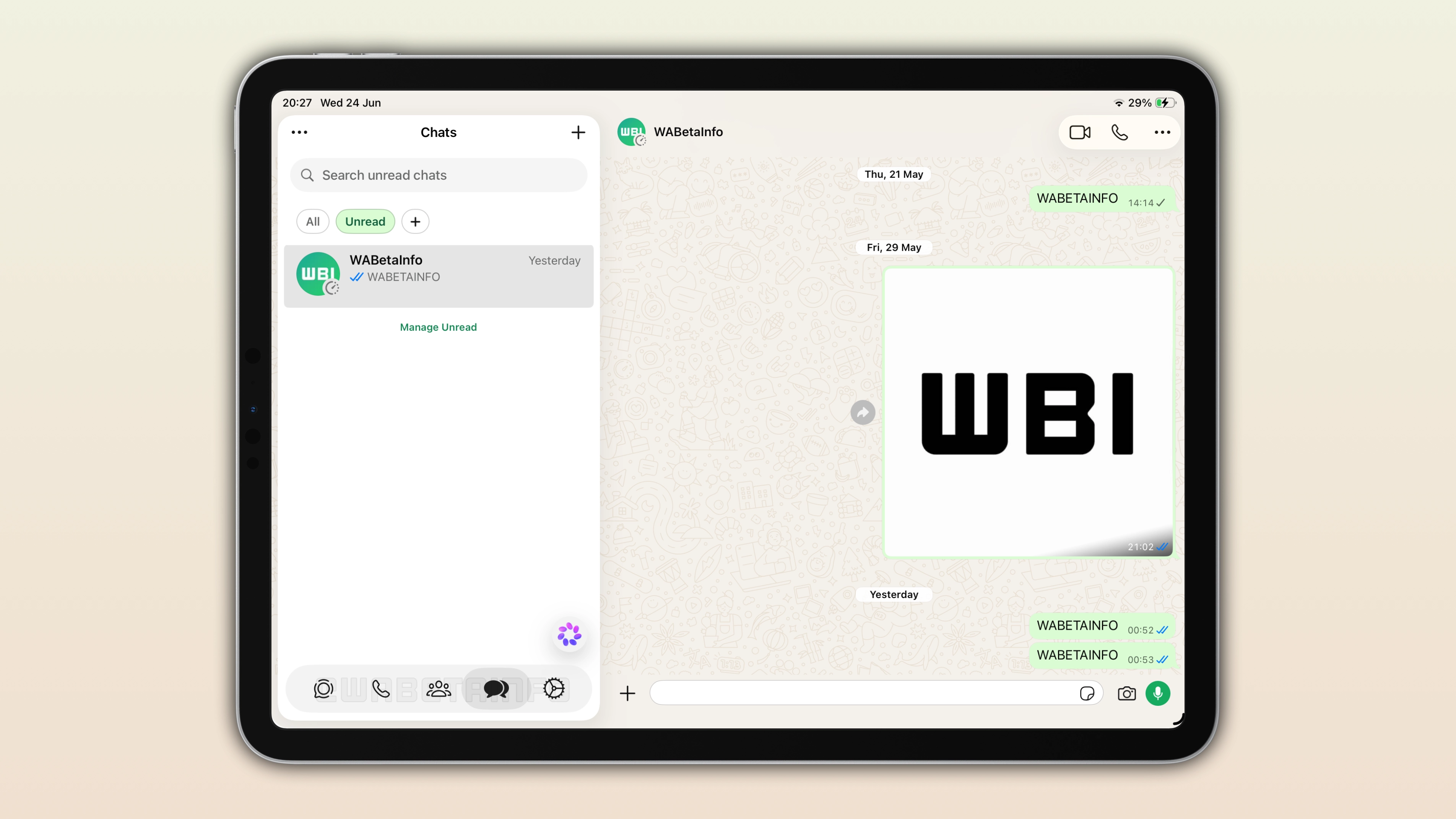
WhatsApp updates the tab bar on iPad, making it compatible with Liquid Glass
The tab bar at the bottom of the screen is the easiest way to spot the new design on iPad. Instead of sitting flat against the edge, it now floats above the interface as a semi-transparent element. Its effect makes the screen feel less flat. This matches exactly how the tab bar already looks on iPhone. However, there is one difference from the tab bar we have on iPhone: it doesn't show text labels under the icons. This makes it look quite similar to the tab bar on the Threads app, which also relies on icons without any text underneath.
WhatsApp refreshes the navigation bar, which now reacts as you scroll the interface
At the top of the screen, the navigation bar now responds to scrolling in the chat list. As users scroll, it gradually becomes more transparent, making the content underneath visible. This makes the transition between the navigation bar and the rest of the interface feel smoother. This works exactly the same way it already does on iPhone.
Buttons also follow the Liquid Glass style on iPad
Buttons throughout the interface now use the same frosted glass appearance introduced on iPhone. They respond with fluid animations when tapped, which makes the interaction feel more polished. This consistency also extends to the context menu, which now shares the same translucent look. At this point, everything just looks like part of the same Liquid Glass design.
Why WhatsApp didn't roll out Liquid Glass for iPad earlier
WhatsApp for iPhone, iPad, and Mac share the same underlying app code. However, this doesn't mean they can receive new features at the same time. WhatsApp rolls out changes for Liquid Glass separately. This allows WhatsApp to monitor performance and fix bugs before making the new interface widely available. This explains why iPad users had to wait, even though the iPhone app had already moved on to this design months ago. Future updates regarding the Liquid Glass design will probably follow the same pattern.
WhatsApp is testing further improvements for Liquid Glass on iPhone
While iPad catches up on this update, WhatsApp has been moving forward on iPhone with additional changes. As covered in our report about the WhatsApp beta for iOS 26.25.10.16 update, WhatsApp is bringing the same translucent style to the chat bar and the navigation bar within the conversation interface. This update is already available to some iPhone users, but it is not yet available on iPad. Since WhatsApp is working on bringing more improvements for Liquid Glass separately, it will likely take additional time before they become available on iPad as well.
WhatsApp for iPad may get further refinements, similar to the design we spotted for the Mac app
Looking ahead, iPad could receive changes similar to what we previously spotted in development for the Mac app. This would include a redesigned sidebar with text labels and a dedicated section for locked chats. The direction WhatsApp is taking on the desktop app suggests it's aiming for more consistency. For now, WhatsApp is rolling out limited changes for Liquid Glass to the iPad app. However, this update gives them enough to properly experience Liquid Glass for the first time.
WhatsApp is rolling out Liquid Glass for iPad to some users
The Liquid Glass design on iPad is available to some users at this stage. As usual, WhatsApp will expand access over the coming weeks. While this rollout focuses on beta testers for now, some users on the stable version of the app may also start seeing it. WhatsApp has not announced an official timeline for when the design will be available to everyone, but we expect it to be available to more users in the future.
Connect with WABetaInfo
Follow WABetaInfo on X and visit our About page to learn more about what we do. We always appreciate your feedback on posts like this one.