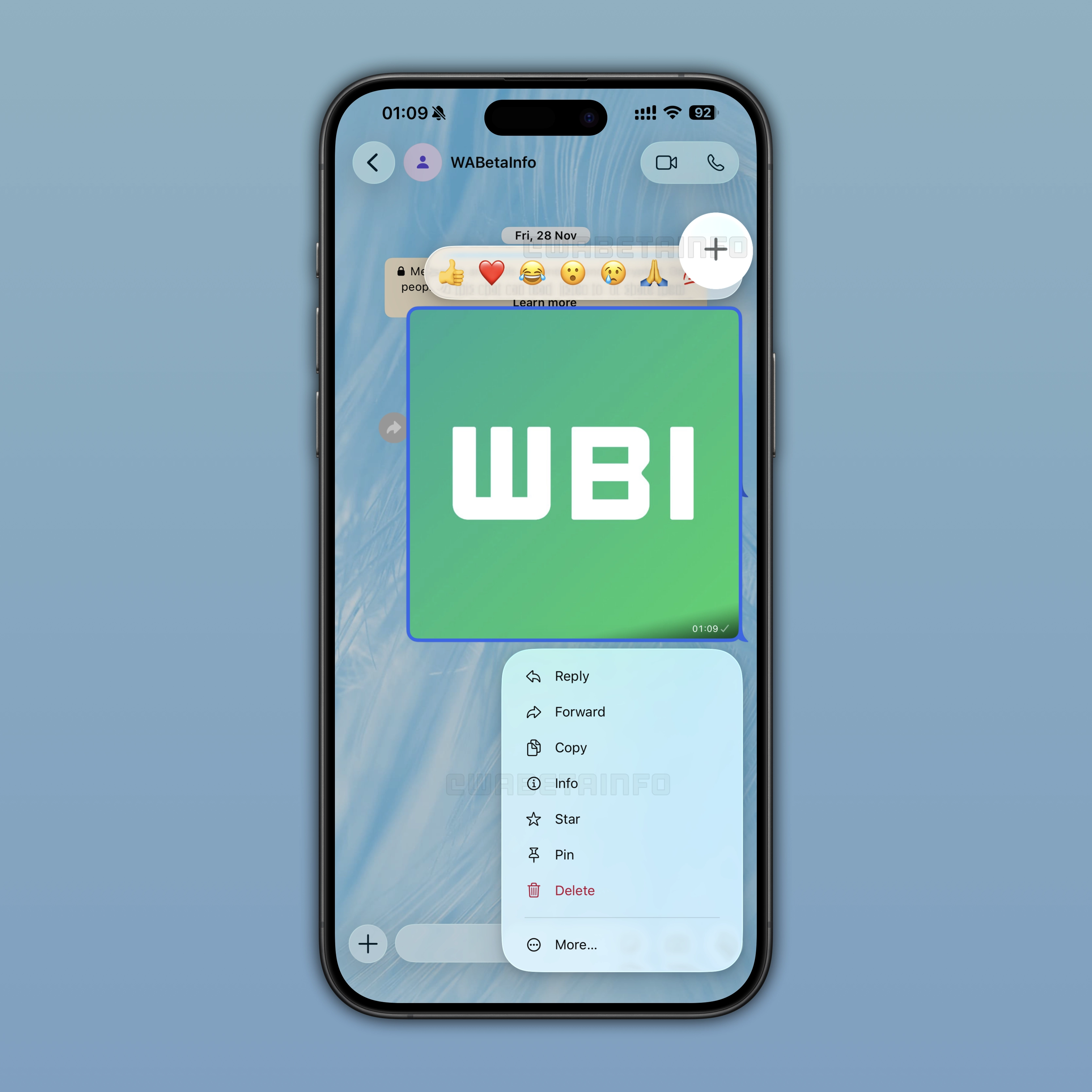
WhatsApp is refining the look of message reactions and the context menu to better match the Liquid Glass design language. The update focuses on enhancing translucency and creating a more unified visual style across the interface.
| Key points | Details |
|---|---|
| Name of the feature: | Liquid Glass - reactions and messages |
| Feature availability: | Some features may be under development, and they are not available to beta testers. Others may become available to users over time. If you're unable to access a certain feature, you will need to wait for a future update. Keep reading to learn more. |
| News shared last week: | WhatsApp will bring the Liquid Glass interface to the chat screen! |
| Previous article: | WhatsApp Plus is rolling out premium features to iOS users! |
Weekly WhatsApp Beta Updates: New Features and Improvements
This new weekly roundup brings together all the latest updates about WhatsApp beta shared this week. As a result, you can finally catch up on everything you might have missed from our past announcements. You can consider this summary as a way to keep up new features, improvements, and fixes. This week's highlight focuses on making more UI elements compatible with the Liquid Glass design language. See what else has been announced this week.
WhatsApp shuts down the avatar feature on iOS and Android
WhatsApp is discontinuing support for the avatar feature on iOS and Android. In the app settings, WhatsApp displays an alert to explain that users can no longer create or edit their avatar. WhatsApp is also removing the avatar entry point from the keyboard in the chat screen. So users cannot access or send their avatars as stickers. However, their previously sent avatar stickers will still be available. We believe that WhatsApp may not have considered maintaining and developing the avatar feature further a priority due to low usage.
WhatsApp to update reaction tray and context menu with Liquid Glass interface
WhatsApp is working to further align its interface with Liquid Glass. Development is now focused on the reaction tray and context menu within the conversation screen. The reaction tray, which contains the emojis users can choose to react to a message, will be updated with a more translucent effect that better matches the Liquid Glass interface. This update will also affect the more button, which allows users to react to messages with emojis beyond the default set. Instead, the context menu will feature a more translucent appearance with layered transparency effects that better align with the updated interface style. At the moment, a blurred background when the context menu is visible is not planned, but this may change before the official release.
WhatsApp continues refining the Liquid Glass interface ahead of another rollout
Although WhatsApp has already expanded the rollout of the Liquid Glass interface to more users multiple times, many people are still waiting to receive the new design on their accounts. WhatsApp is continuing to refine several elements of the interface before making the experience fully available. Recent developments show that WhatsApp is still working on updating the chat interface, reaction tray, context menus, and even the voice note player to better align with Apple's Liquid Glass design language. As a result, the wider rollout will likely continue gradually until all these components are ready and visually consistent.
WhatsApp is working on a status archive feature on Android
In the post about the WhatsApp beta for Android 22.6.18.1 update, we announced that WhatsApp will introduce Status Archive. Instead of deleting status updates completely, the archive will automatically store them once they expire after 24 hours. So the archive is a private hub where users will find their expired status updates. Since it is private, nobody else will be able to see other users' archives.
WhatsApp Plus is available to a limited number of iOS users
WhatsApp Plus is a new optional subscription plan that WhatsApp is gradually rolling out to iOS users. The plan was previously rolled out to a limited number of Android users as well. The premium tier focuses mainly on personalization features and new convenience tools rather than changing the core messaging experience. Subscribers will be able to customize the app with exclusive themes, additional accent colors, custom app icons, premium stickers with fullscreen animations, and exclusive ringtones. WhatsApp Plus also increases the number of pinned chats from 3 to 20. Additionally, it introduces bulk settings for chat lists, making organization easier for power users.
WhatsApp Plus pricing and future premium features
According to early reports, the subscription may cost around €2.49 per month, although pricing could vary depending on the country. Essential features, including messaging, calls, status updates, and end-to-end encryption, will remain completely free for everyone. As a result, we can consider WhatsApp Plus as an optional upgrade for users who want a more customizable and visually enhanced experience.In a future update, WhatsApp is committed to adding more exclusive features to the premium tier, making it a more valuable option for users interested in advanced customization tools.
WhatsApp to improve visibility for chat lists
The post about the WhatsApp beta for Android 2.26.18.4 update contains information about upcoming improvements for chat lists. Specifically, WhatsApp is working on making it easier for users to navigate through their chat lists. Users will be able to hide the favorite list from the main interface. All their hidden lists will be grouped in a separate menu. This will make the Chats tab cleaner and more relevant to their preferences.
WhatsApp to launch a widget for status updates on Android
WhatsApp is currently working on a new widget for the Android app. Once placed the widget in the Home Screen, it will let users check which contacts shared a status update. The widget will display up to three contacts at a time. They will be selected using the same ranking system already implemented for status updates within the app. This system mainly prioritizes contacts users interact with the most.
Connect with WABetaInfo
Follow WABetaInfo on X to learn more about new features and updates. We love hearing your feedback, so please let us know what you think! You can also visit our About page to explore all our services and keep up with the latest announcements.