WhatsApp introduces an alert to unmute channels on iOS
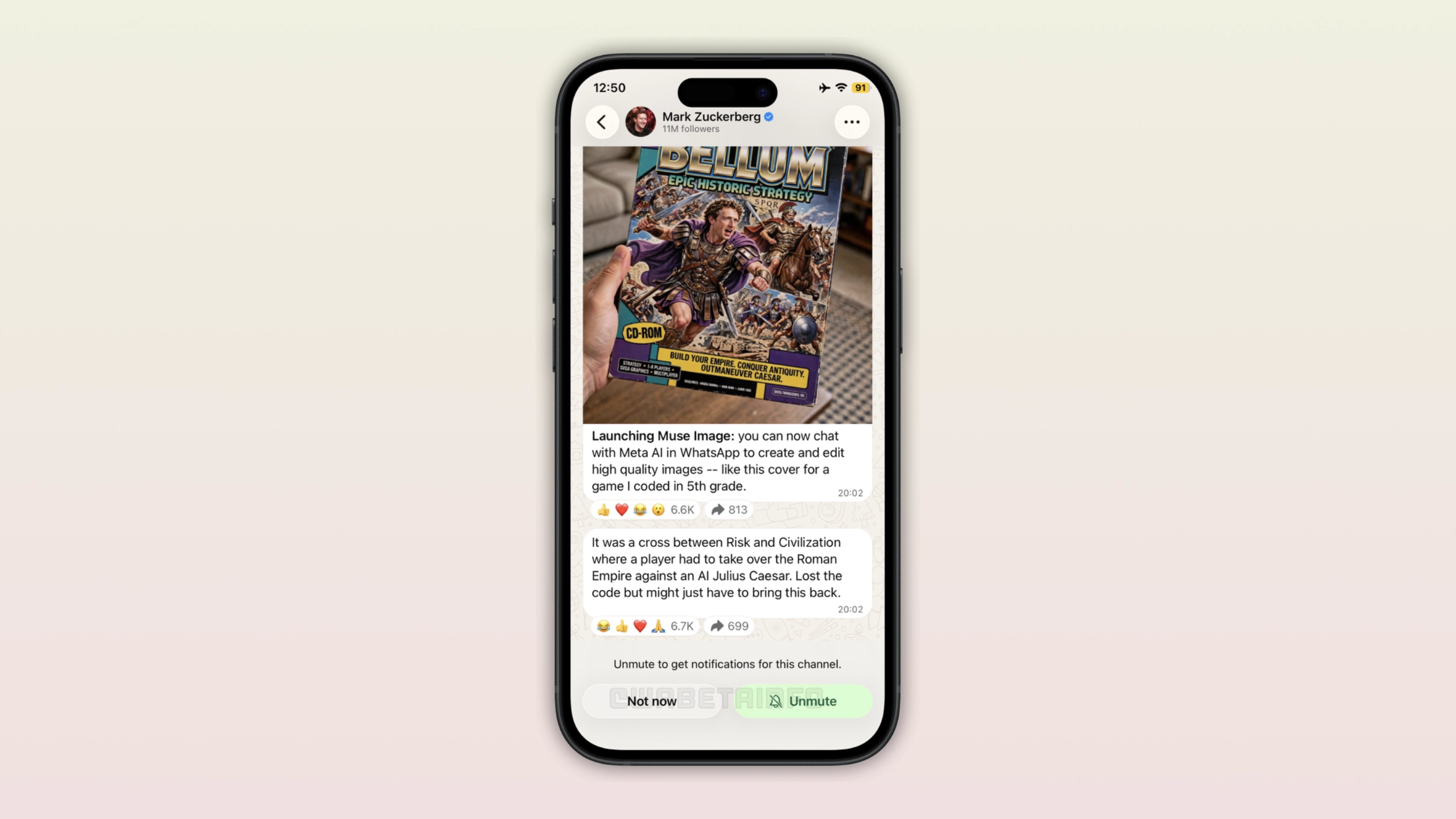
WhatsApp is rolling out a new alert to inform users that the channel they just followed is muted, the same available on Android. It appears right after users follow a channel, when their attention is still on it. Users who want to receive notifications can enable them immediately, and those who prefer to keep things quiet can simply move on.
| Key Points | Details |
|---|---|
| Feature: | Unmute alert for channels on iOS |
| Status: | Rolling out |
| Compatibility: | WhatsApp beta for iOS 26.31.10.25 is a compatible update. |
| Availability info: | This feature is available to some beta testers, and some users on the stable version may also notice it. |
| Previous news: | WhatsApp is testing new chat themes with animations on Android! |
WhatsApp added a prompt to unmute channels
In the post about the WhatsApp beta for Android 2.26.30.5 update, we announced a new prompt for channels. The prompt appears right after users follow a channel, and in the same spot where the follow button used to be. It lets users know that the channel is muted by default, and it gives them the option to turn its notifications on. This makes it much easier for users to notice the unmute setting right when it matters most.
WhatsApp is now bringing the same alert to iOS
Not long after the Android rollout, WhatsApp started introducing the same functionality on the iOS app. The two platforms handle channels the same way, so the alert makes just as much sense on iOS. As a result, users who follow a new channel on WhatsApp for iOS will now see the same alert too. We discovered this feature after installing the WhatsApp beta for iOS 26.31.10.25 update, which is available on TestFlight. Specifically, WhatsApp is rolling out the same unmute alert for channels.
The trade-off of muting channels by default
WhatsApp mutes every new channel automatically. This makes sense. Nobody wants to receive many notifications from a channel they just started following. However, it may be a problem from the channel admin's side. When a channel is muted, followers only see it if they remember to check. But most of them do not. Over time, this translates into lower view counts. The new alert does not change the default, but it gives users a moment to reconsider before moving on.
How the alert works on iPhone
The moment the user follows a new channel, WhatsApp replaces that button to show the new alert in the same spot. It informs the user that the channel is muted and offers a way to unmute it. Users can then turn notifications on. Since users are already looking at that part of the screen right after following the channel, the alert catches their attention at exactly the right moment.
Who is most likely to act on the suggestion
Not every user who sees the alert will unmute the channel. Someone who follows many channels and never checks their notifications probably will not bother. But someone who followed a channel because they want to see its updates is much more likely to unmute it now. The alert works best for this case since they are the followers that channel admins care about most.
Why WhatsApp chose a suggestion over a requirement
WhatsApp could have simply left notifications on by default when users follow a new channel. However, WhatsApp decided not to, and for good reasons. Many notifications may feel intrusive, and users who get too many alerts often end up muting the channel. A suggestion keeps the user in charge. WhatsApp is just making sure nobody misses this option without being pushed into it.
WhatsApp is rolling out the unmute alert to the iOS app
The new unmute alert is available to some users who install the latest WhatsApp beta update from TestFlight. Some users on the stable version of the app may also see the same alert after following a new channel. Note that WhatsApp is rolling out this feature gradually, so not everyone will see it immediately. Additionally, WhatsApp has not announced when this feature will be available to everyone.
Connect with WABetaInfo
Follow WABetaInfo on X and visit our About page to learn more about what we do. We always appreciate your feedback on posts like this one.