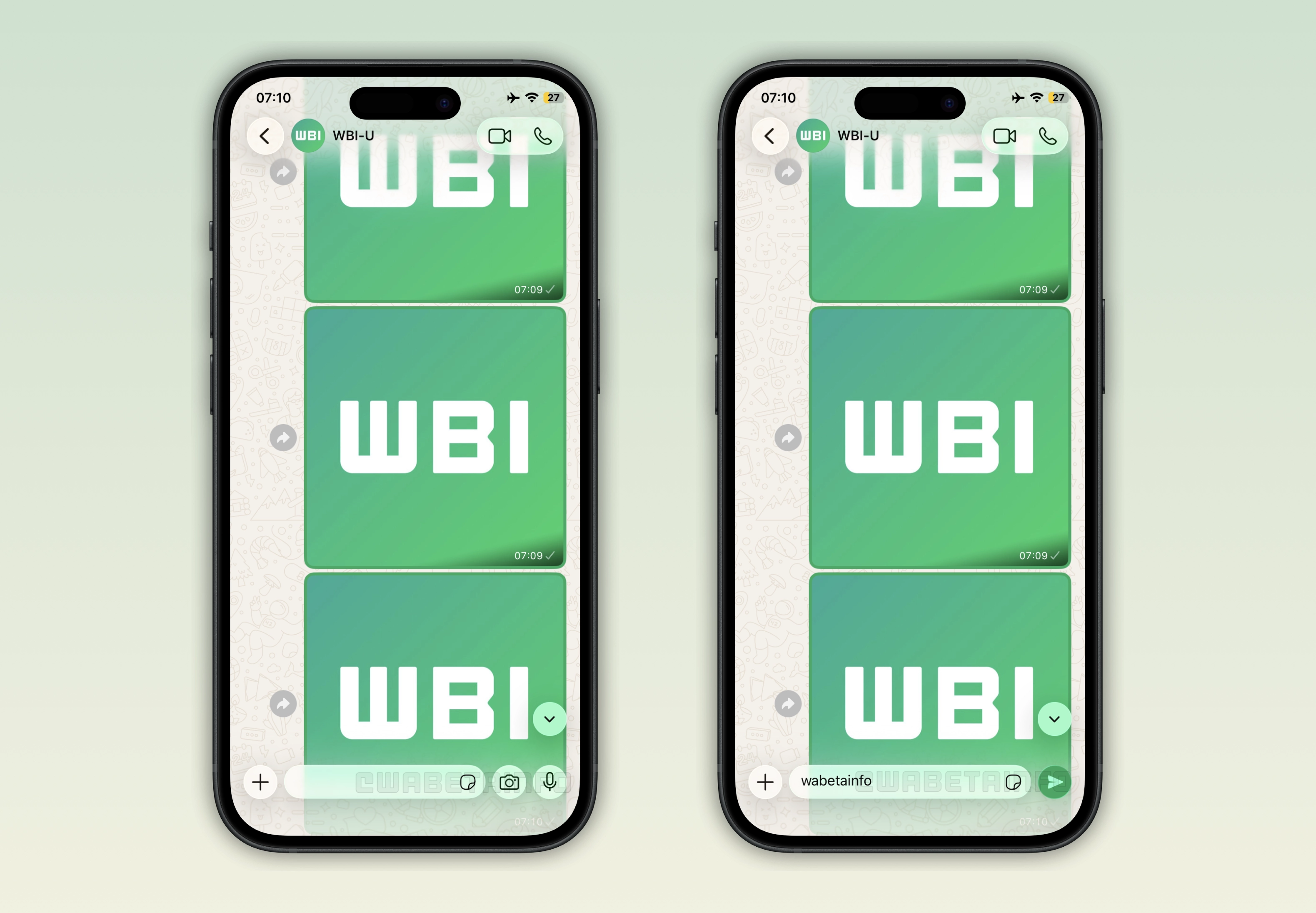
WhatsApp is testing a chat interface compatible with the Liquid Glass design. The update will introduce additional visual refinements that align with Apple's latest design language on iOS 26.
| Key points | Details |
|---|---|
| Name of the feature: | Liquid Glass - chat interface |
| Feature availability: | Some features may be under development, and they are not available to beta testers. Others may become available to users over time. If you're unable to access a certain feature, you will need to wait for a future update. Keep reading to learn more. |
| News shared last week: | WhatsApp Plus launches premium features for a monthly fee! |
| Previous article: | WhatsApp beta for Android 2.26.17.10: what's new? WhatsApp is rolling out a feature that shows when status updates are reshared many times! |
Weekly WhatsApp Beta Updates: New Features and Improvements
This new weekly roundup brings together all the latest updates about WhatsApp beta shared this week. As a result, you can finally catch up on everything you might have missed from our past announcements. You can consider this summary as a way to keep up new features, improvements, and fixes. This week's highlight focuses on Liquid Glass-compatible interface for the chat screen, a feature currently under development. See what else has been announced this week.
WhatsApp will drop support for Android 5.0 and 5.1
WhatsApp will drop support for older Android versions on September 8, 2026. Specifically, users with a device on Android 5.0 and 5.1 will no longer be able to use WhatsApp once the update takes effect. Users can back up their chat history on Google Drive right within the app settings to preserve their conversations. Dropping support to old operating systems is a common practice, as it allows developers to focus on introducing new features without being constrained by outdated technologies.
WhatsApp to test Liquid Glass design for the chat interface
WhatsApp is testing an interface for the chat screen compatible with Liquid Glass. First, WhatsApp is working on bringing the Liquid Glass design to the chat bar. Liquid Glass will bring a translucent, glass-like material to the chat bar that dynamically reflects and refracts what is behind it. Liquid Glass will also be compatible with the button that lets users quickly jump to the latest message in the conversation. Additionally, WhatsApp is focusing on the navigation bar as part of the Liquid Glass update. Specifically, WhatsApp will make the navigation bar transparent within the chat interface. As a result, the update will make the app more aligned with the Liquid Glass design language.
Liquid Glass for WhatsApp: rollout information
Over the past few weeks, WhatsApp has expanded the rollout of the Liquid Glass design to a larger number of users. However, this does not mean that everyone can already access the new interface. Even though Apple now requires apps to be built using the iOS 26 SDK, developers can still disable Liquid Glass. It appears that WhatsApp plans to release Liquid Glass to 100% of users only once every part of the interface is fully optimized. This means that a full release will happen when the chat screen and other elements of the interface are ready for Liquid Glass.
WhatsApp will launch first-party encrypted cloud backup provider
WhatsApp is testing a new feature for chat backups. Specifically, users will be able to choose if they want to back up their chat history on WhatsApp's servers in a future update. However, users will still be able to select Google Drive for backing up their chats. Encryption will be mandatory for all stored data if users choose to upload their backups to WhatsApp's servers. The default option to encrypt a backup is the passkey. Users will also be able to choose a different option, such as a custom password or a 64-digit encryption key. Users may get 2GB of free storage, although WhatsApp may also be working on a paid plan to offer up to 50GB of space.
WhatsApp launches status updates at the top of the chat list
In the post about the WhatsApp beta for Android 2.26.17.1 update, we announced a feature that displays status updates at the top of the chat list. This feature lets some beta testers view the status tray directly in the Chats tab without opening the Updates tab. In the top app bar, WhatsApp displays up to 3 contacts who have recently shared a status update. To see the entire status tray, users will have to scroll down the interface. This looks like an experiment than a full rollout. So viewing status updates through the new tray in the Chats tab won't display any ads between statuses at this stage.
WhatsApp to bring channels to the chat list
WhatsApp is working on a feature that brings channels to the Chats tab. This feature will let users view the channels they follow by selecting a separate list in the chat list. This means channels will not appear in the main "All" chat list. So chats and groups will still be separate from channels. Since WhatsApp is testing both status updates and channels in the Chats tab, WhatsApp might replace the Updates tab with a new tab dedicated to other features in the future.
WhatsApp is testing a label for frequently reshared status updates
The WhatsApp beta for Android 2.26.17.10 update allows some beta testers to see when a status update has been reshared many times. When the same status update is reshared multiple times, WhatsApp will show the "Reshared many times" label at the top of the status screen. This information will help users understand that the status update may have reached them through multiple reposts rather than a single original source. Since users may share fake news or misleading content in their status updates, this feature may help raise awareness about potentially unreliable information.
Connect with WABetaInfo
Follow WABetaInfo on X to learn more about new features and updates. We love hearing your feedback, so please let us know what you think! You can also visit our About page to explore all our services and keep up with the latest announcements.