WhatsApp is rolling out a feature to expand images on iOS
WhatsApp is introducing a feature that lets users expand photos in their chats and status updates. The feature relies on Meta AI to generate an expanded version of the image in the 9:16 format. Users can find this AI-powered tool in the drawing editor before sharing the image.
| Key Points | Details |
|---|---|
| Feature: | AI photo expansion |
| Status: | Rolling out |
| Compatibility: | WhatsApp beta for iOS 26.44.10.16 is a compatible update. |
| Availability info: | This feature is available to some beta testers, and it's rolling out to more people over the coming weeks. |
| Previous news: | WhatsApp is rolling out AI photo expansion on Android! |
WhatsApp rolled out AI photo expansion on Android
In the post about the WhatsApp beta for Android 2.26.44.8 update, we announced a feature to expand photos using Meta AI. This feature lets users expand a photo to generate new content around the edges. WhatsApp added this option to the drawing editor under the Edit tab, where users can find other effects and filters. Note that WhatsApp only shows the option when the photo is not already in a supported format. For example, a 1:1 square image is a good choice to verify if the feature is available.
WhatsApp is introducing AI photo expansion on iOS
WhatsApp is now bringing the same functionality to the iOS app. Users can now expand their photos right within the drawing editor, making it simpler to generate alternative versions without relying on third-party apps. We discovered this with the WhatsApp beta for iOS 26.44.10.16 update, which is available on TestFlight. With this update, WhatsApp is rolling out a feature to expand images to some beta testers.
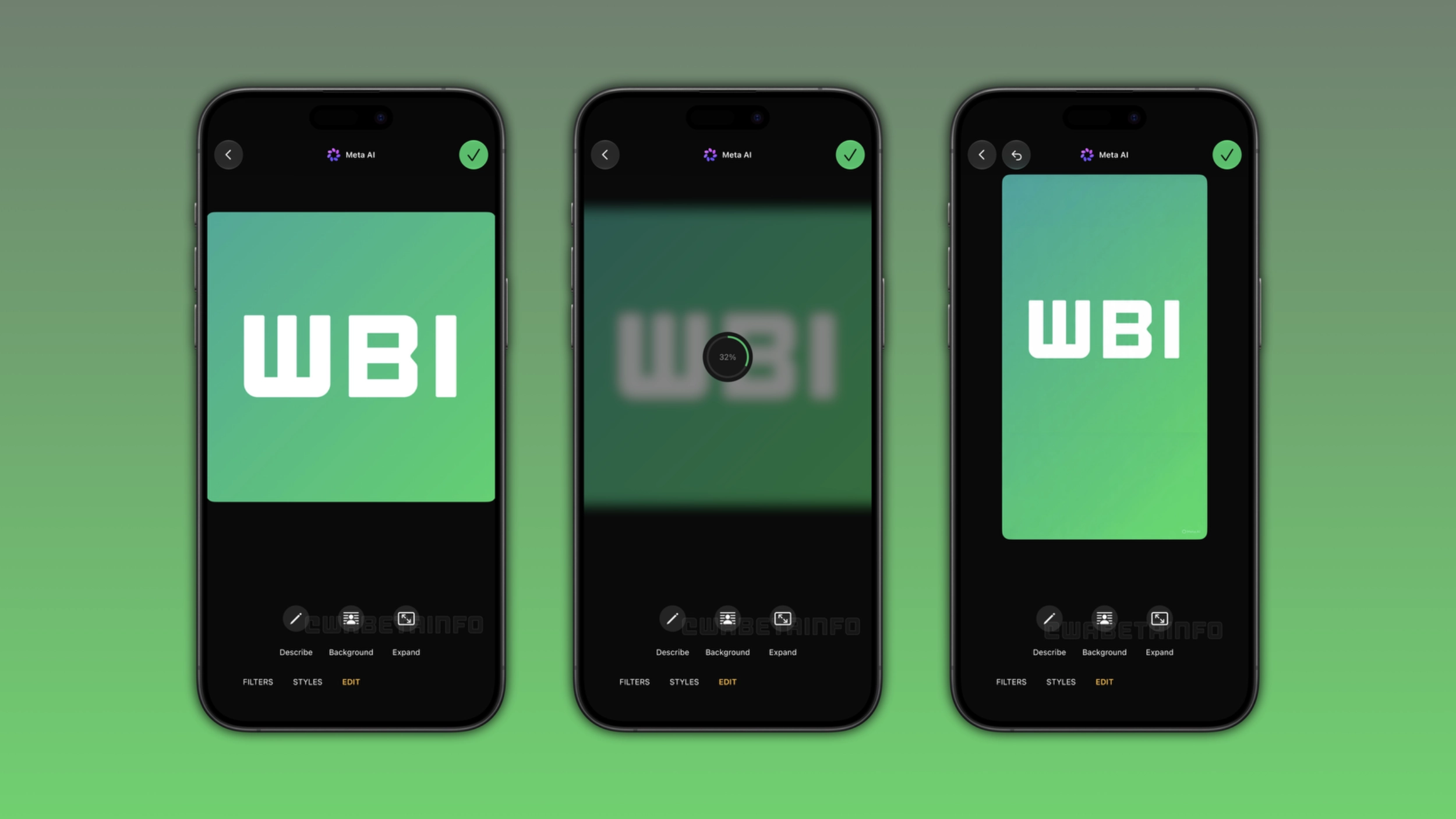
Where users can find the option to expand photos
When users select a photo in their chats, WhatsApp opens the drawing editor. Here, they can choose to apply some AI effect to improve it. Among these, users can find a new option to expand their photos. Once users select this option, Meta AI takes a few seconds to analyze the photo and generate the expanded version. Once the process is complete, WhatsApp shows the expanded photo in the drawing editor and users can choose to send it. Note that this feature is also compatible with status updates.
What happens if users do not like the result
If the expanded photo does not look as users expected, they do not have to send it. The drawing editor shows the result before users share the image. Users can tap the undo button to restore the original photo at any time. Users can tap the button to expand the photo again to generate a different result if they want to try once more. WhatsApp never sends the photo automatically, so users can try multiple times until Meta AI generates an image they like.
How Meta AI generates the expanded photo
Meta AI uses an algorithm to analyze the context of the image to generate new content. With this feature, Meta AI can create a 9:16 version of the photo where the added area look like a continuation of the original scene. This lets users get a photo that feels complete rather than stretched. Note that the result will be more accurate if the original image provides clear details around its borders.
Why the 9:16 format is helpful for status updates
The 9:16 format fills the full screen on the device without any empty space at the top or bottom. When users share a square or landscape photo as a status update, it appears with black bars above and below. With the feature to expand photos, WhatsApp is addressing this issue by converting the photo to the right format before sharing. As a result, users do not need to use another app to resize the photo before sharing it.
WhatsApp is rolling out AI photo expansion to iOS beta testers
The feature to expand images is available to some users who install the latest update from TestFlight. Note that some users who install the latest version from the App Store can already expand their photos using Meta AI. Since WhatsApp is gradually rolling it out, this feature is not available to all users. WhatsApp plans to expand its availability over the coming weeks.
Connect with WABetaInfo
Follow WABetaInfo on X and visit our About page to learn more about what we do. We always appreciate your feedback on posts like this one.