WhatsApp is rolling out chats powered by Meta AI on Android
WhatsApp is making it easier for users to organize their threads with Meta AI by introducing separate conversations in the chat list. Users can choose a name and a custom profile photo for their AI-powered chats. It is possible to access conversations with Meta AI by selecting a new filter in the Chats tab.
| Key Points | Details |
|---|---|
| Feature: | Chats powered by Meta AI |
| Status: | Rolling out |
| Compatibility: | WhatsApp beta for Android 2.26.44.6 is a compatible update. |
| Availability info: | This feature is available to some beta testers, and it's rolling out to more people over the coming weeks. |
| Thanks: | Sc and Akan, for testing and reporting. |
| Previous news: | WhatsApp is rolling out media suggestions on Android and iOS! |
WhatsApp released separate threads for conversations with Meta AI
In the post about the WhatsApp beta for Android 2.26.9.4 update, we announced a feature to manage conversations with Meta AI. With this update, WhatsApp introduced threads to organize conversations with Meta AI by topic. Threads keep their context, so information from a specific conversation does not affect others automatically. Users can access their threads from a separate panel within the conversation with Meta AI. Meta AI automatically generates a title for a thread, but users can rename it to make it easier to find it.
WhatsApp is bringing conversations powered by Meta AI to the chat list
WhatsApp is now taking a step further by turning threads into full conversations. Users can create a new chat with Meta AI, give it a name, and set a custom profile picture to quickly identify it. We discovered this with the WhatsApp beta for Android 2.26.44.6 update, which is available on the Google Play Store. With this update, WhatsApp is rolling out the ability to create chats powered by Meta AI to some beta testers. Instead of opening the conversation with Meta AI to find a thread, users can now see their chats with the chatbot in the chat list.
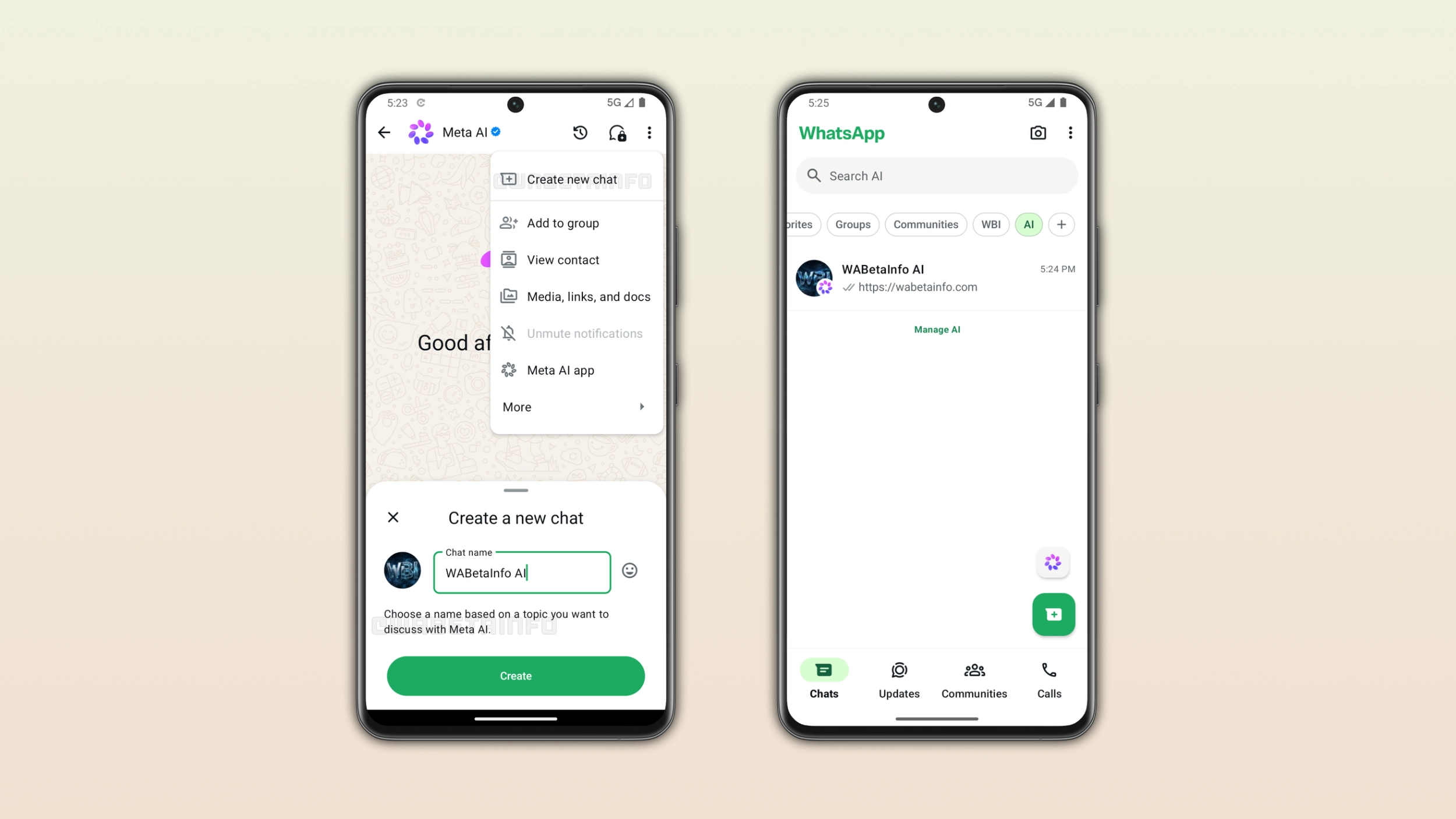
How to create a new chat with Meta AI
Users can create a new AI-powered chat right within the conversation with Meta AI. WhatsApp added a new option to the overflow menu where users can create a new chat. Once users select this option, WhatsApp presents a bottom sheet where they can type a name for the new chat. Users should choose a name based on the topic they want to discuss with Meta AI. Users can also set a custom profile picture for the chat, making it easier to distinguish the chat from other conversations.
How the new chats with Meta AI look and where to find them
Once users create a new chat with Meta AI, WhatsApp automatically adds it to the chat list. Users can easily find it by tapping the AI filter. This list lets users see chats they created with Meta AI. Users can easily distinguish chats with Meta AI from other conversations by the chatbot logo over the profile icon, making it clearer that the conversation is AI-powered. WhatsApp also shows the chat preview just like any other conversation in the Chats tab.
How this differs from the previous thread system
With the previous thread system, users had to open the conversation with Meta AI to find their threads. They could find their threads by opening the overflow menu. This means that users had to take multiple steps every time they wanted to switch to a different thread. The new system makes it easier for users to find their chats with Meta AI and switch between them.
How to manage and delete chats with Meta AI
Users can delete a chat with Meta AI at any time if they no longer need it. In addition, the filter that displays AI-powered conversations in the chat list is optional. It is possible to move the filter to a separate section in case users prefer a cleaner chat list. However, users can quickly access their conversations with Meta AI by keeping the filter in the main chat list.
WhatsApp is rolling out chats with Meta AI to Android beta testers
This feature is available to some beta testers who install the latest update from the Google Play Store. WhatsApp is rolling it out gradually, so not every beta tester can create a chat with Meta AI. If this feature does not appear in the conversation with Meta AI, it should become available to more accounts over the coming weeks. WhatsApp has not announced when this feature will be available to everyone.
Connect with WABetaInfo
Follow WABetaInfo on X and visit our About page to learn more about what we do. We always appreciate your feedback on posts like this one.