With the latest updates, WhatsApp is making it faster for users to share recent photos and videos in their chats. When users open a conversation, WhatsApp can suggest the most recent media from their gallery. Users can manage this feature from the app settings, and it is compatible with both Android and iOS.
| Key Points | Details |
|---|---|
| Feature: | Recent media suggestions |
| Status: | Rolling out |
| Availability info: | This feature is available to some users, and it is rolling out to more people over the coming weeks. |
| Thanks: | Sc, UnluckyTester, Sniper, kingcyrious, Technical MJ TV, Federico Trevisani, Muhammad Hammad, shw_9876, FastenM, flakoflow, Lukkkas, Dimu, lostliano, for testing and reporting. |
| Previous news: | WhatsApp is rolling out message text actions on Android and iOS! |
WhatsApp released sticker suggestions on Android
In the post about the WhatsApp beta for Android 2.25.34.11 update, we announced that WhatsApp was rolling out sticker suggestions. With this feature, WhatsApp can display stickers above the keyboard as users type, based on the emojis they enter. These suggestions allow users to quickly send a suggested sticker without opening the full sticker keyboard. This feature is optional, so users can disable it from the app settings at any time.
WhatsApp is introducing new media suggestions on Android and iOS
Some users noticed that WhatsApp is expanding the suggestion system beyond stickers by introducing media suggestions. WhatsApp already makes it simpler for users to open the gallery or camera from the chat bar. But now, WhatsApp goes one step further by suggesting the most recent media from the gallery when users open their chats. With the latest updates, WhatsApp is rolling out recent media suggestions to some iOS and Android users. This functionality helps users share their photos and videos faster without opening the gallery.
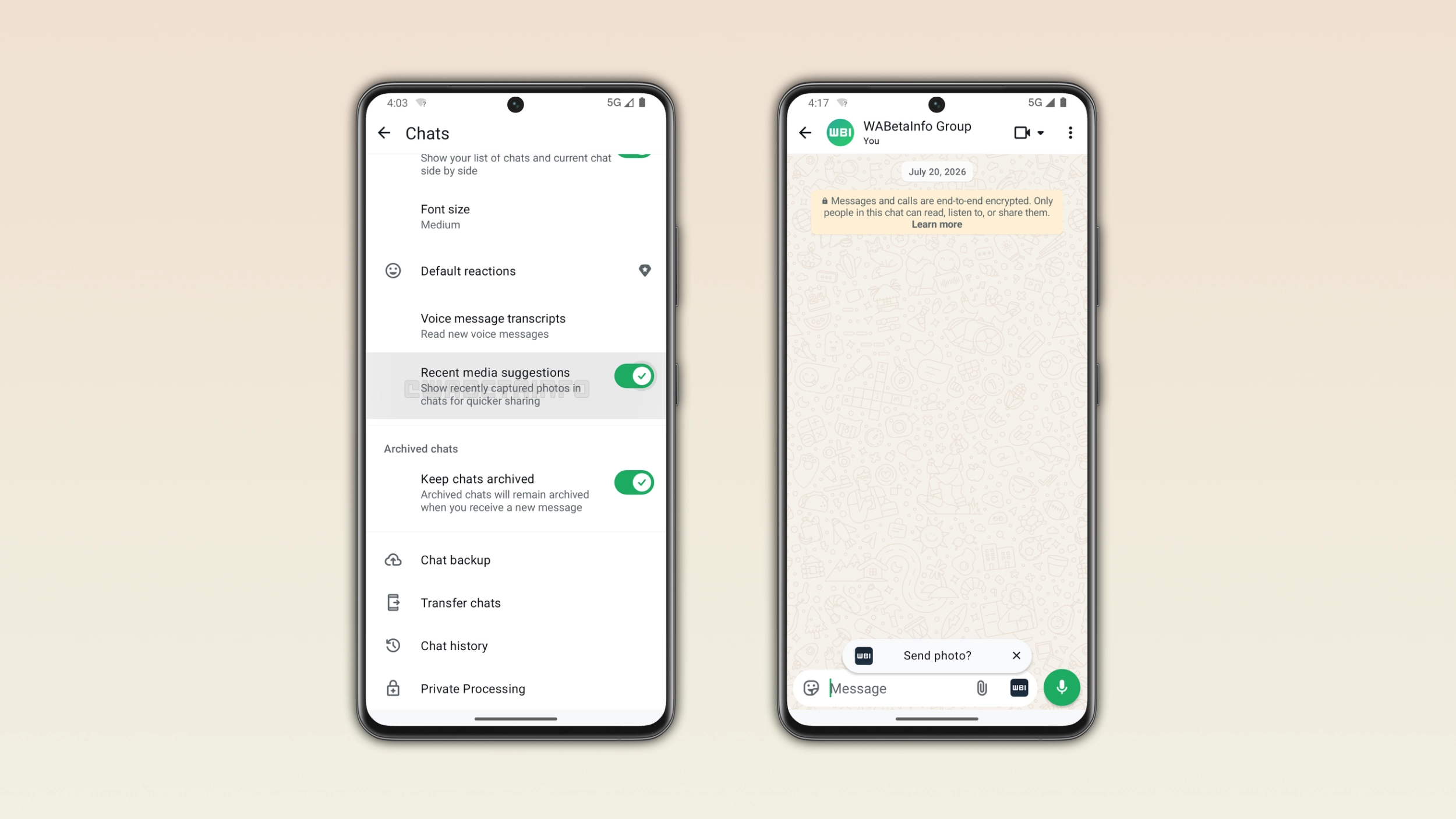
How media suggestions appear in the chat
WhatsApp is currently testing this feature with two different entry points based on the user. With the first configuration, WhatsApp immediately shows a toast above the chat bar when users open a conversation. The toast shows a thumbnail of the most recent media from the gallery and it asks users if they want to send it. Users can quickly dismiss the toast by tapping the close button. With the second configuration, WhatsApp temporarily replaces the camera icon in the chat bar with the media thumbnail. Note that users will only get one of these two configurations. In both cases, users can ignore the suggestion and keep chatting as usual.
What happens when users tap the suggestion
When users tap the toast or the thumbnail in the chat bar, WhatsApp does not send the media automatically. Instead, WhatsApp opens the drawing editor, where users can review the photo or video. They can also add a caption or a sticker before sending it. By presenting the drawing editor instead of sending the media automatically, WhatsApp prevents accidental shares in case users interact with the suggestion by mistake. WhatsApp gives users full control over media suggestions since they can dismiss the drawing editor without sending the media.
What types of media WhatsApp suggests
WhatsApp suggests the most recent media from the device gallery regardless of where the user saved it. This includes photos the user captured with the camera, screenshots, images from the web, videos the user saved from other apps, and any other new media from the gallery. WhatsApp does not filter media by type or source since the app simply selects the most recent item. This means that the suggestion could be a photo, a video, or a screenshot based on what the user added to their gallery.
How to disable media suggestions
WhatsApp is enabling this feature automatically. As soon as the feature is available, users will see media suggestions in the chat interface. Users who prefer not to see suggestions can disable the feature at any time. They can find the option to manage media suggestions right with the app settings. Here, users need to open the Chats screen and disable "Recent media suggestions". When users disable this option, WhatsApp will never show media suggestions in their chats again.
WhatsApp is rolling out media suggestions to Android and iOS users
This feature is available to some users who install the latest versions of WhatsApp for Android and iOS. WhatsApp is rolling it out gradually, so not everyone will see media suggestions immediately. If the toast or the camera thumbnail does not appear yet, the feature should become available to more accounts over the coming weeks. WhatsApp has not announced when media suggestions will be available to everyone.
Connect with WABetaInfo
Follow WABetaInfo on X and visit our About page to learn more about what we do. We always appreciate your feedback on posts like this one.