WhatsApp is introducing a feature that automatically detects phone numbers, dates, addresses, and email addresses. When WhatsApp detects them in a message, the app shows a dotted underline below the text to suggest some shortcuts. Users can tap the shortcut to see what they can do with it or keep chatting.
| Key Points | Details |
|---|---|
| Feature: | Message text actions |
| Status: | Rolling out |
| Availability info: | This feature is available to some users on the latest versions of WhatsApp for Android and iOS. |
| Thanks: | Sc, Federico Trevisani, Muhammad Hammad, shw_9876, kingcyrious, FastenM, troncarlo, Lukkkas, Dimu, lostliano, for testing and reporting. |
| Previous news: | WhatsApp is working on a refreshed settings interface on Android! |
WhatsApp released the Events hub in the app settings
In the post about the WhatsApp beta for Android 2.26.36.5 update, we announced a feature that lets users manage their events in a new hub. With this functionality, WhatsApp added a new section to the app settings where users can create, manage, and review their events. The hub lets users create an event with a name, date, time, location, and an optional call link. By listing events in the same section, WhatsApp makes it easier for users to find them without opening every chat.
WhatsApp is introducing message text actions on Android and iOS
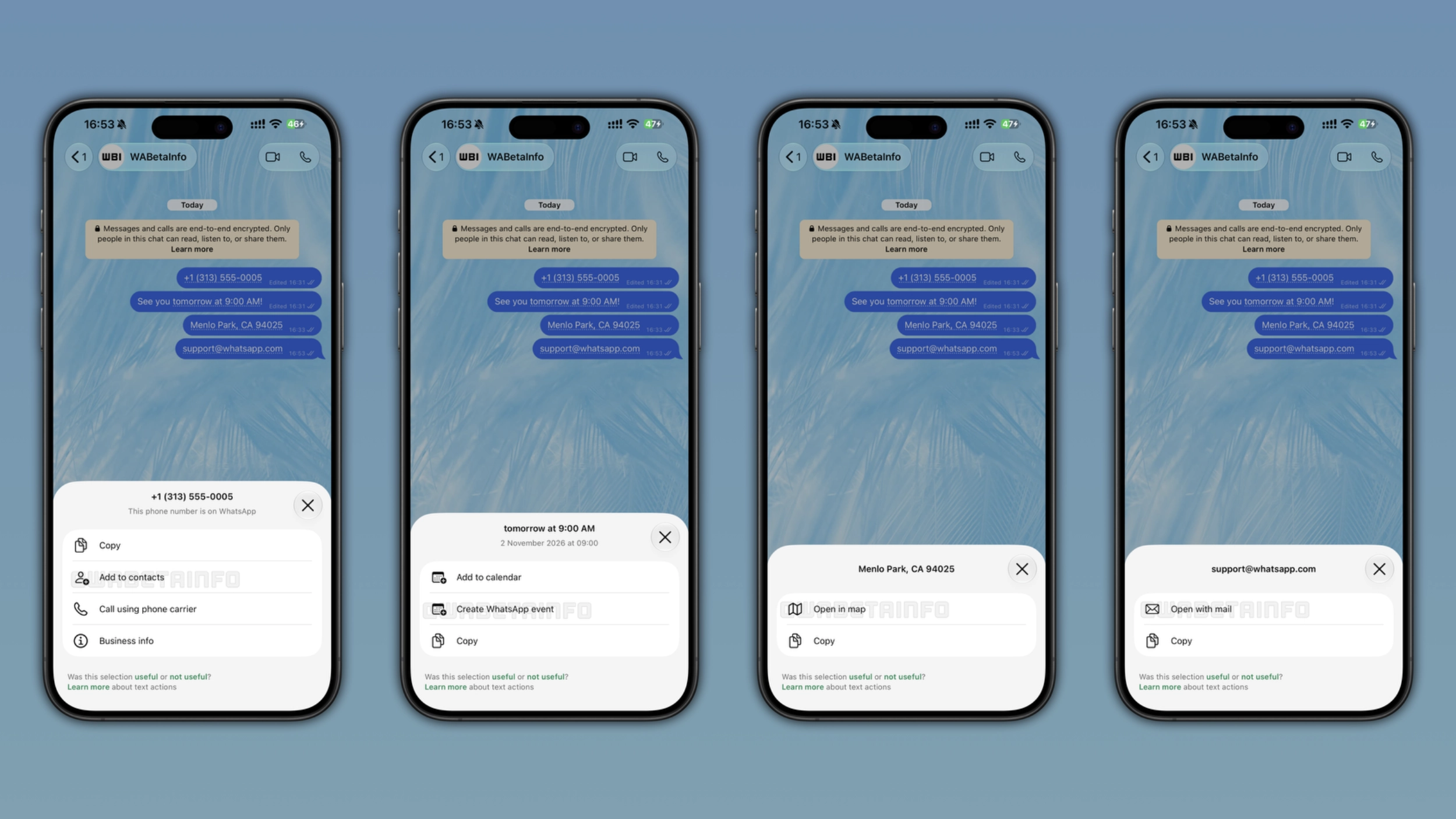
To make event creation easier, WhatsApp is introducing a new shortcut right within the conversation screen. However, event creation is just one of the four shortcuts available with the latest update. When WhatsApp recognizes a phone number, a date, an address, or an email address, the app marks the text with a dotted underline to let users know that an action is available. With the latest updates for iOS and Android, WhatsApp is rolling out smart message text actions. This functionality helps users save time when they interact with their messages.
What text actions are and how they work
The latest update introduces smart text actions. They are shortcuts that WhatsApp automatically adds to messages when the app detects a specific text format. They are compatible with both incoming and outgoing messages. When a text action is available, WhatsApp shows a dotted underline under the text the app recognized. Users who tap the underline can see a popup where they can find certain shortcuts. The popup also shows the exact text WhatsApp detected at the top of the interface. This makes it simpler for users to confirm that the app recognized the right message. If users do not want to use the shortcut, they can simply ignore it and keep chatting.
Which messages are compatible with text actions
WhatsApp shows different actions based on what the app detects in the message. For phone numbers, WhatsApp lets users copy them, add them to contacts, and place a call using their phone carrier. In case users tapped a business phone number, they can also see its information. For dates and times, users can add to the calendar, copy it, or create a new event within WhatsApp. For addresses, users can copy them or open the address in the map. Finally, WhatsApp lets users tap email addresses to open them with the mail client or copy them. These actions cover the most common things users would want to do in their conversations with phone numbers, dates and times, locations, or email addresses. Note that some actions were already available in the past. However, WhatsApp is now making it easier for users to view and manage them.
How to submit feedback on text actions
When users choose a text action, WhatsApp shows a section to submit feedback at the bottom of the screen. Here, WhatsApp asks if the selection was useful or not useful. Users can tap either option to share their opinion. If users think the selection was not useful, they can add more details by indicating if the app detected wrong text or if the action was not needed. Note that this feature only shares a flag with WhatsApp. This means that it does not share the content of the message. With this flag, WhatsApp can understand if the app needs improvements to detect text formats more reliably.
How WhatsApp protects user privacy with text actions
WhatsApp generates text actions on the device without sending anything to the server. In particular, WhatsApp uses regular expressions to scan the text and identify patterns that match known formats. The app keeps this pattern-matching locally on the device, so WhatsApp never receives the message content or the suggestion. As a result, the feature does not affect end-to-end encryption.
WhatsApp is rolling out text actions to Android and iOS users
This feature is available to some users who install the latest versions of WhatsApp for Android and iOS. WhatsApp is rolling text actions out gradually, so not everyone will see them immediately. If text actions do not appear yet, they should become available to more accounts over the coming weeks. WhatsApp has not announced when this feature will be available to everyone.
Connect with WABetaInfo
Follow WABetaInfo on X and visit our About page to learn more about what we do. We always appreciate your feedback on posts like this one.