WhatsApp is rolling out AI photo expansion on Android
WhatsApp is improving the drawing editor by adding a feature that lets users expand their photos. The update allows users to expand any photo to the 9:16 format with a single tap. The feature is compatible with both chats and status updates.
| Key Points | Details |
|---|---|
| Feature: | AI photo expansion |
| Status: | Rolling out |
| Compatibility: | WhatsApp beta for Android 2.26.44.8 is a compatible update. |
| Availability info: | This feature is available to some beta testers, and it's rolling out to more users over the coming weeks. |
| Thanks: | Sc, for testing and reporting. |
| Previous news: | WhatsApp is rolling out chats powered by Meta AI on Android! |
WhatsApp introduced AI-powered editing tools for photos
In the post about the WhatsApp beta for Android 2.26.33.2 update, we announced a new option to expand photos using Meta AI. The drawing editor already offers several AI-powered features. These include the ability to describe the image to generate a new one, a feature to manage its background, and a tool to apply a different artistic style. With the update we announced, WhatsApp also planned to introduce another tool to let users expand their photos.
WhatsApp brings AI photo expansion to the drawing editor on Android
WhatsApp is finally adding a new AI-powered tool to the drawing editor. Users who open a photo in the drawing editor can now find a new button to expand their photos. We discovered this with the WhatsApp beta for Android 2.26.44.8 update, which is available on the Google Play Store. With this update, WhatsApp is rolling out the feature to expand photos to some beta testers. This functionality uses Meta AI to generate a new image.
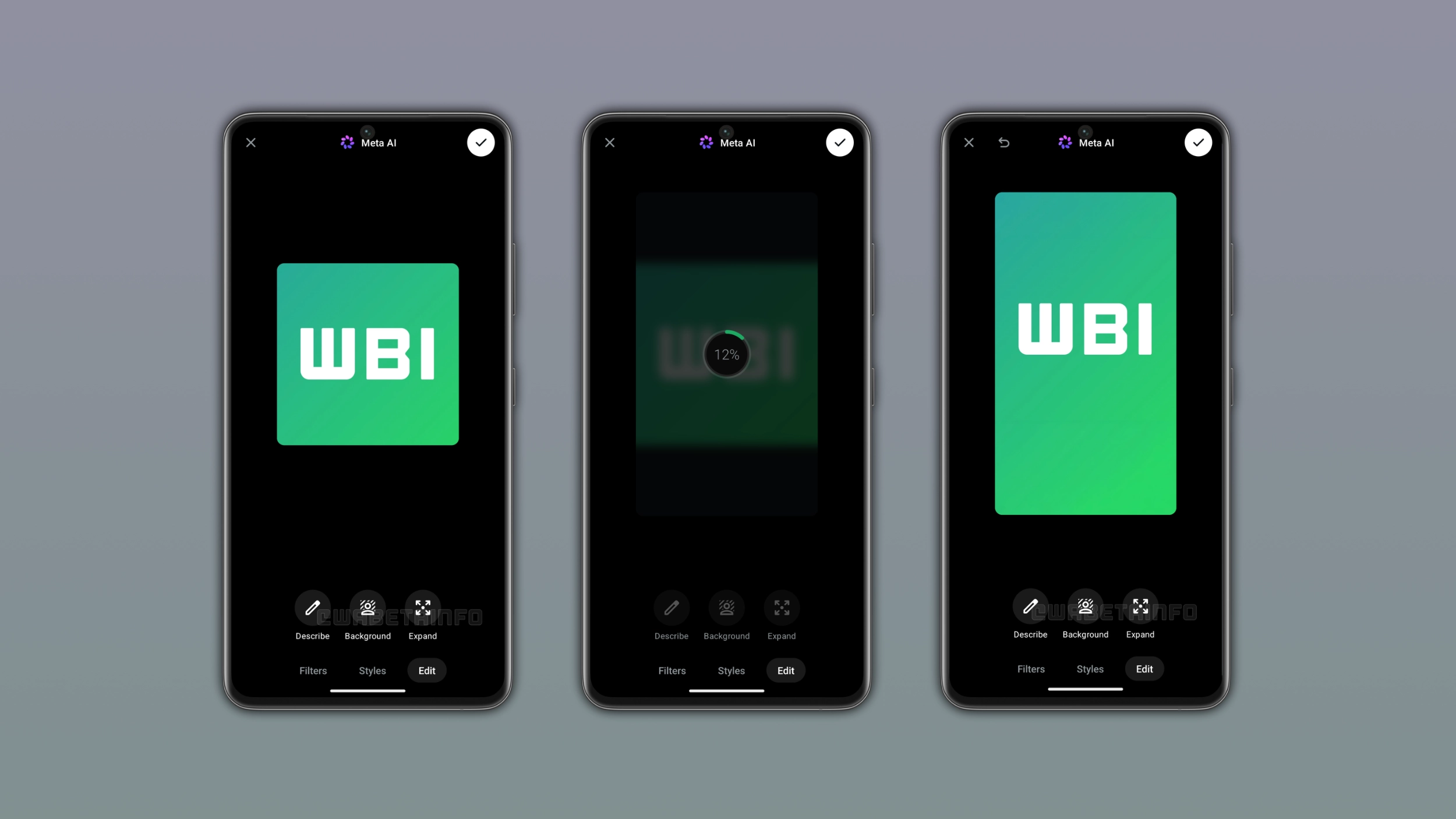
How to use the Expand feature in the drawing editor
Users can expand their photos by opening the drawing editor. Here, they need to restyle the photo using AI. Once users slide up the interface, they can access the photo expansion option in the "Edit" section. After they select the option to expand the photo, Meta AI will start processing it to generate the expanded version in a few seconds. Meta AI will generate a new photo in the 9:16 format, which is very useful for status updates. Users can confirm the result or try to generate a different version.
How Meta AI expands a photo on WhatsApp
Meta AI does not stretch the original image to fit the 9:16 format. Instead, it analyzes the content of the photo to generate new content around its edges. With this expansion, Meta AI generates a taller version of the image where the added area blend with the original. The quality of the expansion depends on how much context the original photo provides around its edges.
When the Expand option does not appear
WhatsApp shows the option to expand photos only when the photo is not already in a supported format. For example, if the image is already in the 9:16 format, WhatsApp will not show this option since there is nothing to expand. Users can test this feature by choosing a 1:1 square image in the drawing editor. With a square photo, WhatsApp will always show the option to expand images.
Where the Expand feature works on Android
WhatsApp added the option to expand photos to the drawing editor. This means that this feature is available for both chats and status updates. Users can share a square photo as a status update by expanding it to fill the full screen. However, the availability may vary depending on the user. WhatsApp is testing different configurations, so some users may be able to expand their photos only in their chats. Instead, other users may only see it when they create a new status update.
WhatsApp is rolling out AI photo expansion to Android beta testers
The feature to expand photos is available to some users who install the latest update from the Google Play Store. WhatsApp is rolling it out gradually, so not every beta tester will see this option immediately. If the feature does not appear in the drawing editor, it should become available to more accounts over the coming weeks. WhatsApp has not announced when this will be available to everyone.
Connect with WABetaInfo
Follow WABetaInfo on X and visit our About page to learn more about what we do. We always appreciate your feedback on posts like this one.