WhatsApp is rolling out status updates at the top of the chat list
WhatsApp beta for Android has a new feature that lets users see status updates directly at the top of the Chats tab. This feature makes it easier for users to quickly access recent updates without switching to a separate section, keeping everything visible within the main chat interface.
| Key Points | Details |
|---|---|
| Name of the feature: | Status updates in the top app bar |
| Status: | Rolling out |
| Compatibility: | WhatsApp beta for Android 2.26.17.1 has been designated as a compatible update. |
| Availability info: | This feature is available to some beta testers, and it is rolling out to more users over the coming weeks. |
| Thanks: | Kingcyrious and ecowsco, for testing and reporting. |
| Previous news: | WhatsApp to test first-party encrypted cloud backup! |
WhatsApp explores status updates at the top of the Chats tab
In the post about the WhatsApp beta for Android 2.26.11.2 update, we announced a feature that adds status updates to the top of the Chats tab. This feature is designed to make the process of viewing status updates more immediate. Instead of opening the Updates tab, users would be able to see recent status updates directly inside the Chats screen. So status updates will be surfaced more prominently within the Chats tab, with a layout that brings them closer to the main conversation list.
Early beta testing and ongoing rollout
When we shared the details about this feature in a previous post, it was still under development. Now, WhatsApp is testing the placement of status updates within the Chats tab with a limited number of Android beta users. With this rollout, some beta testers can view status updates in a more compact form in the chat list. Following the release of the latest WhatsApp beta for Android 2.26.17.1 update, which is available on the Google Play Store, we discovered that WhatsApp is rolling out a feature that displays status updates at the top of the Chats tab.
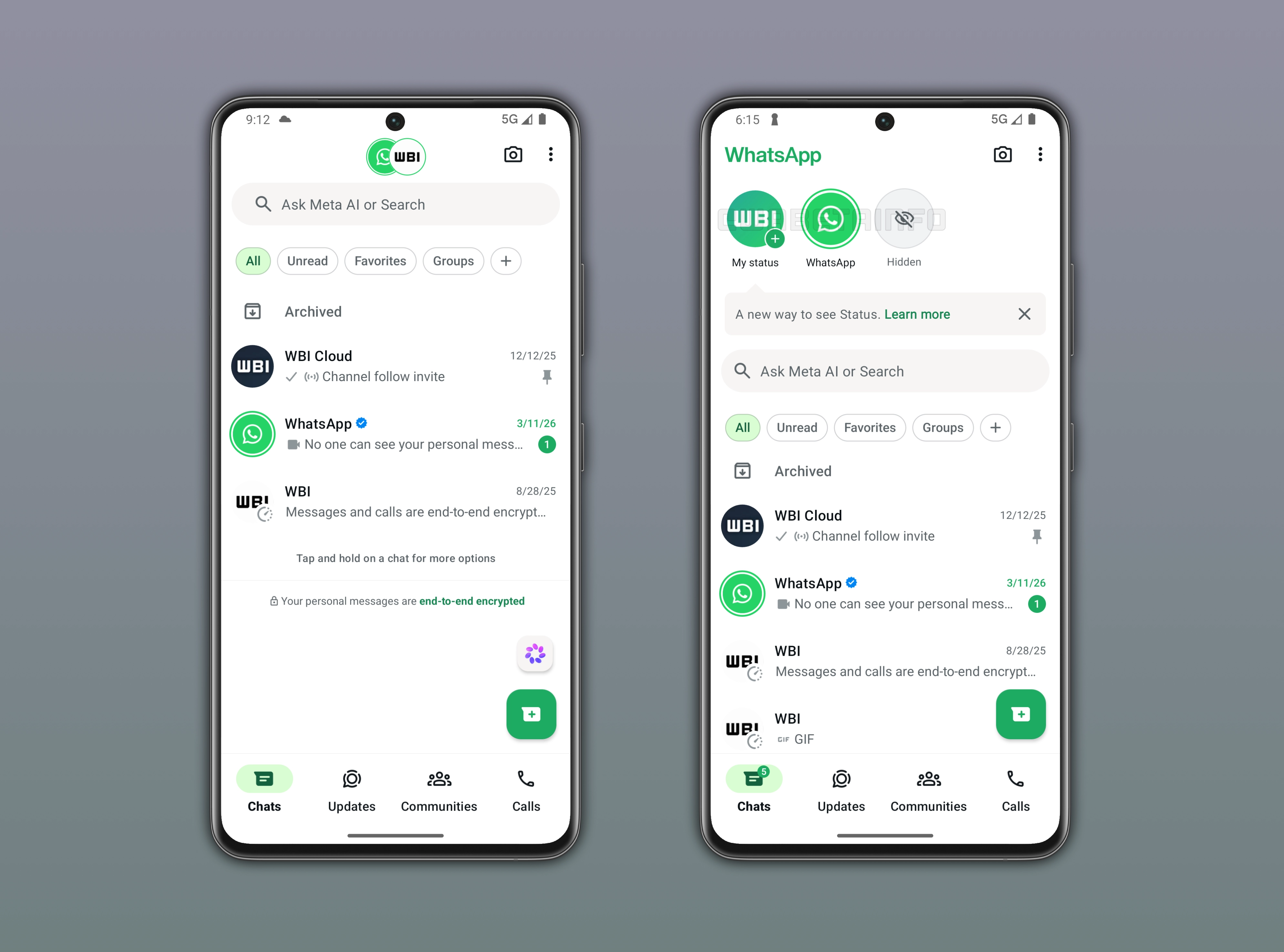
How status updates appear in the chat list
The attached image shows a feature that lets users see status updates directly in the chat list. Note that it was already possible to view status updates in the Chats tab. However, users could only see updates from contacts with whom they have an active chat. This means that for a full overview, users need to open the Updates tab to access all status updates from their contacts in one place. With the latest update, WhatsApp is now placing status updates in the top app bar. So users can now see status updates immediately when they open the app.
Expanded tray for status updates in the Chats tab
In the top app bar, WhatsApp displays up to 3 contacts who have recently shared a status update. To see the entire list of status updates shared by their contacts, users can scroll down the interface. This way, users can see more than just the three items visible in the top app bar. This section also includes updates from archived contacts and from people with whom there is no active conversation. The design follows a format similar to Instagram, where stories are arranged at the top of the feed. With this change, status updates are integrated directly into the top of the chat list, making it easier to view them without switching to the Updates tab. Additionally, the "WhatsApp" label in the top left is hidden when status updates are available to view, and it appears once users scrolls down the interface.
Full status overview remains in the Updates tab
Status updates are still available in the Updates tab. In this tab, WhatsApp presents status updates with preview thumbnails that provide a clear visual snapshot. In contrast, the Chats tab presents a more compact representation of the same updates. Here, the interface is simplified and minimized so that it occupies less space and integrates more seamlessly with the chat list. This makes the Chats tab feel less visually heavy, but it still indicates who has shared a new status update. Even in the Chats tab, status updates are displayed in a specific ranked order based on relevance and interaction patterns. Although this may currently seem redundant, users should view it as an experimental test in the beta version.
Status updates in the Chats bar seems like an experiment
The introduction of status updates in the top app bar appears to be more of an experiment than a final rollout for all users. It seems intended to help WhatsApp observe how people interact with the feature in a real usage environment. By testing it on a limited scale, WhatsApp can collect feedback and evaluate whether users find the new placement useful or distracting. Since it is still an experimental rollout, viewing status updates through the new tray in the Chats tab won't display any ads between statuses.
Gradual rollout of status updates in the chat list
The feature that displays status updates in the top app bar is available to some beta testers who install the latest WhatsApp beta for Android update from the Google Play Store. Note that this feature is not available to all users right now. WhatsApp is gradually rolling out this functionality, so access might be very limited at first. Over the next few weeks, more users may see status updates at the top of the chat list, although availability will continue to depend on different testing results.
Connect with WABetaInfo
Follow WABetaInfo on X to learn more about new features and updates. We love hearing your feedback, so please let us know what you think! You can also visit our About page to explore all our services and keep up with the latest announcements.