WhatsApp is rolling out channel storage cleanup on Android
WhatsApp is introducing a new feature to clean up storage used by channels. The update allows users to filter and delete media from specific channels by category. The feature also lets users clear media from multiple channels at once directly from the Updates tab.
| Key Points | Details |
|---|---|
| Feature: | Channel storage cleanup |
| Status: | Rolling out |
| Compatibility: | WhatsApp beta for Android 2.26.30.4 is a compatible update. |
| Availability info: | This functionality is available to some beta testers, but some users may get the same feature by installing certain previous updates. |
| Thanks: | shw_9876, bima_me, lostliano, Sc, flakoflow, kingcyrious, and Dimu, for testing and reporting. |
| Previous news: | WhatsApp redesigns the media viewer interface on Android! |
WhatsApp was working on storage cleanup tools for channels
In the post about the WhatsApp beta for Android 2.26.19.4 update, we announced a smarter storage cleanup tool for channels. At the time, users could already manage channel storage from the app settings. However, the experience was limited. Users had to scroll through all shared media files and select them manually before deleting the content. The new feature would let users filter content by type before deleting. In addition, it would preserve starred updates if the user decided to keep them.
WhatsApp gives users control over channel media files
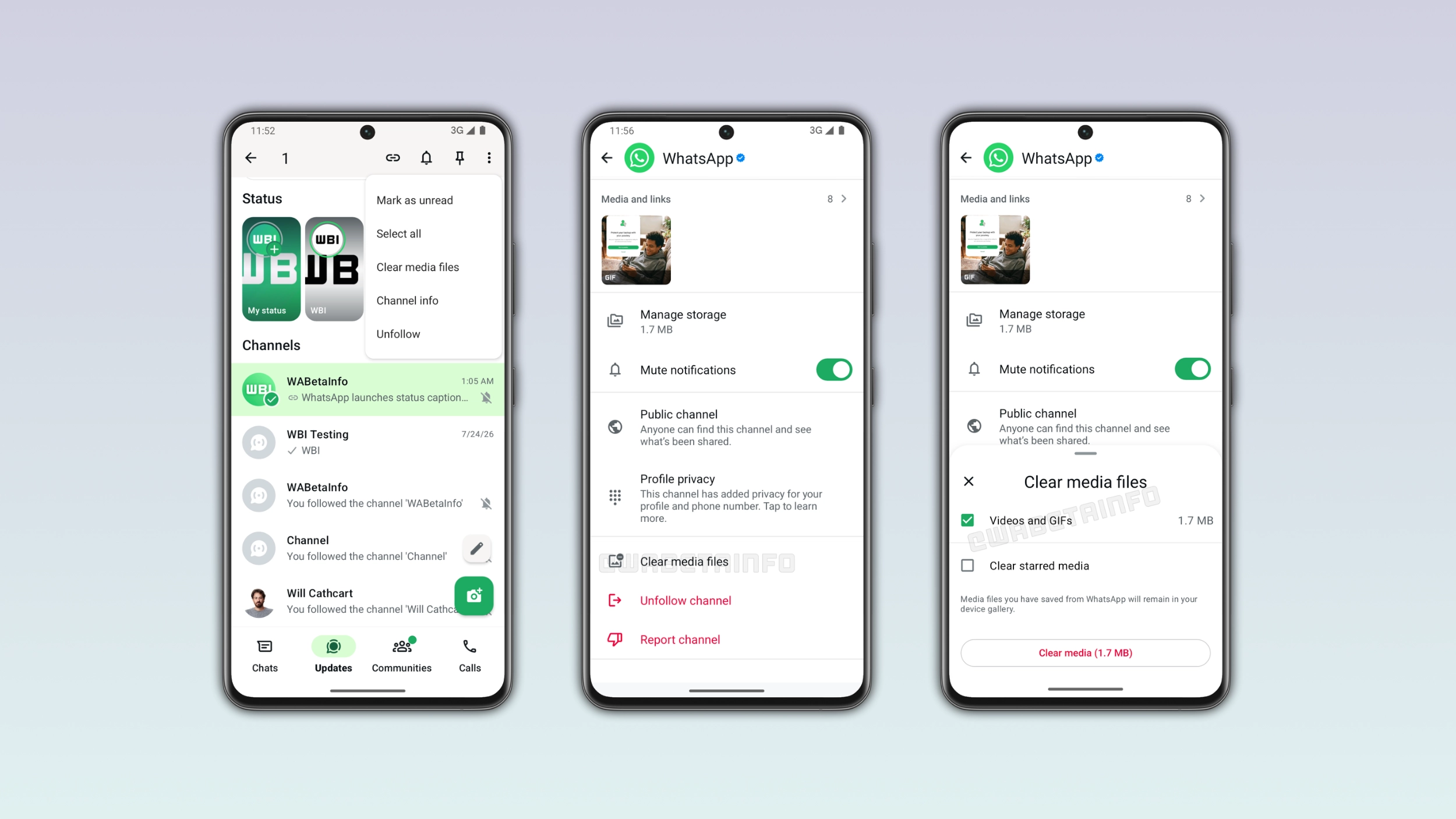
WhatsApp did not rush this one. Two months after our first report, the feature is finally available to some beta testers. We discovered the news with the WhatsApp beta for Android 2.26.30.4 update, which is available on the Google Play Store. In particular, WhatsApp is rolling out a channel storage cleanup tool with two dedicated entry points, giving users more control over the media that channels save on their device.
Why channel storage can grow without users noticing
WhatsApp saves media files shared in channels on the device. A channel that shares photos and videos regularly can accumulate a significant amount of data over weeks or months. Most users never notice until their device starts running low on space. For example, an active channel might save many photos and videos on the phone. The new cleanup tool gives users an option to manage this situation.
The first entry point is in the channel info screen
Users can access the cleanup tool directly from the channel info screen. Here, they can see a new option to review and manage the media that specific channel saved on their device. Users can filter content by category before deciding what to delete. The categories include photos, videos, stickers, and voice notes. This makes it easier to target the file types that take up the most space without deleting more. WhatsApp will also preserve any starred updates during the cleanup. This means that important updates do not disappear by accident.
The second entry point is in the Updates tab
WhatsApp also added a second entry point to clear media in channels. In the Updates tab, users can tap and hold a channel to select it, then open the overflow menu to find the "Clear media files" option. This entry point is particularly useful because users can select multiple channels at once and clear their media files. Anyone who follows a lot of active channels will immediately see why this is useful.
Starred updates are preserved during cleanup
Users who starred specific channel updates can decide to keep them. This means that WhatsApp will not delete them during a cleanup unless the user chooses to remove them. Starred updates remain on the device even when the user clears all other media files from a channel. This makes the cleanup tool safe to use without losing important updates.
WhatsApp is rolling out channel storage cleanup to Android beta testers
The channel storage cleanup tool is currently available to some beta testers who install the latest WhatsApp update from the Google Play Store. Note that this feature is not available to everyone. WhatsApp is gradually rolling out to specific users. If the cleanup option does not appear yet in the channel info screen or the Updates tab, it should become available to more users over the coming weeks. At the moment, WhatsApp has not announced when this feature will be available to everyone in the stable version.
Connect with WABetaInfo
Follow WABetaInfo on X and visit our About page to learn more about what we do. We always appreciate your feedback on posts like this one.