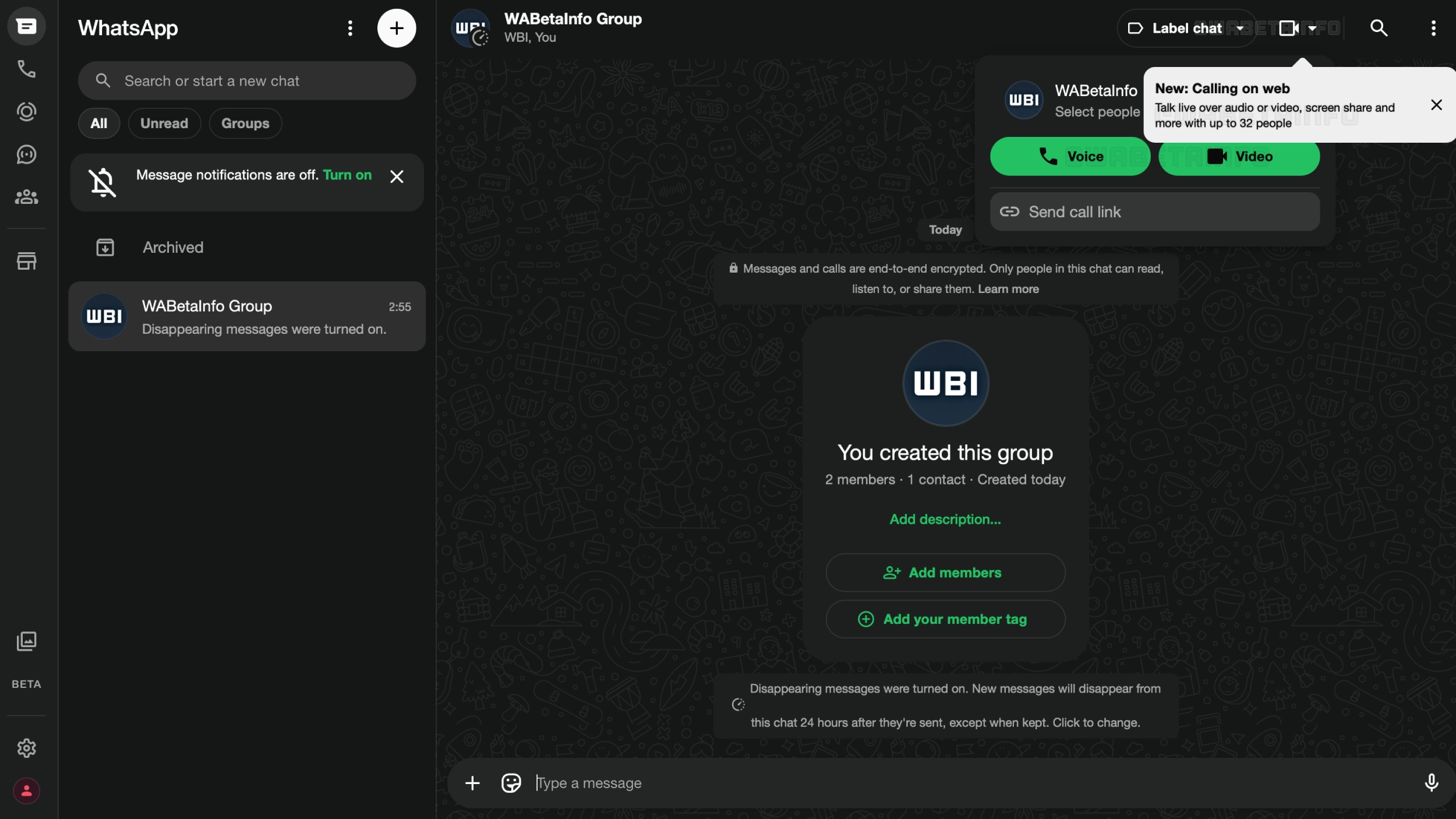
WhatsApp just announced an important upgrade for calls. The major feature is the ability to place calls directly from the web client. With this feature, users no longer need to rely on mobile or desktop apps to call their contacts.
| Key points | Details |
|---|---|
| Feature: | Voice and video calls from the Web |
| Feature availability: | Some features may be under development, so they are not available to beta testers. Others may become available to users over time. If you're unable to access a certain feature, you will need to wait for a future update. |
| News shared last week: | WhatsApp brings modern design to message bubbles on iOS! |
| Previous article: | WhatsApp adds a new prompt to unmute channels on Android! |
Weekly WhatsApp beta updates: new features and improvements
This new weekly roundup brings together all the latest updates about WhatsApp beta shared this week. As a result, you can finally catch up on everything you might have missed from our past announcements. You can consider this summary as a way to keep up new features, improvements, and fixes. This week's highlight focuses on web calling, a feature available on both individual and group chats directly from the web client. See what else has been announced this week.
WhatsApp introduces an alert for new channels
WhatsApp is now adding a new prompt when users follow a channel. After following a channel, WhatsApp replaces the "follow" button with a new alert in the same spot. The alert informs the user that the channel is muted and suggests they unmute it to get notifications. The prompt is a suggestion, not a requirement. This means that new channels are still muted by default.
WhatsApp is rolling out new calling features
WhatsApp announced new features for calls. First, It is finally possible to start and receive audio and video calls directly from WhatsApp Web. It works just like calling from the mobile or desktop app. Users can now transfer an active group call from their phone or tablet to WhatsApp Web or the desktop app, or vice versa. WhatsApp also introduced Waiting Rooms. When a host enables the option "Require approval to join" on the call link, participants who click it land in a waiting room instead of joining directly.
QuickHD and Noise Suppression enhance call quality
WhatsApp is also improving the quality of calls by introducing QuickHD and Noise Suppression. QuickHD is a technology that allows WhatsApp to deliver high-definition video in the very first few seconds of the call. Instead, Noise Suppression removes the background noise around you. This makes your voice come through clearly to the person you're calling. This feature is also available on mobile apps. For the best experience, both users should enable this option during a call.
WhatsApp is rolling out private view counts on iOS and Android
Channel admins can now see how many people viewed their updates. Now, WhatsApp displays a view counter directly in the message bubble. WhatsApp updates this number as more followers view the update. This information makes it easier for admins to focus on channel updates that better resonate with their audience. At the moment, only channel admins can see how many followers viewed their updates. However, WhatsApp is exploring another feature that would make this information public in the future.
WhatsApp is rolling out status caption editing on Android
The WhatsApp beta for Android 2.26.30.1 update allows some beta testers to edit their status captions. Users can edit a caption directly from the section that lists their shared status updates. In addition, users can edit the caption by tapping a a small pencil icon next to the caption right within the status interface. The editing window is limited to 15 minutes from the moment the user shares the status update. After 15 minutes, the option disappears and users can no longer edit the caption.
WhatsApp launches a reply bar for the media viewer screen
The WhatsApp beta for Android 2.26.30.3 update brings a new reply bar to the media viewer screen. Users can type a text reply, attach a photo or video, record a voice message, or send any other type of content. With the new design, users can now do everything from the media viewer without switching back to the conversation. For users who share a lot of photos and videos, this experience feels more complete now.
WhatsApp introduces channel storage cleanup on Android
With the WhatsApp beta for Android 2.26.30.4 update, some beta testers can now clear media files from their channels. Channels can accumulate a significant amount of data over weeks or months. As a result, WhatsApp is now adding a tool that makes it easier to delete media files. Users can access the cleanup tool directly from the channel info screen. Here, they can filter content by category before deciding what to delete. In addition, the overflow menu within the Updates tab includes the same "Clear media files" option.
Connect with WABetaInfo
Follow WABetaInfo on X and visit our About page to learn more about what we do. We always appreciate your feedback on posts like this one.