WhatsApp redesigns the media viewer interface on Android
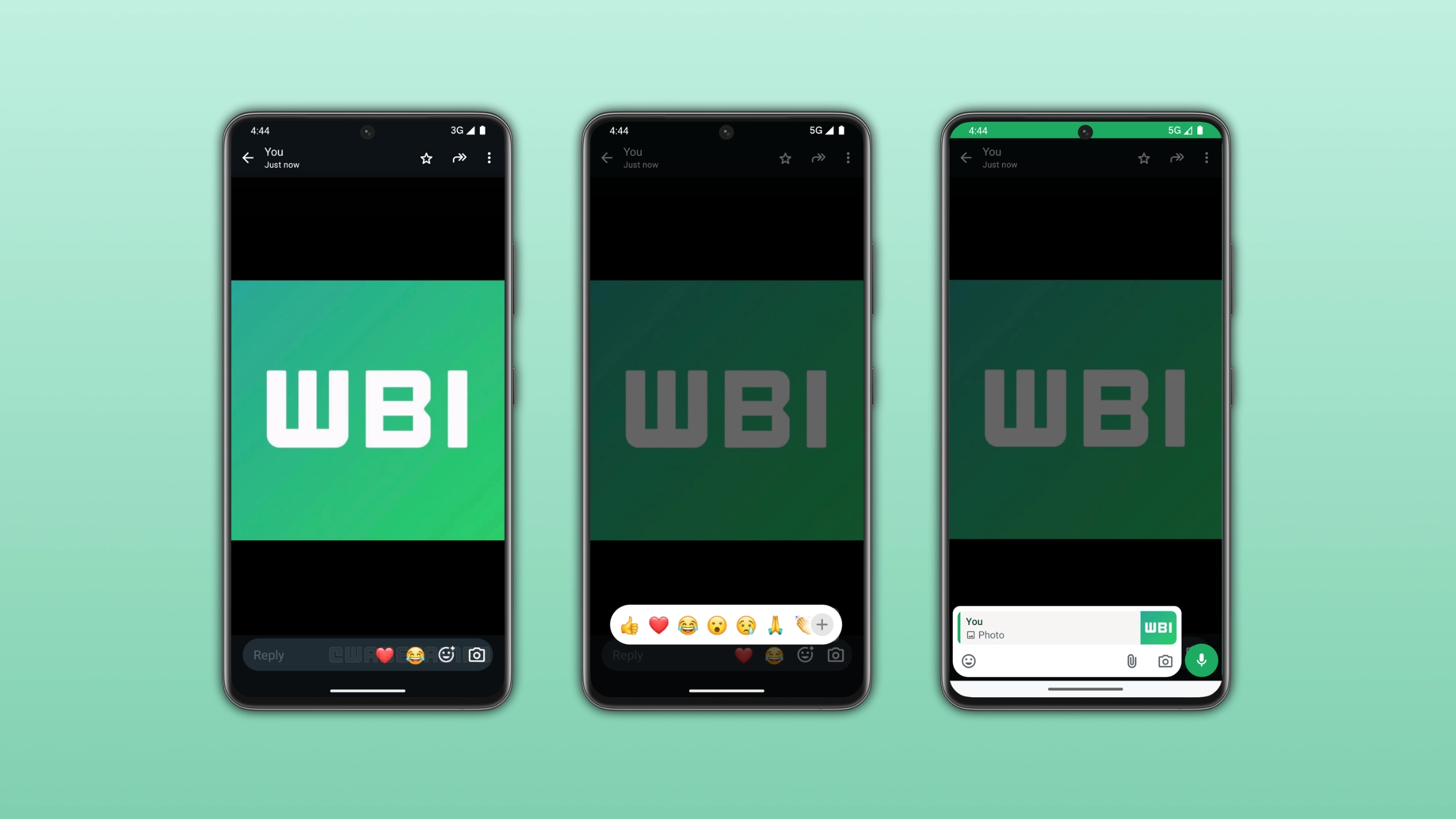
WhatsApp is redesigning the media viewer interface to include a new set of tools to react and reply without leaving the full-screen view. The new design replaces the old shortcuts with a new reply bar. Users can now respond to a photo or video with any type of message, including voice notes and attachments, directly from the media viewer.
| Key Points | Details |
|---|---|
| Feature: | Redesigned media viewer interface |
| Status: | Rolling out |
| Compatibility: | WhatsApp beta for Android 2.26.30.3 is a compatible update. |
| Availability info: | This feature is available to some beta testers, and it's rolling out to more people over the coming weeks. |
| Thanks: | Sc, Traiti, shw_9876, and Muhammad Hammad, for testing and reporting. |
| Previous news: | WhatsApp rolls out the home screen voice widget on Android! |
WhatsApp introduced media reaction and reply shortcuts in 2024
In the post about the WhatsApp beta for Android 2.24.11.18 update, we announced new shortcuts to reacting and reply to media directly from the media viewer screen. Before this update, users had to go back to the chat to react or reply to a photo or video. The update made it possible to interact with the media file without leaving the full-screen view. Those shortcuts were a good step in the right direction. However, the interface was still limited compared to what users could do from the chat.
WhatsApp is now taking that interface much further
Two years after those first shortcuts, WhatsApp decided to introduce a move complete overhaul for the media viewer. As a result, WhatsApp is now testing a full redesign of the bottom bar in the media viewer. We discovered this with the WhatsApp beta for Android 2.26.30.3 update, available on the Google Play Store. Specifically, WhatsApp is rolling out a redesigned media viewer interface to some beta testers.
The old interface had limited options
In the previous version of the media viewer, users had a small set of shortcuts at the bottom of the screen. The reply button let users respond to the media. A single emoji appeared as a quick reaction shortcut, and users who wanted a different emoji had to open the full keyboard. It worked, but users who needed more had to go back to the chat anyway.
The new reaction tray shows all six default emoji
The redesigned media viewer now shows two default emoji. In addition, users can open the full reaction tray at the bottom of the screen. All six default emoji appear directly, so users can tap one without switching back to the chat interface. Users can also open the emoji keyboard by tapping thee"+" button. This brings the experience in the media viewer in line with what users already know from the chat view.
A full reply bar replaces the simple reply button
Instead of a basic reply button, the media viewer now shows a full chat bar at the bottom of the screen. Users can type a text reply, attach a photo or video, record a voice message, or send any other type of content. They do not need to leave the full-screen view. The chat bar works exactly like the one in the regular chat, so users do not have to learn anything new to use it.
Why this redesign makes media interactions faster
Before this update, users who wanted to react or reply to a photo had two options: the limited shortcuts in the media viewer, or going back to the chat. Although the limited shortcuts in the media viewer were enough, WhatsApp decided to introduce a more modern interface. With the new design, users can now do everything from the media viewer without switching back to the conversation. For users who share a lot of photos and videos, this experience feels more complete now.
WhatsApp is rolling out the redesigned media viewer to Android beta testers
The new media viewer interface is available to some beta testers who install the latest WhatsApp update from the Google Play Store. In case you do not see the new reply bar, note that this update should become available to more users over the coming weeks. Since WhatsApp is gradually rolling out these changes, they are not immediately available. WhatsApp has not shared any timeline regarding when this update will be available to everyone.
Connect with WABetaInfo
Follow WABetaInfo on X and visit our About page to learn more about what we do. We always appreciate your feedback on posts like this one.