WhatsApp is rolling out update controls for the Mac app
WhatsApp is introducing a new feature that gives beta testers more control over how the app updates on Mac. Users can now choose between daily updates and a more stable weekly release. With this feature, users can also check for new versions manually at any time.
| Key Points | Details |
|---|---|
| Feature: | App updates section for Mac |
| Status: | Rolling out |
| Availability info: | This feature is available to some users who install the latest versions of WhatsApp beta for Mac. |
| Thanks: | Akan and Aaron, for testing and reporting. |
| Previous news: | WhatsApp launches voice and video calls on the Web! |
WhatsApp discontinued the Mac beta program on TestFlight
Earlier this year, WhatsApp discontinued the Mac beta program on TestFlight. Users who relied on TestFlight to access early builds of the Mac app could no longer get them through that channel. However, WhatsApp did not leave the Mac app without a beta program. Users can still download the latest beta version of WhatsApp for Mac directly from WhatsApp's official servers. We also have a dedicated page where you can discover verified links to download official apps, including the latest Mac beta build.
After discontinuing TestFlight, WhatsApp is now rolling out update controls for Mac
After ending the TestFlight beta program for Mac, WhatsApp is now introducing a new feature to manage how the app updates. With the latest versions of WhatsApp beta for Mac, WhatsApp is bringing a new "App updates" section to the settings page. This section allows users to control how often the app updates and which builds they want to install on their Mac. As a result, users can choose how frequently the app updates.
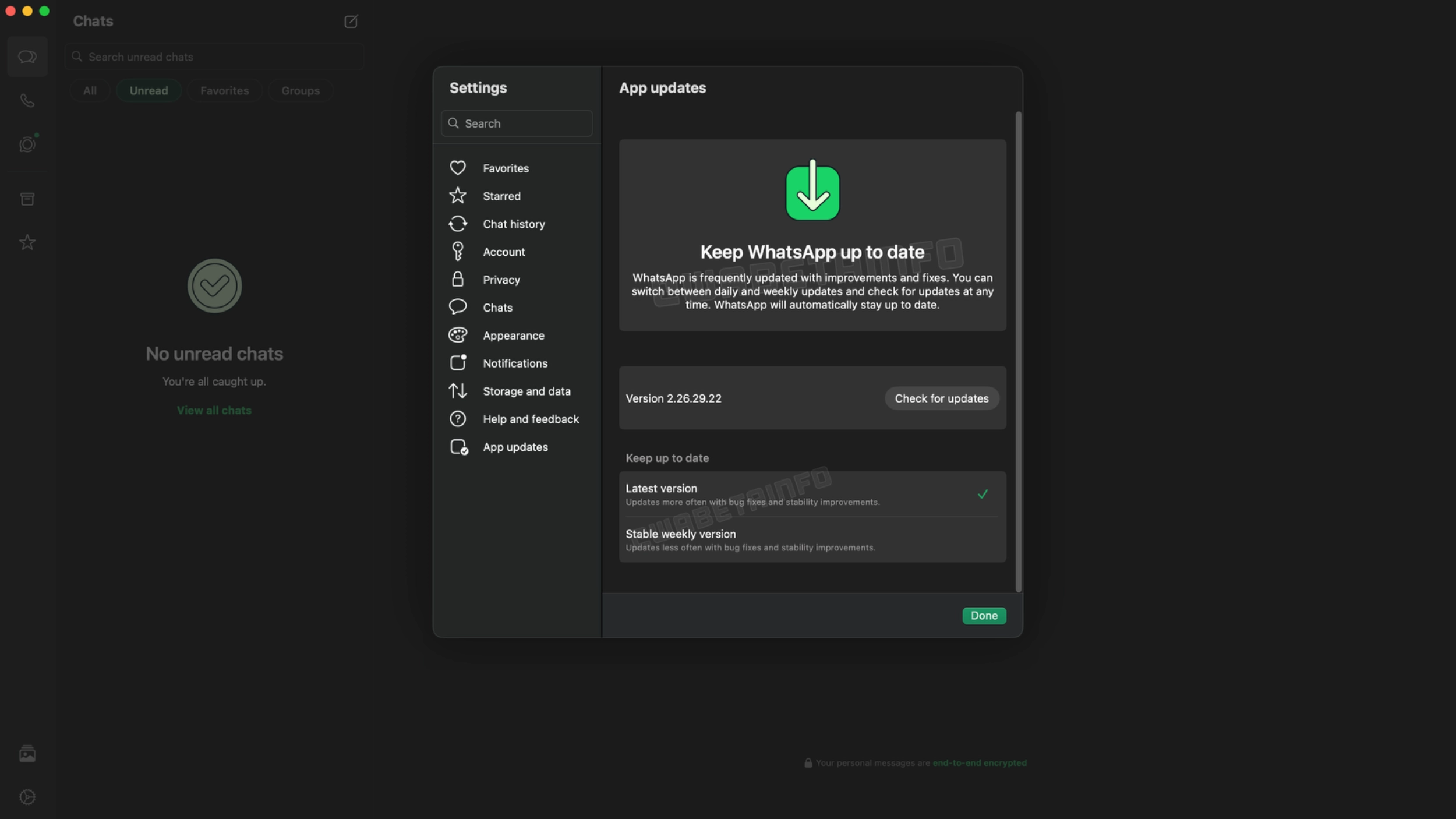
What the App updates section looks like
The new "App updates" section opens a dedicated screen within the settings page on Mac. At the top of the interface, users can see the current version of the app and a "Check for updates" button that lets them look for a new version at any time. In the same section, users can choose between two options to control how WhatsApp handles future updates. Users can switch between them at any time without reinstalling the app.
The Latest version option keeps Mac always up to date
The first option is called "Latest version". With this option, users can get daily builds with many bug fixes and stability improvements. This means that WhatsApp can push a new build to the Mac app on a daily basis. Users who choose this option get new bug fixes and improvements as soon as WhatsApp releases them. The trade-off is that daily builds reflect work in progress, so occasional bugs may appear. Users can choose this option when they want to install the latest version available, even if it means that the app might not always be at its most stable.
The Stable weekly version prioritizes reliability
WhatsApp also offers a second option called "Stable weekly version". This option delivers updates less often once a week. This means that WhatsApp bundles all the fixes from the daily builds into a single release. These updates are typically available before the weekend. Users who prefer a more predictable update schedule will find this option more comfortable. It is a good option for anyone who uses WhatsApp on Mac for work and wants to avoid unexpected changes during the week.
Which option is better for most users on WhatsApp for Mac
Both options deliver the same core features, but the timing differs. The "Latest version" option may occasionally offer new features ahead of the weekly build. As a result, daily updates can sometimes include functionality that the weekly release does not yet include. However, the "Stable weekly version" is the safer pick for most users. For users who simply want the newest build available at all times, the "Latest version" option is the right one.
WhatsApp is rolling out the App updates section for Mac
The feature that lets users control how the app updates is currently available to some beta testers on the latest versions of WhatsApp for Mac. WhatsApp is rolling out this feature gradually, so not everyone will see it immediately. If this new section is not yet visible in the app settings, it should become available to more accounts over the coming weeks. WhatsApp has not announced when this will be available to all beta testers.
Connect with WABetaInfo
Follow WABetaInfo on X and visit our About page to learn more about what we do. We always appreciate your feedback on posts like this one.