WhatsApp is rolling out a feature that lets users share sound stickers on Android and iOS. Users can tap a sound sticker in the chat to hear the sound attached to it. They can create their own sound stickers from a video and choose the audio track from the sticker editor.
| Key points | Details |
|---|---|
| Feature: | Sound stickers |
| Feature availability: | Some features may be under development, so they are not available to beta testers. Others may become available to users over time. If you're unable to access a certain feature, you will need to wait for a future update. |
| News shared last week: | WhatsApp introduces cloud backup storage on Android and iOS! |
| Previous article: | How to buy and install a Travel eSIM on WhatsApp for Android! |
Weekly WhatsApp beta updates: new features and improvements
This new weekly roundup brings together all the latest updates about WhatsApp beta shared this week. As a result, you can finally catch up on everything you might have missed from our past announcements. You can consider this summary as a way to keep up new features, improvements, and fixes. This week's highlight focuses on sound stickers, a new type of message available on Android and iOS. See what else we announced this week.
WhatsApp introduces view-once text messages on iOS
With the WhatsApp beta for iOS 26.45.10.73 update, WhatsApp is rolling out the view-once feature for text messages. To send a view once text, Users need to enter the message in the chat bar and press and hold the send button. When they select the view-once option, the app immediately sends the message. WhatsApp blocks screenshots and screen recordings while the recipient reads the message. This means that the recipient cannot copy the text, forward it, or save it in any form. Once the recipient closes the message, WhatsApp removes it from the chat.
WhatsApp is rolling out new sound sticker messages on Android
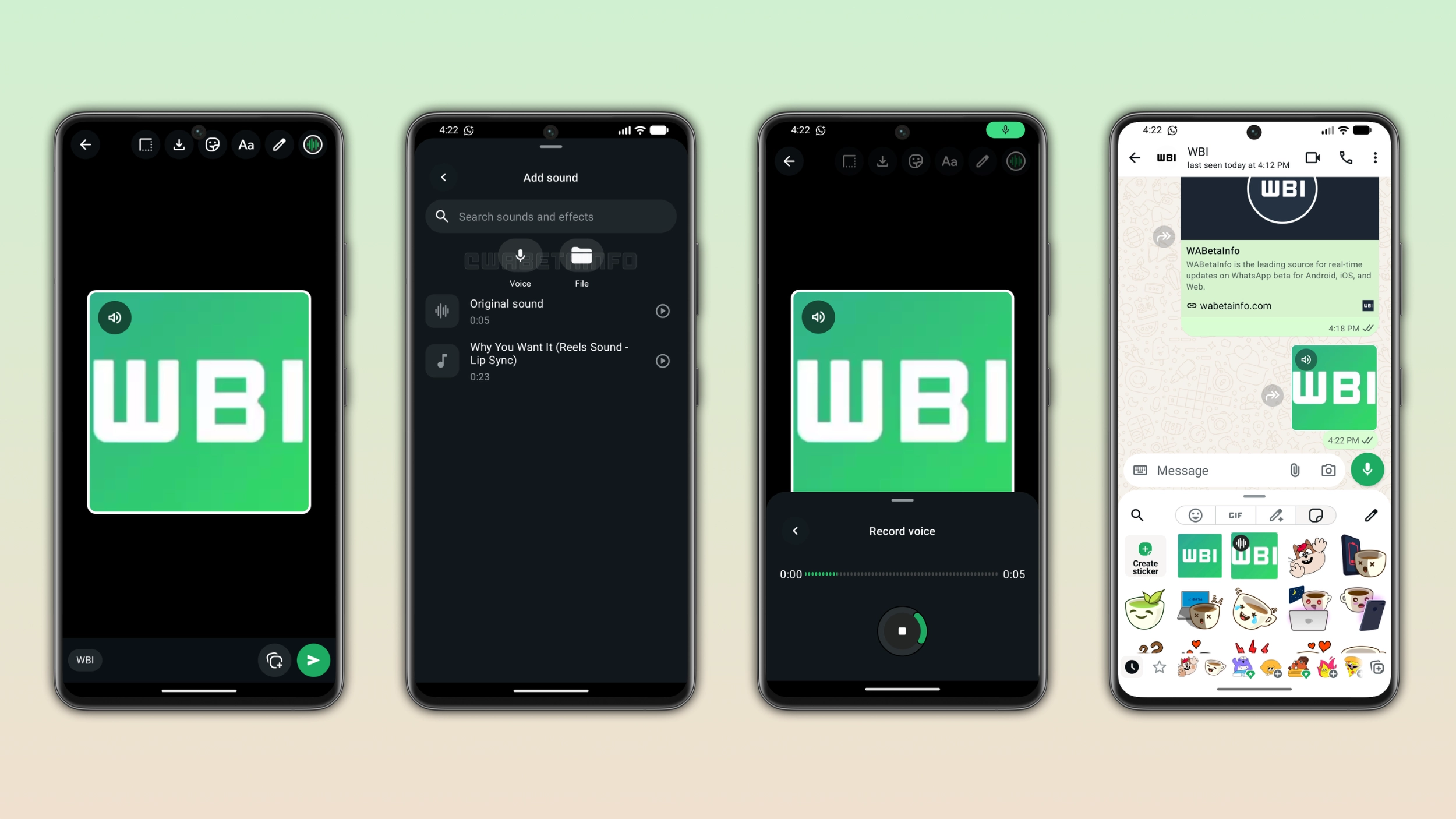
WhatsApp is introducing a feature that lets Android users share stickers with an audio track. Users can create a sound sticker from the sticker keyboard by selecting a video from their gallery. Once WhatsApp converts it into an animated sticker, users can tap the audio button to add a sound. They can keep the original audio, choose a preset effect, import an audio track from the Files app, or record a voice note. When users send a sound sticker, WhatsApp shows a small audio icon on the sticker in the chat. To avoid interrupting conversations, WhatsApp mutes sound stickers by default. Note that WhatsApp secures both the sticker and its audio track with end-to-end encryption.
WhatsApp is rolling out sticker messages with audio on iOS
WhatsApp is also bringing the ability to create sound stickers to the iOS app. Users can create a sound sticker from the sticker keyboard by selecting a video from their gallery. With the latest updates, WhatsApp is adding a new button to include audio at the top of the screen. The audio library lets users choose the original sound from the video, predefined effects, an audio file from the Files app, or a custom voice note. To avoid interruptions, WhatsApp mutes sound stickers by default.
WhatsApp launches scheduled messages on Android and iOS
WhatsApp is finally making scheduled messages available to everyone on Android and iOS globally. Users can schedule a message by tapping and holding the send button. Here, users need to choose when they want to send the message. The minimum scheduling time is 10 minutes while the maximum is 14 days in advance. WhatsApp sends scheduled messages even if the device is offline, so users do not need to keep the app open to send the message. The recipient cannot see if the sender scheduled the message in advance. Users can review and delete their scheduled messages from the chat info screen before the app sends them.
WhatsApp is testing built-in eSIM data plans for Android
With the WhatsApp beta for Android 2.26.47.4 update, WhatsApp is developing built-in eSIM data plans. WhatsApp will offer different plans, so users can choose the one they prefer. Users will be able to search for their destination by country name or filter by popular destinations, countries, regions, and global. Once users purchase a plan, WhatsApp installs the eSIM on their device. WhatsApp will activate the plan automatically when the phone connects to a network in the destination country. The Travel eSIM will just offer a data plan to users, so they do not have to remove their main phone number to get data in a different country.
WhatsApp announces Travel eSIM data plans on Android and iOS
Just a few hours after our first report, WhatsApp officially announced Travel eSIM data plans. Users will be able to purchase the Travel eSIM from the Account screen. Here, they will be able to discover which plans are available for their destination. WhatsApp is working with several providers and telecom partners, including Jio, Smart Axiata, Smart Communications, Verizon, and 1Global. Users will keep their existing phone number throughout the trip, so they can still use it to interact with their contacts.
How to buy and install a Travel eSIM on WhatsApp for Android
Users will be able to access the Travel eSIM section from the Account settings. They can choose between unlimited data and fixed data plans. Once they find the right plan, they can tap "Buy plan" to see a summary that includes the destination, the plan details, and the total price. After tapping "Install eSIM", the installation takes a few seconds, and WhatsApp will show a green checkmark to inform users that the app successfully installed the Travel eSIM. Users can activate the eSIM when they arrive at their destination, and they can open WhatsApp and use it exactly as they normally would with the same phone number.
WhatsApp is rolling out a minimal design for the tab bar on iOS
WhatsApp is introducing a new design for the tab bar. The tab bar now shows icons for Updates, Calls, Contacts, Chats, and You without any labels. Without labels, the tab bar takes up less space at the bottom of the screen. As a result, the interface becomes less cluttered.
WhatsApp is building a new Stickers app to make packs public
WhatsApp is developing a new standalone app called Stickers. This app will allow users to discover new sticker packs and upload their own packs. WhatsApp will not publish sticker packs automatically after a creator uploads them. WhatsApp will review every pack to make sure it complies with the Sticker Guidelines before making it available to download. The app will be available on the Google Play Store and App Store in the future by searching for "WhatsApp Stickers".
WhatsApp is rolling out a dual camera mode on Android
WhatsApp is rolling out a dual camera mode to some Android beta testers. Once users activate it, WhatsApp places the front camera in a small rectangular frame in the top right corner while filling the screen with the back camera. However, users can switch between them by tapping the rotate button in the interface. WhatsApp does not lock the small frame in place, so users can drag it to any position on the screen. The dual camera mode is compatible with both photos and videos, and users can share them in chats, groups, channels, and status updates.
Connect with WABetaInfo
Follow WABetaInfo on X and visit our About page to learn more about what we do. We always appreciate your feedback on posts like this one.