WhatsApp is rolling out sticker messages with audio on iOS
With the latest update for the iOS app, WhatsApp is bringing a new audio dimension to animated stickers. Sound stickers combine animations with an audio track that the app plays when the recipient taps it. Users can create their own sound stickers from a video and customize its track before sending.
| Key Points | Details |
|---|---|
| Feature: | Sound stickers |
| Status: | Rolling out |
| Compatibility: | WhatsApp beta for iOS 26.46.10.70 is a compatible update. |
| Availability info: | This feature is available to some beta testers, and it's rolling out to more people over the coming weeks. |
| Thanks: | Knight and Thiago, for testing and reporting. |
| Previous news: | WhatsApp is rolling out new sound sticker messages on Android! |
WhatsApp rolled out sound sticker messages on Android
In the post about the WhatsApp beta for Android 2.26.47.1 update, we announced that WhatsApp was rolling out sound stickers. With this feature, users can convert a video into an animated sticker and add an audio track to it. WhatsApp plays the audio track when the recipient taps the sticker, and the app loops it three times before stopping. This feature makes it easier for users to send something more expressive than a standard sticker.
WhatsApp is now rolling out a new sound sticker format on iOS
WhatsApp is not limiting this functionality to the Android app. Finally, WhatsApp is introducing the ability to create sound stickers on the iOS app as well. We discovered this with the WhatsApp beta for iOS 26.46.10.70 update, which is available on TestFlight. With this update, WhatsApp is rolling out the sound sticker format to some beta testers. By bringing a new audio layer to stickers, WhatsApp expands what users can express in their conversations.
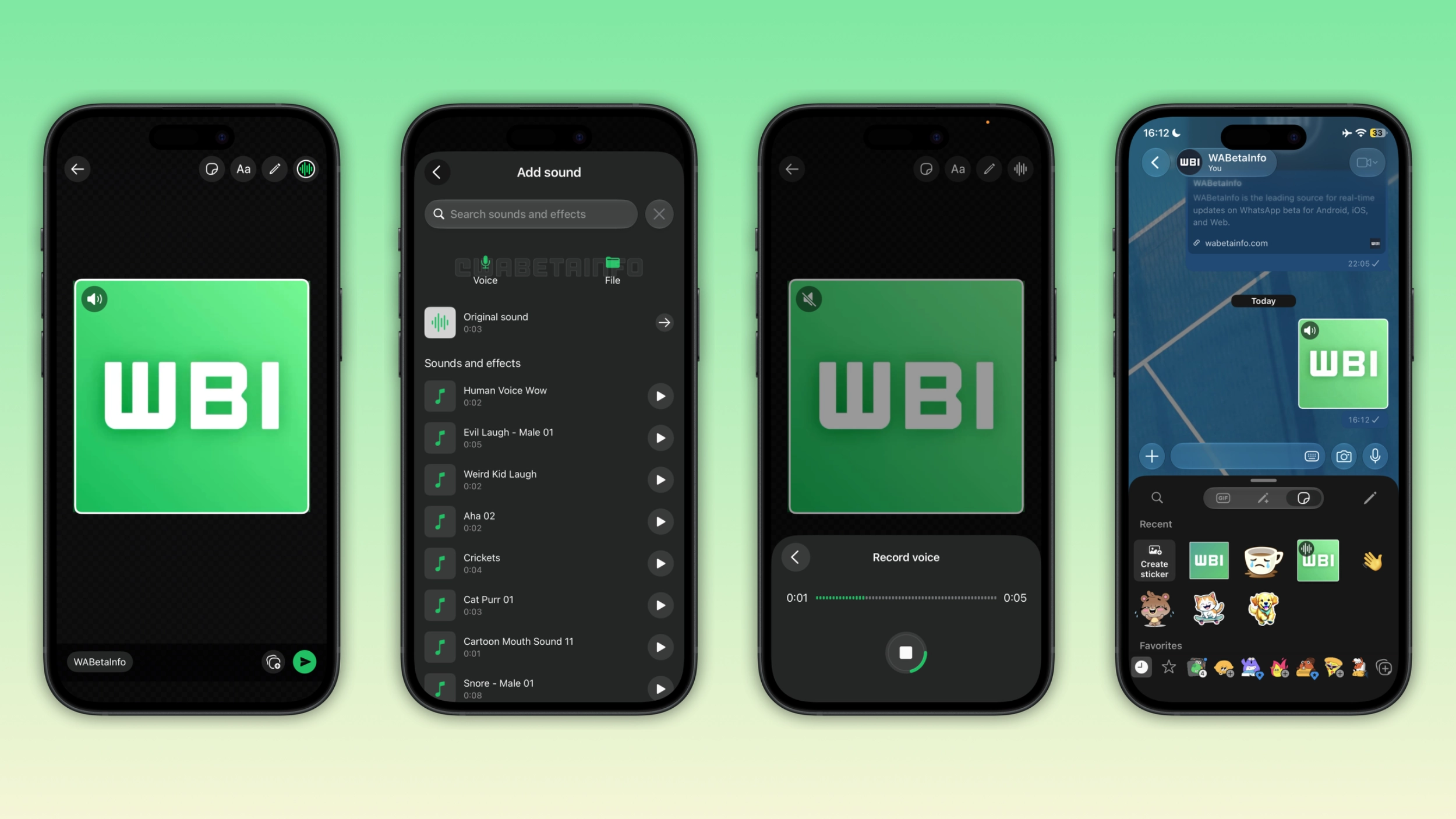
How to create a sound sticker on iOS
Users can create a sound sticker from the sticker keyboard by tapping the Create sticker option. Here, users can select a video from their gallery and WhatsApp converts it into an animated sticker. With the recent update, WhatsApp is adding a new button to include audio at the top of the screen. As soon as users tap this button, WhatsApp presents the audio library where users can choose how to customize their sound sticker.
What audio options are available on iOS
The audio library is the place where users can refine their sound stickers. The first option is the original sound from the video. Users can also choose one of the predefined sounds and effects from the library. These includes tracks like Human Voice Wow, Evil Laugh, Weird Kid Laugh, Crickets, Cat Purr, and more. Users can also import an audio file from the Files app or record a voice note from the sticker editor. WhatsApp lets users preview the audio track before creating the sound sticker.
How the audio plays when recipients open a sound sticker
WhatsApp shows a small audio icon on sound stickers to indicate that the audio track is available. However, WhatsApp doesn't play the audio automatically. WhatsApp mutes sound stickers by default to avoid interruptions. Users can play the sound sticker by tapping its audio icon. WhatsApp loops the audio three times before stopping since the animated sticker also plays three times in the chat. If the recipient prefers not to hear the sound, they can simply avoid to tap the audio icon.
Why sound stickers make conversations more expressive
By sending sound stickers, users can make their conversations more fun. For example, they can add a funny sound effect to a sticker to make the recipient laugh. The ability to record a custom voice note and attach it to a sticker also makes the format more personal. With sound stickers, users can create something that feels unique to their conversations.
WhatsApp is rolling out the sound sticker format to iOS beta testers
The sound sticker format is available to some beta testers who install the latest update from TestFlight. However, this feature is also available to some users who use the version from the App Store. WhatsApp is rolling it out gradually, so not every beta tester will see the audio button in the sticker editor. If the feature does not appear yet, it should become available to more accounts over the coming weeks. WhatsApp has not announced when this feature will be available to everyone.
Connect with WABetaInfo
Follow WABetaInfo on X and visit our About page to learn more about what we do. We always appreciate your feedback on posts like this one.