How to buy and install a Travel eSIM on WhatsApp for Android
WhatsApp announced a new feature that lets users buy and install a Travel eSIM data plan from the app. Although this feature is not available yet, we can now show a complete look at the full experience. The flow is clean and covers every step users need to get online when they land.
| Key Points | Details |
|---|---|
| Feature: | Travel eSIM |
| Status: | Under development |
| Availability info: | WhatsApp will release the Travel eSIM feature in select countries on Android and iOS. |
| Previous news: | WhatsApp is rolling out a minimal design for the tab bar on iOS! |
WhatsApp announced Travel eSIM data plans on Android and iOS
Yesterday, WhatsApp announced the Travel eSIM feature. With this functionality, WhatsApp will offer users data coverage for their trip without visiting a carrier store or a third-party website. It will let users buy and install a Travel eSIM without leaving the app, so they can connect with their friends and family when they land. At the moment, WhatsApp is working with several partners to offer data plans in different countries. These include Jio, Smart Axiata, Smart Communications, Verizon, and 1Global.
How to buy and install a Travel eSIM on WhatsApp
On November 26, 2026, WhatsApp said that it would begin rolling this feature out in select countries soon. However, we can already show a closer look at the full experience, from choosing a destination to installing the eSIM. The setup is fast and does not take more than a minute to complete. As a result, WhatsApp makes it very easy for users to get a Travel eSIM for any destination they plan to visit.
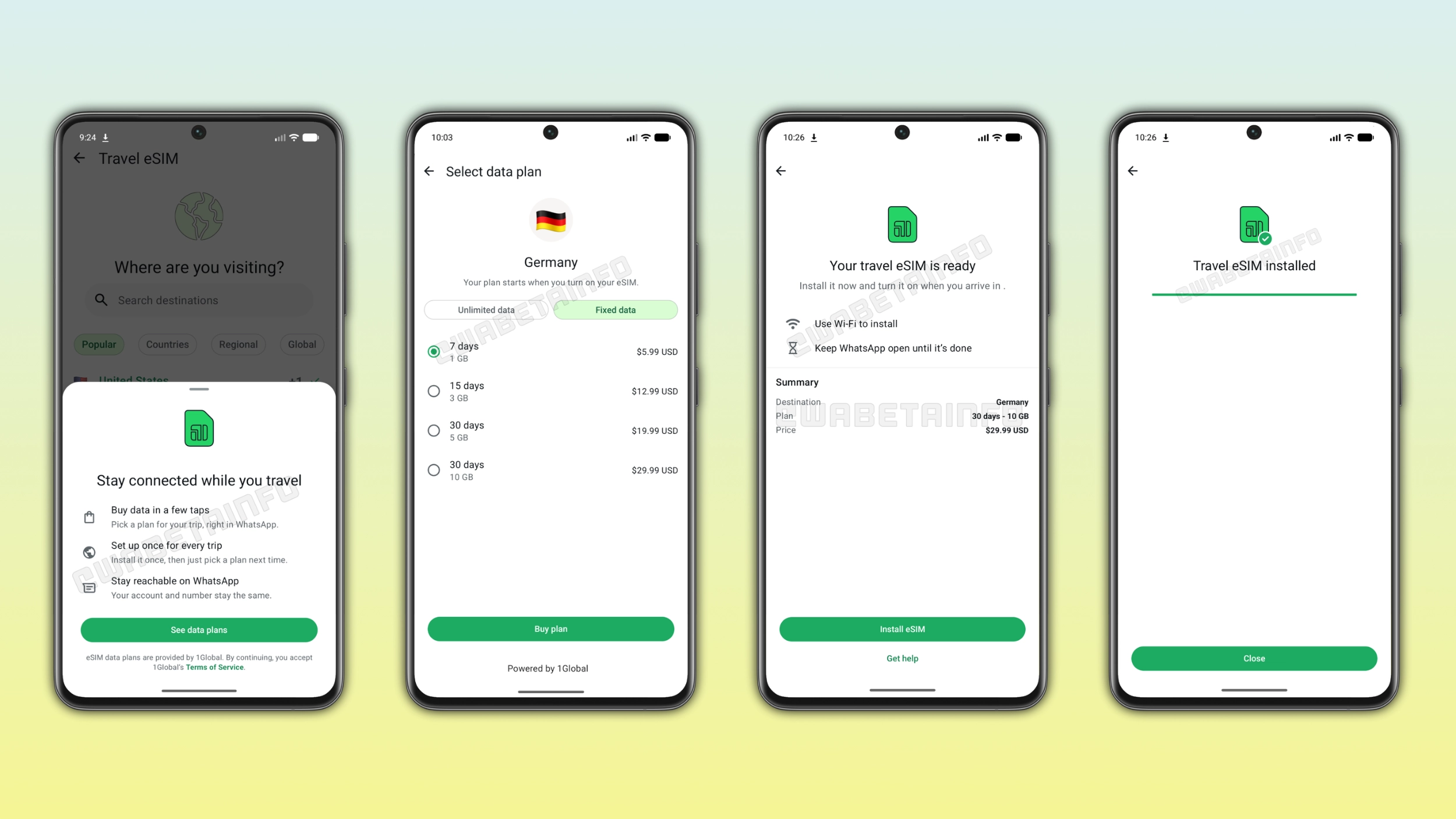
How to find the Travel eSIM section on Android
Users will be able to access the Travel eSIM section from the Account settings. Here, they need to open the "Travel eSIM" screen and enter where they are visiting. Users can enter their destination into the search bar, but they can also filter the list by Popular, Countries, Regional, and Global. WhatsApp says that users can buy a Travel eSIM in a few taps to pick a plan for their trip. They can install the Travel eSIM once and pick a plan for every destination. In addition, WhatsApp does not change the user's account or phone number after installing the Travel eSIM.
How to choose a destination and select a data plan
After users select a destination, they can see which data plans are available in the country. Users can choose between unlimited data and fixed data. They can switch between these two plans to find the option they prefer. Fixed data offers different durations and data plans, so users can choose the one that covers their trip. Instead, the unlimited plan offers data without any cap for the duration of the plan. Note that the prices visible in the screenshot are indicative since they do not represent the final plans yet. Once users find the right plan, they can tap "Buy plan" to continue.
What happens after users tap "Buy plan"
After tapping "Buy plan", WhatsApp will let users see a summary of the selected plan. The summary includes the destination, the plan details, and the total price. WhatsApp suggests using Wi-Fi to complete the installation, and it asks users to keep the app open. Users can tap "Install eSIM" to start the installation, and it takes a few seconds. If users need help, they can tap the "Get help" link at the bottom of the screen.
What users see after WhatsApp installs the Travel eSIM
WhatsApp will show a green checkmark to inform users that the app successfully installed the Travel eSIM. After this step, users can see the eSIM on the device, but they do not have to turn it on immediately. WhatsApp recommends that users activate the eSIM when they arrive at their destination. This means that they can activate the plan at the right time. Users can open WhatsApp and use it exactly as they normally would with the same phone number.
When the Travel eSIM will be available
WhatsApp said that it will roll out the Travel eSIM feature in select countries soon. WhatsApp has not shared the full list of countries where the feature will be available at launch. Note that WhatsApp will make this feature available on iOS as well. This will make it simpler for users to get data coverage for their trip whether they use an iPhone or an Android device.
Connect with WABetaInfo
Follow WABetaInfo on X and visit our About page to learn more about what we do. We always appreciate your feedback on posts like this one.