WhatsApp is rolling out new sound sticker messages on Android
WhatsApp is introducing a new type of sticker that plays a sound when users tap it. Sound stickers combine an animation with an audio track, making conversations more expressive than what standard stickers offer. Users can create their own sound stickers from the sticker keyboard by converting a video and adding an audio track to it.
| Key Points | Details |
|---|---|
| Feature: | Sound stickers |
| Status: | Rolling out |
| Compatibility: | WhatsApp beta for Android 2.26.47.1 is a compatible update. |
| Availability info: | This feature is available to some beta testers on the Google Play Store. |
| Thanks: | Lukkkas, for testing and reporting. |
| Previous news: | WhatsApp is rolling out a dual camera mode on Android! |
WhatsApp was testing a sound sticker format on Android
In the post about the WhatsApp beta for Android 2.26.41.3 update, we announced sound stickers. With this feature, WhatsApp is developing a new format to add an audio track to a sticker. This would allow users to send a sticker that plays a sound when the recipient taps it. This feature is compatible with animated stickers since WhatsApp lets users create a sticker from a video and attach a sound to it.
WhatsApp is now rolling out sound sticker messages on Android
WhatsApp is finally making sound stickers available to the public. Some users can create sound stickers from the sticker keyboard and send them to their contacts and group chats. We discovered this with the WhatsApp beta for Android 2.26.47.1 update, which is available on the Google Play Store. With this update, WhatsApp is rolling out sound sticker messages to some beta testers. This feature makes conversations more expressive by giving stickers a new dimension beyond animations.
How to create a sound sticker on Android
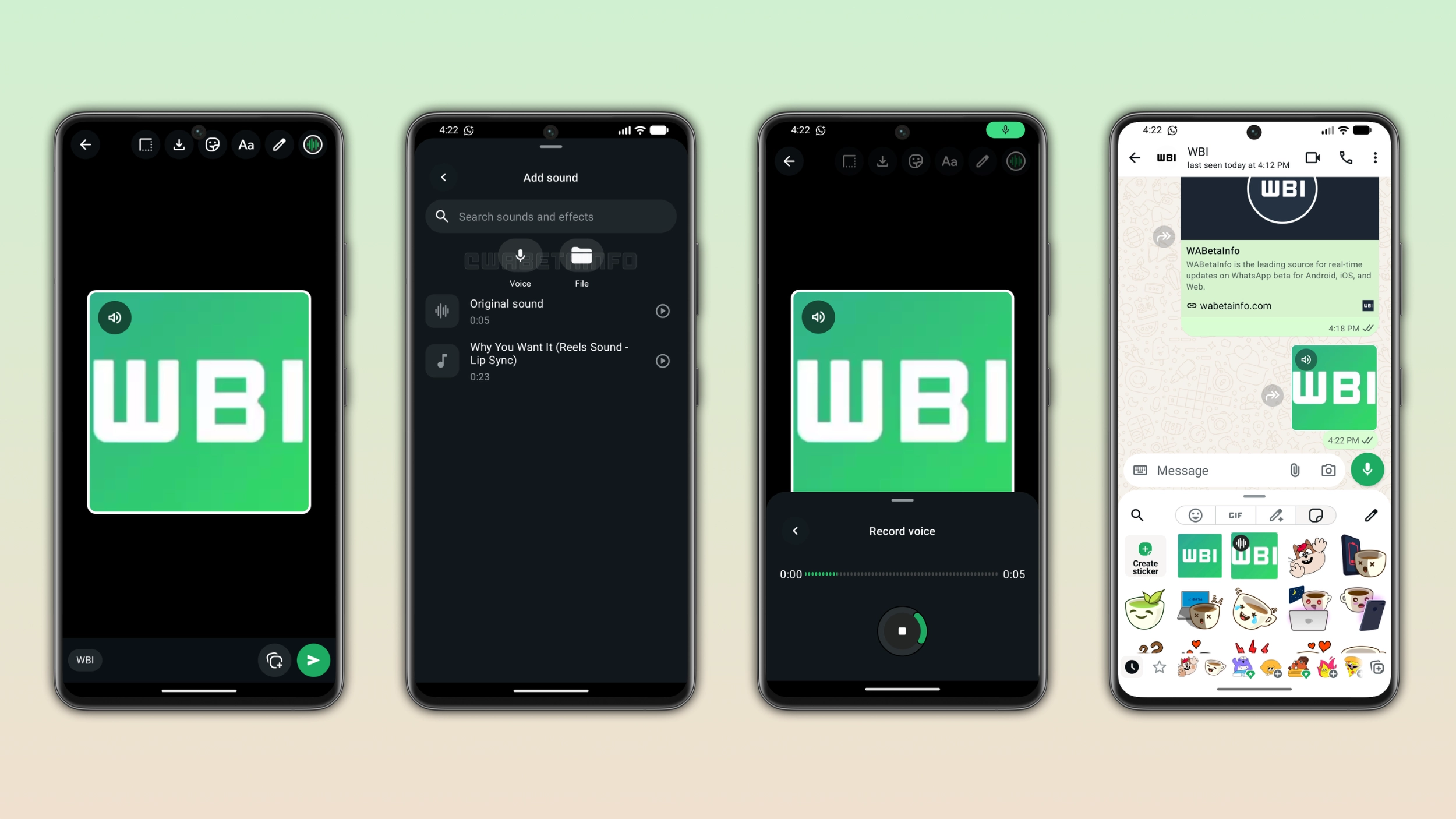
Users can create a sound sticker from the sticker keyboard. Here, users need to tap the "Create sticker" option. WhatsApp will present a new screen where users can select a video from their gallery. Once users choose a video from their gallery, WhatsApp converts it into an animated sticker automatically. At the top of the editor, users can find a new audio button that lets them add a sound to the sticker. If users tap this button, WhatsApp will display a new "Add sound" screen. This section lets users refine the new sound sticker by choosing which audio track to attach to it.
What audio options are available for sound stickers
WhatsApp offers several option to add audio to a sound sticker. For example, users can keep the original audio. If the video already includes the perfect audio track, users can use it without replacing it. It's also possible to choose a preset effect from a collection of sounds available in this screen. If these options are not enough, users can import an audio track from the Files app. Users can further customize the sound sticker by recording a voice note.
How sound stickers appear and play in the chat
When users send a sound sticker, WhatsApp shows a small audio icon on the sticker in the chat. This icon allows users to understand that the sticker includes a sound. To avoid interrupting conversations, WhatsApp mutes sound stickers by default. However, the recipient can tap the audio icon to play the sound. WhatsApp plays the audio track three times in a loop before stopping. WhatsApp secures both the sticker and its audio track with end-to-end encryption.
How sound stickers differ from standard stickers
WhatsApp offers both static and animated stickers, but they never produced a sound. Sound stickers add a third dimension to the format by including an audio track that users can manually play. The animation works like any other animated sticker, but users can tap on the audio icon to play the sound attached to it. This makes sound stickers a more expressive option for users who want more than what standard stickers offer.
WhatsApp is rolling out sound stickers to Android beta testers
Sound stickers are available to some users who install the latest update from the Google Play Store. WhatsApp is rolling the feature out gradually, so not every beta tester will see it immediately. If the audio button does not appear in the sticker editor, the feature should become available to more accounts over the coming weeks. WhatsApp has not announced when this feature will be available to everyone.
Connect with WABetaInfo
Follow WABetaInfo on X and visit our About page to learn more about what we do. We always appreciate your feedback on posts like this one.