WhatsApp is rolling out a new bottom navigation bar on Android
WhatsApp is finally introducing a floating bottom navigation bar with the latest beta update on Android. The new design makes the bottom navigation bar less intrusive by shrinking it into a compact pill when users scroll through the interface. WhatsApp is refreshing the bottom navigation bar to give the app a more modern look.
| Key Points | Details |
|---|---|
| Feature: | New bottom navigation bar |
| Status: | Rolling out |
| Compatibility: | WhatsApp beta for Android 2.26.45.3 is a compatible update. |
| Availability info: | This feature is available to some beta testers on the Google Play Store. |
| Thanks: | Muhammad Hammad, Aksaqa, and A7mad, for testing and reporting. |
| Previous news: | WhatsApp is rolling out a new Contacts tab on iOS beta! |
WhatsApp was testing a floating bottom navigation bar on Android
In the post about the WhatsApp beta for Android 2.26.41.6 update, we announced a refreshed bottom navigation bar. WhatsApp was testing a floating bar with rounded corners and without text labels. WhatsApp also decided to switch the tab selection style from a pill shape to a circular one. When users scroll down through the chat list, WhatsApp shrinks the bar into a compact floating pill, and the app expands it to its full size when they scroll back up. With the new bottom navigation bar, WhatsApp makes the app interface more modern and consistent with what other apps already offer.
WhatsApp is introducing the new bottom navigation bar on Android
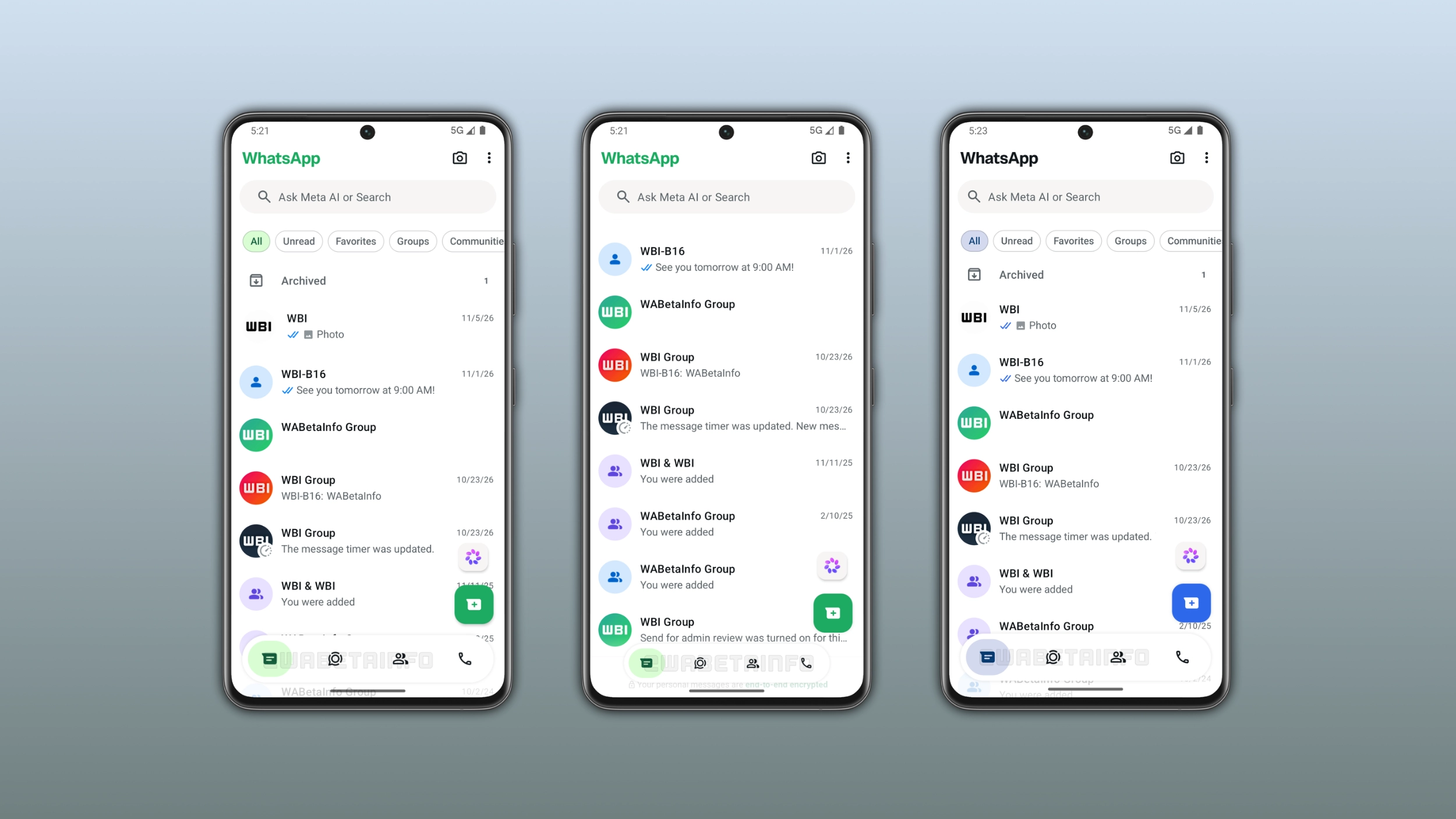
WhatsApp is finally making the new bottom navigation bar available to the public. However, WhatsApp is also introducing other refinements that complete the design. We discovered this with the WhatsApp beta for Android 2.26.45.5 update, which is available on the Google Play Store. With this update, WhatsApp is rolling out the new bottom navigation bar to some beta testers. This feature replaces the previous static bar with a floating design that adapts to scrolling.
What the new bottom navigation bar looks like
WhatsApp is introducing a new bottom navigation bar that floats above the screen. WhatsApp keeps the bottom navigation bar separate from the main interface since it no longer touches the edges of the screen. With the new bottom navigation bar, WhatsApp is also removing text labels, so it takes up less space than the previous design. WhatsApp changed the tab selection style from a pill shape to a circular one. As a result, the selected tab now shows a rounded highlight around the icon. The floating navigation bar is visible at the bottom of every tab, including Chats, Updates, Contacts, and Calls. Note that it is also compatible with the You tab. This means that some users may get a bottom navigation bar with five tabs.
How the bar adapts to scrolling
The new bottom navigation bar responds to the scroll direction and changes its size automatically. For example, when users scroll down through the chat list, WhatsApp gradually shrinks the bar in both width and height until it becomes a compact floating pill. WhatsApp keeps its icons visible in the compact form, but the bar takes up much less space. When users scroll back up, WhatsApp gradually restores the bottom navigation bar to its full size. This feature lets users focus on their chats, updates, contacts, and calls while they scroll through the interface.
What the progressive blur adds to the design
WhatsApp added a progressive blur effect below the bottom navigation bar. With this effect, WhatsApp is introducing a gradual transition between the bar and the screen behind it. Without the blur, the bar would appear above the chat list with a hard edge. Instead, the progressive blur integrates the bottom navigation bar into the interface, so it does not appear as a simple separate element. This update refines the interface by making the design of the bottom navigation bar more polished. It is also compatible with the edge-to-edge layout, so the interface fills the screen completely.
How the accent color affects the navigation bar
WhatsApp also applies the app theme color to the selected tab in the bottom navigation bar. WhatsApp uses green as the default accent color, so the selected tab appears with a green highlight. Users who subscribe to WhatsApp Plus can choose a different accent color, and WhatsApp applies it to the selected tab in the bottom navigation bar as well. This makes the navigation bar feel more consistent with the app interface and offers users a more personalized experience.
WhatsApp is rolling out the new navigation bar to Android beta testers
The new bottom navigation bar is available to some users who install the latest update from the Google Play Store. WhatsApp is rolling it out gradually, so not every beta tester will see it immediately. If the new bottom navigation bar does not appear yet, it should become available to more accounts over the coming weeks. WhatsApp has not announced when this will be available to everyone.
Connect with WABetaInfo
Follow WABetaInfo on X and visit our About page to learn more about what we do. We always appreciate your feedback on posts like this one.