WhatsApp will make calls available for users without an account
WhatsApp is working on a feature that lets iOS users invite people without an account to join a call. The guest will be able to join the call directly from their browser, without downloading the app. Just like guest chats, WhatsApp secures the guest call using end-to-end encryption even for participants who don't have an account.
| Key Points | Details |
|---|---|
| Feature: | Guest calls without a WhatsApp account |
| Status: | Under development |
| Availability info: | This feature is currently in development and not yet available for beta testing. |
| Previous news: | WhatsApp launches a Mac-style navigation sidebar for iPad! |
WhatsApp rolled out guest chats, and guest calls are on the way
In March, we announced a feature that lets users invite people without a WhatsApp account into a text conversation. This feature allows users to communicate through a secure browser link, so they do not need to install the app. Last week, we also reported that WhatsApp is working on expanding this feature to calls on the web. This will let users without an account join calls from their browser. Both features rely on the same technology and protect the conversation with end-to-end encryption.
WhatsApp to extend guest functionality to calls on iOS
WhatsApp is not limiting guest calls to the web client. In the future, users on iOS will be able to create links for guest calls that anyone can join. This will also include users without a WhatsApp account. We discovered this feature with the WhatsApp beta for iOS 26.36.10.71 update, which is available on TestFlight. With this update, WhatsApp is working on integrating guest calls directly into the existing call link interface. This will make it easier for users to communicate even when they do not have the app installed.
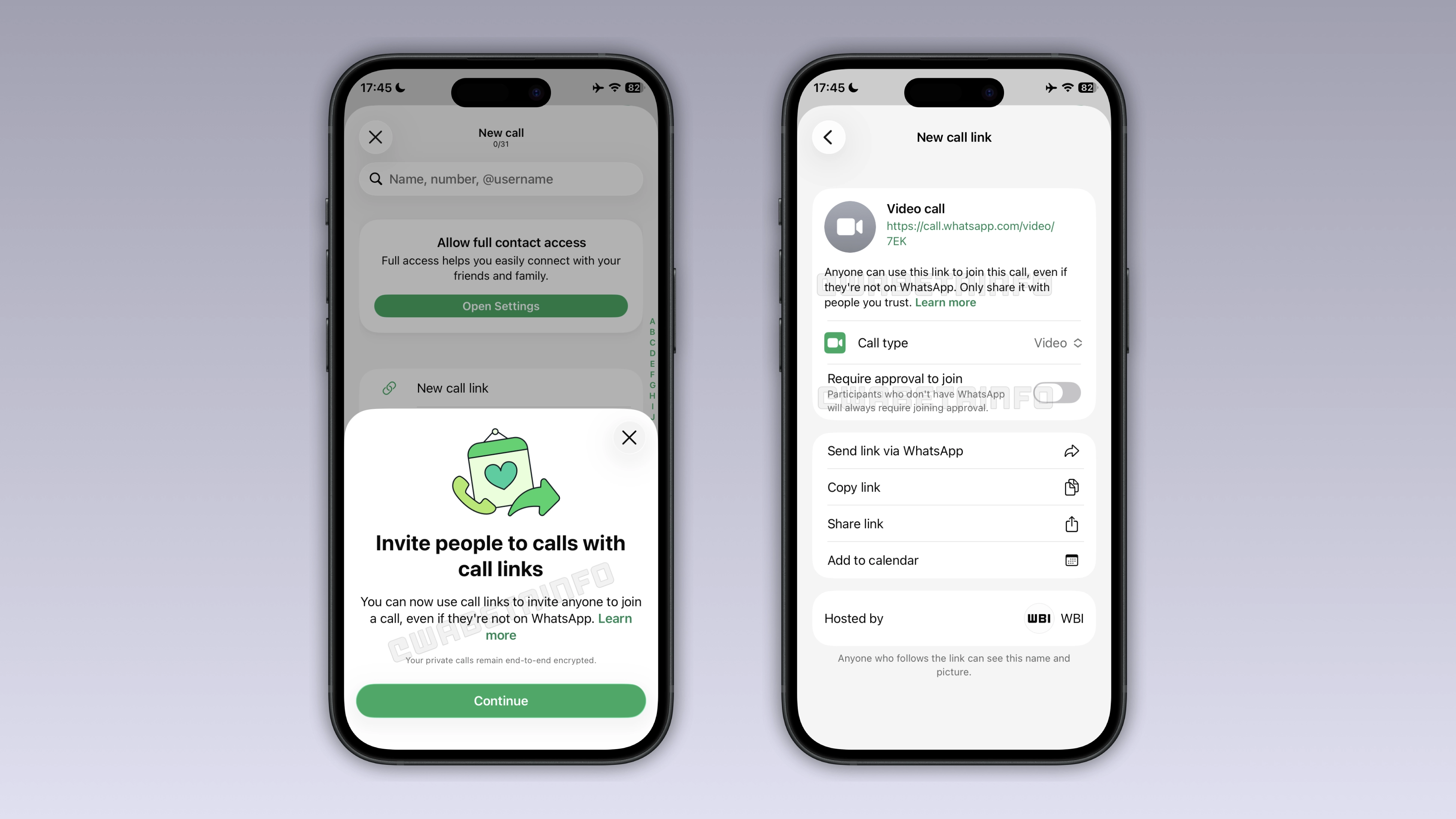
How to create a guest call link on iOS
Users will be able to invite people without a WhatsApp account by opening the Calls tab. In this screen, they can create a call link and choose between a voice call and a video call. Once the call link is ready, they can share the link through WhatsApp, copy it, or forward it through another app. The host can also add the call to their calendar directly from the same screen. Once the link is shared, anyone who receives it can join the call from their browser, even if they do not have an account.
What the guest experience looks like
When someone without an account opens the call link, WhatsApp presents the call interface directly in their browser. This means that guest calls are based on the same technology used for guest chats. As soon as users open the call link, they can decide to join as a guest without creating an account. Before joining the call, the guest must wait for the host to approve their request. While this step is optional is some cases, it is always mandatory for anyone who joins without an account. Once the host approves, the guest can finally participate in the call. This also works with group calls.
Guest calls use end-to-end encryption
End-to-end encryption requires a key to protect the conversation between participants. For guest calls, WhatsApp generates the key from the browser session rather than from an account. When the guest opens the call link in their browser, WhatsApp Web generates a unique identifier. WhatsApp uses it to create the encryption key that protects the call. This makes guest calls compatible with end-to-end encrypted, so no one outside the call can access their content.
Why guest calls require approval for non-WhatsApp users
The host keeps full control over who joins the call through a link. This is very important when the guest doesn't have an account. Anyone who receives the call link could share it with others. As a result, WhatsApp is making the approval step mandatory for anyone who joins without an account. This protects the host from unexpected participants who may have received the link without permission.
Why guest calls are useful
Even if there are more than three billion accounts, not everyone has WhatsApp. For example, a colleague may use a different messaging app, or a client may simply not have WhatsApp. Before guest calls, users had to switch to a different platform to communicate with someone without an account. With guest calls, the conversation happens on WhatsApp, even if the recipient doesn't use the app. For the guest, it may be the first time they place a WhatsApp call. This experience may be enough to convince them to create an account.
WhatsApp is developing guest calls for a future iOS update
This feature is currently under development on WhatsApp for iOS. At the moment, WhatsApp has not enabled call links for beta testers. Since the feature is in development, it is not ready for release. We expect WhatsApp to make it available to the public in a future update.
Connect with WABetaInfo
Follow WABetaInfo on X and visit our About page to learn more about what we do. We always appreciate your feedback on posts like this one.