WhatsApp rolls out the home screen voice widget on Android
WhatsApp is introducing a home screen widget for voice messages on Android, so users can record and send a voice note without opening a specific chat. The widget opens a dedicated recording screen with controls to pause, resume, discard, or confirm the recording. Once they record the voice note, users can share it with one or more recipients at once.
| Key Points | Details |
|---|---|
| Feature: | Home screen widget for voice messages |
| Status: | Rolling out |
| Compatibility: | WhatsApp beta for Android 2.26.30.2 is a compatible update. |
| Availability info: | This feature is available to some beta testers on the latest versions of WhatsApp for Android. |
| Thanks: | Sc, for testing and reporting. |
| Previous news: | WhatsApp announces new calling features including web calls! |
WhatsApp was working on a home screen widget for voice messages
In the post about the WhatsApp beta for Android 2.26.24.2 update, we announced a new widget for voice messages. The widget would give users a faster way to record a voice note without opening a specific conversation. We also shared a closer look at the recording screen to show its interface. With this feature, users can record a voice note and send it to one or more contacts at once.
WhatsApp is introducing the widget to some beta testers
A month after our first report, the widget is finally moving out of development. With the WhatsApp beta for Android 2.26.30.2 update, which is available on the Google Play Store, some users can now add the widget to the Home Screen. The update allows users to send voice notes from a new interface. This makes it easier to record and share voice notes with multiple people.
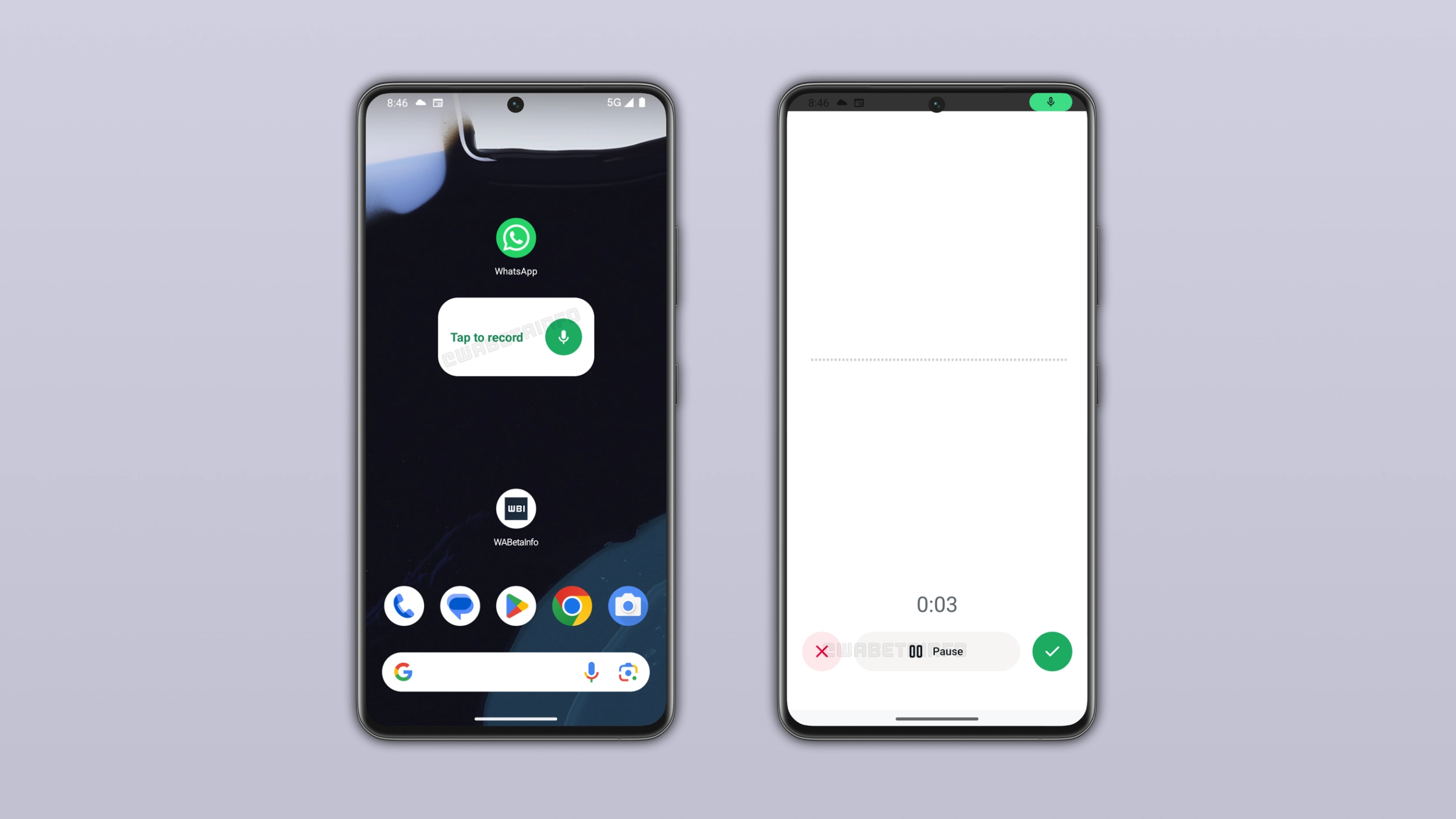
How the widget looks on the home screen
The widget has a default size of 3x1, which keeps it compact without taking up too much space on the home screen. Users can place it anywhere they like and resize it after adding it. WhatsApp does not add the widget to the Home Screen automatically. Users need to long press the home screen and open the widget section. Here, they can find the new widget. Note that there is no reason to add the widget to your Home Screen if you do not send voice messages. The widget is optional.
What happens when users tap the widget
When users tap the widget, WhatsApp presents the new recording screen. Here, they can start recording their voice message and pause it if they need a moment. It is also possible to discard the voice note if they want to record a new once. Once they record the voice message, users can confirm it and move to the next step. WhatsApp then opens the contact picker where users can select one or more recipients and send the voice note to all of them at once.
Why the widget is useful for voice message users
Without the widget, users who want to send the same voice note to many contacts may take a while to share it with them. Users have to open a chat, record the note, send it, then forward it to everyone else. The widget makes this easier than ever. Users record once, select everyone they want to send it to, and WhatsApp delivers it to all of them at once. For users who sends voice messages to multiple people regularly, this is a good shortcut.
WhatsApp adds an in-chat notice to make everyone aware of the widget
Most users never open the widget picker. As a result, many people would never discover this one. WhatsApp is addressing this by showing a notice after recording a voice message. It lets users know that they can add a new widget to record voice messages. The notice appears directly in the conversation, so users who regularly share voice messages are likely to see it.
WhatsApp is rolling out the voice message widget to Android beta testers
The home screen widget for voice messages is available to some beta testers who install the latest WhatsApp update from the Google Play Store. If you do not see this widget, note that it should become available to more users over the coming weeks. Although WhatsApp has not announced when this will be available to everyone, the gradual rollout suggests it is getting closer.
Connect with WABetaInfo
Follow WABetaInfo on X and visit our About page to learn more about what we do. We always appreciate your feedback on posts like this one.