WhatsApp is rolling out the ability to reserve a username before the full feature becomes available. Users can claim their preferred handle directly from the app settings. The update makes it easier to secure a name before someone else takes it.
| Key points | Details |
|---|---|
| Feature: | Reserve username |
| Feature availability: | Some features may be under development, so they are not available to beta testers. Others may become available to users over time. If you're unable to access a certain feature, you will need to wait for a future update. |
| News shared last week: | WhatsApp is rolling out the Liquid Glass interface for the iPad app! |
| Previous article: | WhatsApp is rolling out the green dot for online contacts on iOS |
Weekly WhatsApp beta updates: new features and improvements
This new weekly roundup brings together all the latest updates about WhatsApp beta shared this week. As a result, you can finally catch up on everything you might have missed from our past announcements. You can consider this summary as a way to keep up new features, improvements, and fixes. This week's highlight focuses on username reservation, a feature that allows Android and iOS users to claim their preferred username. See what else has been announced this week.
WhatsApp is rolling out username reservation update
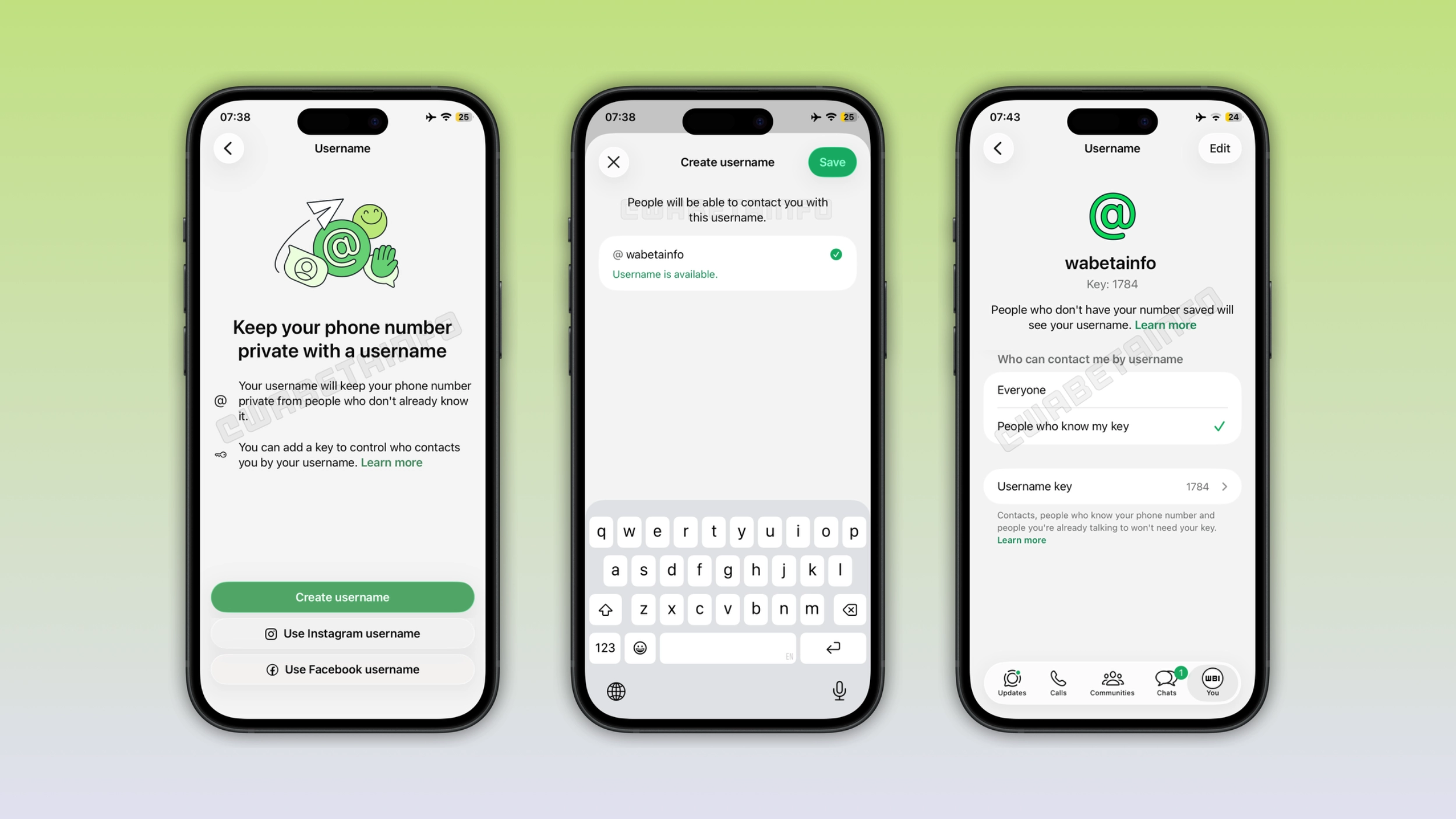
WhatsApp is finally rolling out an update that allows users to reserve their preferred username. With this feature, users can claim their favorite handle ahead of the full username launch. With more than three billion people on WhatsApp, this phase is very important. Since a lot of usernames are going to overlap once WhatsApp launches the feature officially later this year, users should reserve their preferred username as soon as possible.
How to reserve a username on WhatsApp for Android and iOS
Users can reserve their handle right within the app settings. After opening the "Account" section, they will find the "Username" feature. Here, they can enter the handle they want to reserver, as long as it meets some requirements. In addition, WhatsApp lets users claim the same username they already use on Instagram or Facebook by adding their account to Accounts Center. This step is needed since you need proof that you're the person behind the username you use on Facebook or Instagram. However, you do not need to add your account to Accounts Center if you want to reserve a unique username just for WhatsApp.
Usernames will add a new layer of privacy to the messaging experience
Once the full username feature becomes available, you will be able to contact someone new without revealing your phone number. They will see your phone number only if they already have it saved. This means that you can add a new layer of privacy to your messaging experience with new people and businesses. For people who want to keep their phone number private, this update will change a lot about how WhatsApp can be used.
WhatsApp opens username reservations to business partners
After rolling out username reservations to users on Android and iOS, WhatsApp is finally opening this phase to its Cloud API business partners. They can now reserve and claim a username through WhatsApp Manager, Meta Business Suite, or the Username API. WhatsApp is also announcing "Send to BSUID" and "Phone Number Request call-to-action button". These features will make it easier for businesses to interact with their customers who adopt a username.
WhatsApp will bring the contacts tab to the iOS interface
WhatsApp is working on a new navigation experience for the iOS app. First, WhatsApp will introduce a new Contacts tab. With this feature, users will be able to see who is currently online or recently active. To make this possible, WhatsApp will remove the Updates tab. Users will be able to find the channels they follow and status updates directly into the Chats tab. The same plan is also confirmed for the Android app.
WhatsApp introduces the green dot for online contacts on iOS
The WhatsApp beta for iOS 26.26.10.72 update allows users to see if somebody is online from the chat info screen. Here, they will see a green dot on the contact's profile photo. If the contact is no longer active, the green dot disappears. If a contact decides to hide their last seen and online status in their privacy settings, the dot won't appear for them.
Users can choose to use WhatsApp on iPad as primary device
With the latest update, WhatsApp allows some users to use their iPad as primary device. Previously, users could use WhatsApp on iPad by scanning the QR code. This is called "companion mode". However, this mode doesn't offer the full experience. Specifically, users cannot share their live location or create broadcast lists. Now, users can finally choose to use iPad as their primary device.
WhatsApp is introducing a new setup screen for Android tablets
While WhatsApp is now introducing a standalone mode for the iPad app, users could already choose how to use WhatsApp on their Android tablet. But now, WhatsApp is refining the experience by releasing a new setup screen. In this screen, users can choose how they want to use WhatsApp. The interface allows users to select an option between "Link a device" and "Transfer your account". In this case, WhatsApp logs out the previous primary device automatically when the Android tablet becomes the primary device.
WhatsApp migrates users from Tenor to GIPHY
Previously, Tenor announced that they would have discontinued their official API. This week, Tenor just deprecated the official API, so WhatsApp needed to replace this GIF provider. With the latest updates, WhatsApp is now migrating Tenor users to GIPHY. As a result, users who previously searched GIFs through Tenor now see GIPHY as their active provider.
WhatsApp may introduce Klipy as GIF search provider in the future
WhatsApp may distribute some users from GIPHY to Klipy in a future update. Klipy is a third-party GIF search service that allows users to find animated GIFs through a structured API. Initially, WhatsApp planned use it as an additional source of GIF results to maintain continuity in the search experience. This didn't happen, at least for now. Since Klipy is a newer service that WhatsApp was still testing at the time of this change, probably the company didn't want to switch millions of users on the same day Tenor went down. However, the codebase still references it, and nothing suggests WhatsApp dropped the plan to introduce it as a third provider in the future.
WhatsApp is working on passkeys to link new devices
WhatsApp is working on a new feature that will allow users to link a new device using a passkey. At the moment, users need to scan the QR code to link a secondary device. With a future update, users will be able to set up a passkey, making it more convenient to link a device. However, there may be some situations where users will still need to scan the QR code, even if they used a passkey. For example, when they configure the feature for the first time. Note that a limited number of users might already be able to link a device using a passkey right now.
WhatsApp fixed automatic encryption that revealed if you were blocked
Recently, users could open the contact info screen and use the automatic encryption verification to understand whether someone blocked them. If it failed, that was a strong sign the other person had blocked them. This week, we tested this method again and we discovered that it no longer works. The automatic verification now works even in those chats where you've actually been blocked. This means that WhatsApp has fixed the issue that allowed users to understand if there was a block.
Connect with WABetaInfo
Follow WABetaInfo on X and visit our About page to learn more about what we do. We always appreciate your feedback on posts like this one.