WhatsApp is working on passkey device linking for Android
WhatsApp is developing a feature that will let users link their devices using a passkey. This will make the process faster than scanning the traditional QR code. The update will bring an additional layer of security to the experience with linking your devices.
| Key Points | Details |
|---|---|
| Feature: | Passkey device linking |
| Status: | Under development |
| Availability info: | This feature is currently in development, and it is not available for beta testing. In the meantime, check out this article for a sneak peek. |
| Previous news: | You can now reserve your WhatsApp username! |
Passkeys offer added security for your WhatsApp account
A passkey on WhatsApp helps users log into their account with a more secure alternative to SMS verification codes. It uses the device's built-in security features to verify the user's identity. These verifications rely on your fingerprint, face recognition, or screen lock. This makes it harder for unauthorized parties to access an account. WhatsApp uses passkeys primarily for account registration, but the company is now exploring new ways to use them.
WhatsApp is working on using passkeys to link new devices
WhatsApp is now developing a feature that will let users link a new device using a passkey. This means that users can use the passkey stored in their password manager to link their device to their primary one. When they connect a new device, WhatsApp will display a prompt that asks the user to confirm whether they initiated the request. If the user taps Continue, the linking process proceeds as usual. This does not replace the traditional QR code, as WhatsApp is not deprecating the standard method. Instead, this will give users an additional way to link a device without scanning the code.
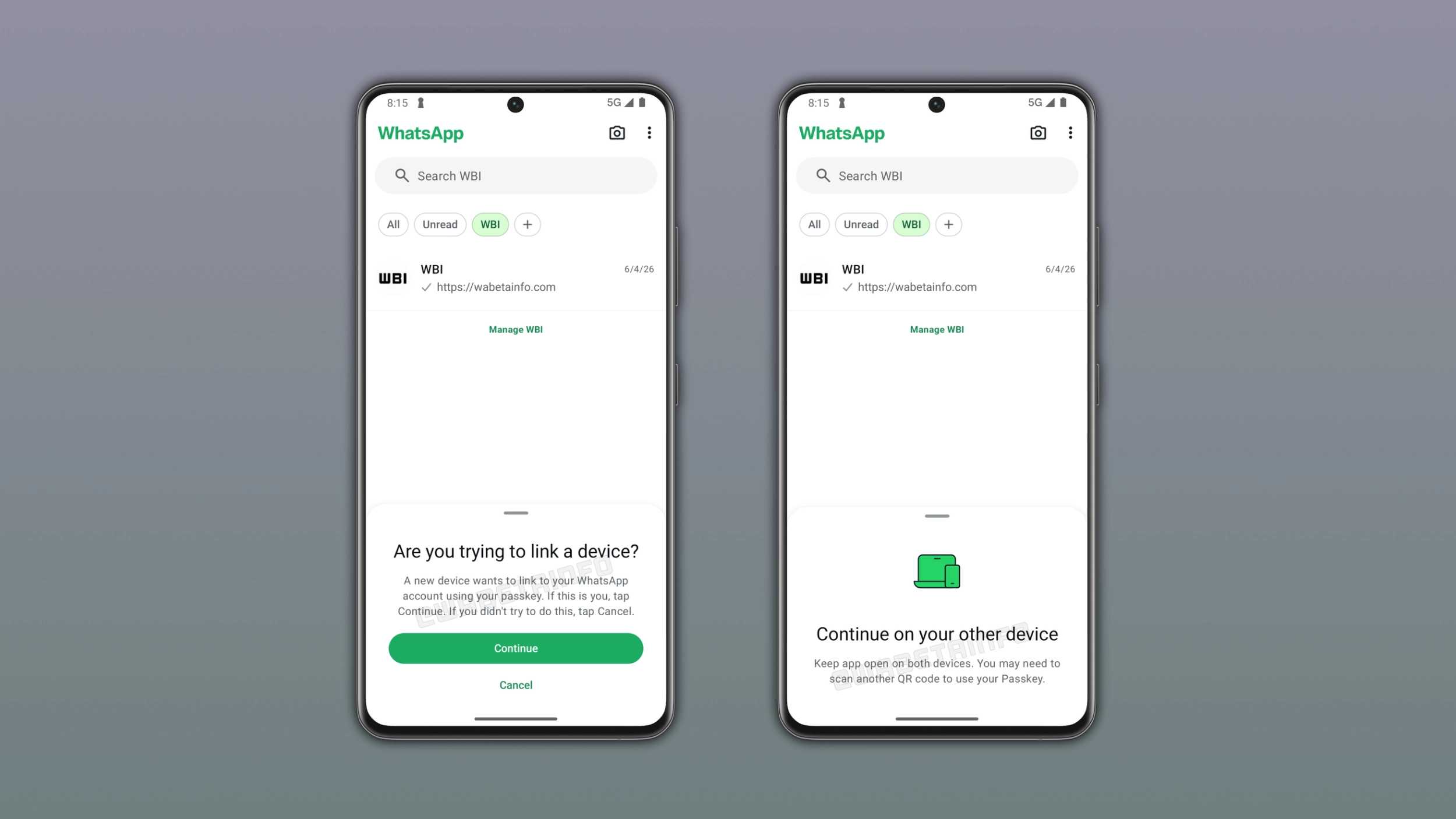
How the passkey device linking flow works
If you use a passkey to log into your account from a second device, WhatsApp sends a notification to your phone to confirm whether it was intentional. You can tap "Continue" to approve the request or "Cancel" to reject it. This will bring a new layer of control over the experience. In certain cases, you may still need to scan the QR code as an additional step to confirm the connection using the passkey. For example, you may be required to scan the QR code the first time you test this feature.
Passkey device linking adds an important security layer
With a passkey, WhatsApp will make it easier to log into an account. However, WhatsApp also wants to make sure that only the account owner can approve a device linking request. The passkey adds a new layer of convenience to the login experience, but WhatsApp still needs to confirm that the person using it is actually you. This makes the linking process more convenient without making it any less safe.
Why WhatsApp is adding a new way to link devices
When you have to link your devices, you need your main device to scan the QR code. With passkey-based linking, you can make the process faster since you do not need to scan the QR code. The update will improve security by relying on the user's biometric data or screen lock for authentication. As a result, WhatsApp will bring a new secure way to users, so they can link their devices using more modern solutions.
Users will need a passkey set up to use this feature
You will need a passkey already configured for your WhatsApp account. If you do not have a passkey, WhatsApp will prompt you to create one before proceeding. To create a passkey, you need a compatible password manager and a lock screen configured on the device. Users who have not yet set up a passkey can create it at any time by opening WhatsApp Settings > Account > Passkeys.
WhatsApp is developing passkey device linking for a future Android update
The feature that lets users link new devices using their passkey is currently under development. It is not available to users yet, and it is not enabled for beta testers at this stage. WhatsApp has not announced an official timeline for its release. However, we expect the feature to become available to beta testers in a future update before rolling out to all users in the stable version.
Connect with WABetaInfo
Follow WABetaInfo on X and visit our About page to learn more about what we do. We always appreciate your feedback on posts like this one.