WhatsApp is finally rolling out the feature to reserve a username on both Android and iOS. Once WhatsApp releases usernames to everyone, people will be able to message new people and businesses without sharing their phone number. You can reserve your username in just a few seconds from the app settings.
| Key Points | Details |
|---|---|
| Feature: | Username reservation |
| Status: | Rolling out |
| Availability info: | Starting today, WhatsApp is rolling out this feature gradually on Android and iOS. |
| Previous news: | WhatsApp patches the encryption trick that confirmed a block! |
WhatsApp to introduce usernames to reduce reliance on phone numbers
Most people do not want to share their phone number with a new coworker or a group chat they just joined. Once someone has your number, there's no way to take that back if things don't work out the way you expected. That's where usernames come in. With a username, you can message someone new without sharing your phone number. WhatsApp will still require users to enter their phone number to sign up and log into the app. However, messaging is getting a privacy upgrade, since you won't need to share your phone number with new people and businesses anymore. This is a big change for an app that has relied entirely on phone numbers since its first launch. It moves WhatsApp closer to how many other messaging apps already work.
WhatsApp launches a feature to reserve your username
WhatsApp isn't launching the full username feature just yet. Instead, WhatsApp is opening reservations early, so people have the chance to pick the username that matters to them before it's gone. With more than three billion people on WhatsApp, a lot of usernames are going to overlap once WhatsApp launches the feature officially later this year. A reservation now means no one else can take it later.
How to reserve your username on WhatsApp
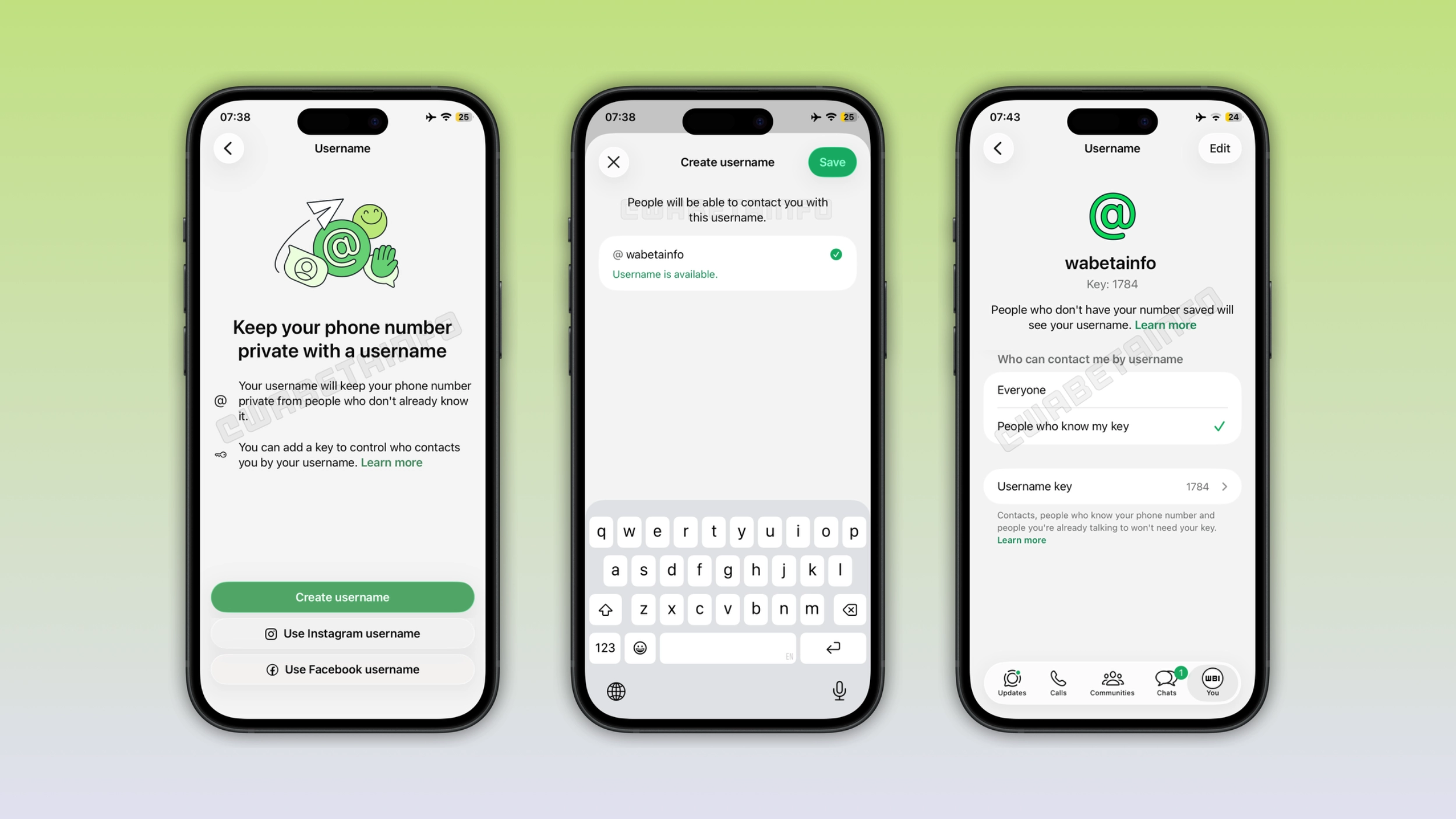
Starting today, you can reserve your username in just a few seconds on the latest version of the app. And this is compatible with both iOS and Android. After updating WhatsApp, open the app settings, tap Account, and then tap Username. Finally, you can type in the username you want, as long as it's still available. If you do not know which username to choose, WhatsApp also offers a feature that generates some suggestions based on your input.
The requirements for choosing a WhatsApp username
Your username must follow some rules to avoid confusion. Specifically, it cannot exceed 35 characters. It can't start with "www." or end with a domain extension. Your username also needs to include at least one letter, and it has to be the first character. This means that numbers and symbols alone aren't enough. It is possible to use periods or underscores, but you can't put two periods in a row.
You can also claim your Instagram or Facebook handle
Creators and businesses often want their presence on WhatsApp to match what people already know them by elsewhere. To support this, WhatsApp lets users claim the same username they already use on Instagram or Facebook. However, you can't simply type that handle into WhatsApp and expect it to work. You need proof that you're actually the person behind it to claim an existing username from Facebook or Instagram. This means that you cannot reserve a username already taken on Instagram or Facebook if you don't own it there.
How to reserve your Instagram or Facebook handle on WhatsApp
To claim the same username you use on Instagram or Facebook, you need to add your WhatsApp account to your Accounts Center. This is the same hub Meta uses to link your Instagram and Facebook accounts. Once you link your accounts, your handle becomes available to reserve on WhatsApp as well. Note that you do not need to add your account to Accounts Center if you want to create a unique username just for WhatsApp. In this case, you can immediately reserve the username.
Act fast if your handle is already taken on Facebook or Instagram by someone else
If you own a username on Instagram or Facebook, and you want to reserve it on WhatsApp, you should reserve it as soon as possible. For example, let's suppose you already have a username on Instagram and want to use the same one on WhatsApp. If someone else has that exact username on Facebook, they could end up claiming it on WhatsApp first. This is the part many people miss: the same username might exist on either Instagram or Facebook, and they are competing for the same spot on WhatsApp.
Usernames will hide your phone number from new contacts
Once WhatsApp officially launches usernames, messaging someone new for the first time will look different if you have the username. New people will only see your username. They won't see your phone number unless they already have it saved. This applies the first time you message a new person or business, which is usually the moment you share your phone number with the recipient. For anyone who wants to keep their phone number private, this changes a lot about how WhatsApp can be used.
The username key adds a new important layer of control
WhatsApp is also introducing an optional username key. With the username key, people need to know it before they can message you for the first time. Without the username key turned on, anyone who knows your exact username can start a conversation with you directly. If you set a username key, your username alone isn't enough. However, people who already know your phone number don't need to know your username key. As a result, you have more control over who can contact you on WhatsApp by enabling the username key. After reserving a username, you can configure the username key from the same section.
Do you actually need to enable the username key?
If you do not know whether you need the username key, the real question is how visible your username is on the web. You should enable the username key if you claimed a well-known handle from Instagram or Facebook. Additionally, you should enable it if you already have a public following under that name, since anyone could find your username easily. If your username isn't something anyone could easily guess, you might not need it. Either way, it's up to you and how comfortable you are with your username.
There's no directory or search to find people by username
Usernames on WhatsApp don't work the way they do on other apps like Instagram, where you can type part of someone's handle to get a list of other profiles. On WhatsApp, there is no directory to browse and no search that displays accounts based on partial matches. To message someone using their username, you need to know it exactly as they've set it up. This is intentional: WhatsApp designed usernames to help people connect with others without exposing their phone number. Finding a profile by guessing simply is not part of the design.
WhatsApp is rolling out username reservations gradually
The feature to reserve a username is rolling out gradually on both Android and iOS. If you don't see this option yet, it's really just a matter of time. WhatsApp will notify users directly in the app once the feature is available in their country. The full username feature will be available to everyone later this year. For now, you can reserve your preferred username to claim it before others.
Connect with WABetaInfo
Follow WABetaInfo on X and visit our About page to learn more about what we do. We always appreciate your feedback on posts like this one.