WhatsApp is rolling out primary device support for iPad
WhatsApp is bringing the iPad app closer to the mobile experience with the latest update. For the first time, users can register their WhatsApp account directly on iPad, making it their primary device. Those users who prefer the companion mode can still use it exactly as before.
| Key Points | Details |
|---|---|
| Name of the feature: | Primary device setup on iPad |
| Status: | Rolling out |
| Compatibility: | WhatsApp for iPadOS 26.25.74 is a compatible update. |
| Availability info: | This feature is available to some users, and it is rolling out to more accounts over the coming weeks. |
| Thanks: | Akan and Joy, for testing and reporting. |
| Previous news: | WhatsApp migrates users to GIPHY as Tenor shuts down its API! |
The WhatsApp for iPad app only supported companion mode
WhatsApp on iPad has always worked as a secondary device. Users need to open WhatsApp on their iPhone or Android phone, check their Linked Devices, and scan the QR code displayed on the iPad. This operation allows WhatsApp to link the two devices, so users could access their account on the iPad from that point on. For most people it was enough, but the companion mode on iPad could not offer a complete experience compared to the mobile app. This is because the companion mode has some limitations. Specifically, a device in companion mode cannot share a live location or create and view broadcast lists. Users cannot communicate with businesses using Flows. In addition, if you do not use WhatsApp for 14 consecutive days on the primary phone, WhatsApp automatically logs out all linked devices, including the iPad.
WhatsApp is rolling out a new way to set up iPad
WhatsApp is now updating how users can set up the app on iPad. Instead of forcing everyone through the companion mode flow, WhatsApp now allows some users to choose how they want to configure WhatsApp on their iPad. This is the news we discovered after installing the latest WhatsApp Messenger for iOS 26.25.74 update, which is available on the App Store. Specifically, WhatsApp is rolling out a feature that lets users set up iPad as their primary device.
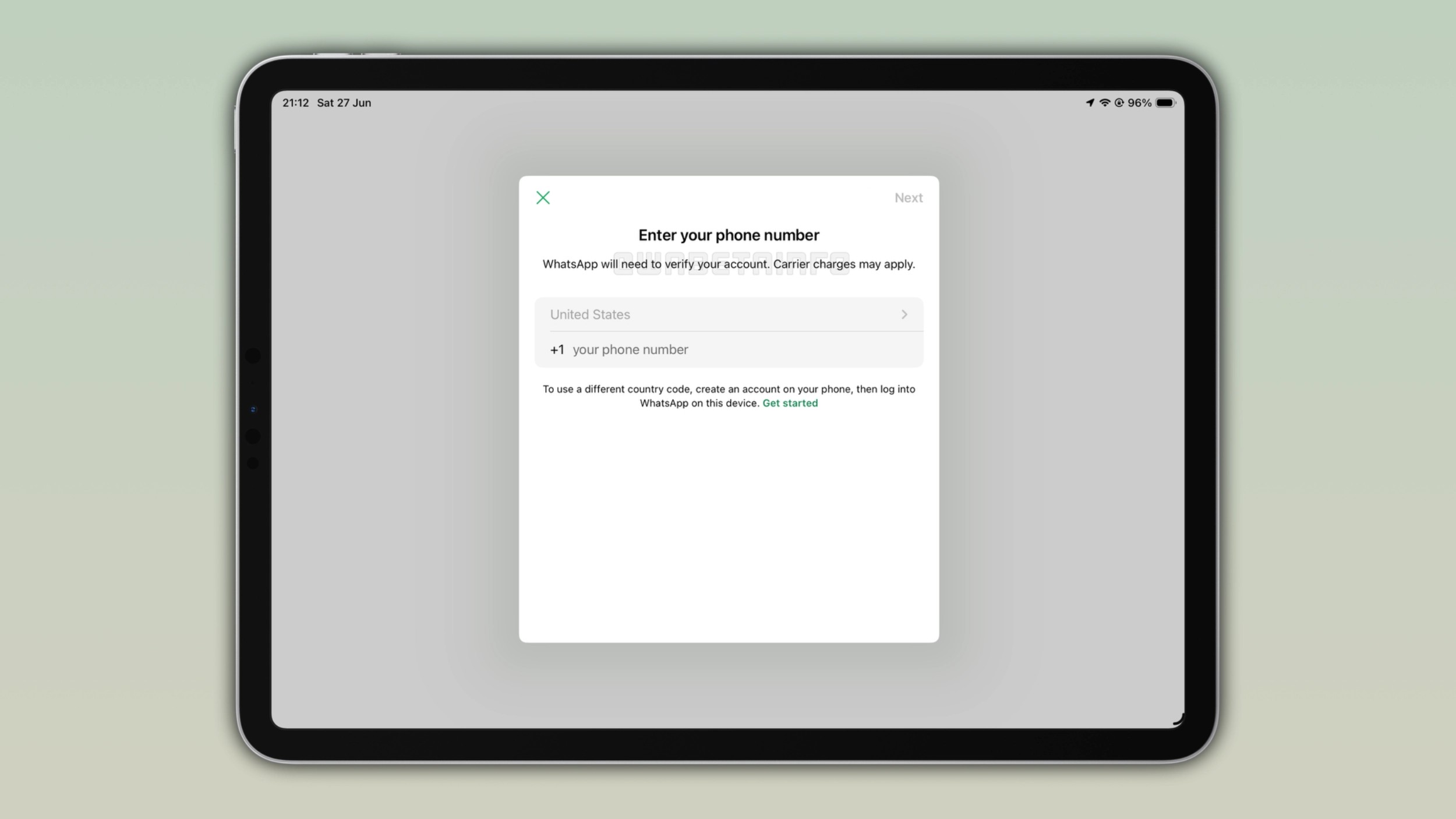
How to set up WhatsApp on iPad as the primary device
Users can register their account on iPad exactly as they do on iPhone and Android. Users need to select their country code, enter their phone number, and wait for the 6-digit verification code. Once they enter the code, users can start using their account on the iPad app as the primary device. This is the same registration flow that most people already know from when they set up WhatsApp on their phone.
Passkeys work on WhatsApp for iPad
If users already configured a passkey for their WhatsApp account, they can use it to set up their account on iPad instead of waiting for the 6-digit verification code. WhatsApp for iPad fully supports passkey authentication at this stage, so the setup can go through the password manager without waiting for the code. It's a faster and more secure way to configure the account, especially for users who already have a passkey set up.
What you gain by using WhatsApp for iPad as the primary device
With iPad as the primary device, users can finally use everything that companion mode does not support. It is possible to use live location and broadcast lists, and users don't get logged out after 14 days of inactivity on the phone. As a result, the experience on iPad becomes complete rather than a limited version of what the phone offers. For anyone who relies on their iPad more than their phone, this makes a real difference.
When this actually makes sense to use
For example, if you send your phone in for repairs and you do not know when you will get it back, the new standalone mode can help you. The companion mode would log out the iPad after just 14 days of inactivity on the phone, which is a problem if the repair takes a month. With iPad set as the primary device, users can keep full access to their account for as long as they need. However, it is not just about repairs. Some people may simply prefer to use a tablet as their main device, and now WhatsApp supports that too.
Companion mode is still there if you prefer it
WhatsApp is not removing the companion mode or changing how it works. Users who want to keep their phone as the primary device and use the iPad as a secondary one can still do exactly that. Users can choose between these two options when they configure their account on iPad the first time. Nothing forces anyone to switch to the primary mode, and users who already have the iPad linked as a companion device don't need to change anything.
WhatsApp is rolling out this update gradually on iPad
The feature that allows users to set iPad as their primary device is available to some users who install the latest update from the App Store. Note that the latest TestFlight build also supports this feature. However, it may not show up immediately even after updating to the latest update. WhatsApp is currently rolling out the feature gradually. If the choice between companion mode and primary device doesn't show up yet, please wait for a future update.
UPDATE:
WhatsApp is currently testing a similar feature for Android tablets as well. Visit the post to learn more.
Connect with WABetaInfo
Follow WABetaInfo on X and visit our About page to learn more about what we do. We always appreciate your feedback on posts like this one.