WhatsApp is testing a new setup screen for Android tablets
WhatsApp is introducing a new interface where users can quickly choose whether to use their Android tablet as the primary device or link it as a secondary one. The feature makes it faster for users to switch their primary device directly from the setup screen. Users can still choose to link the tablet as a secondary device from the new interface.
| Key Points | Details |
|---|---|
| Feature: | New registration interface for Android tablets |
| Status: | Rolling out |
| Compatibility: | The latest WhatsApp beta for Android versions are compatible updates. |
| Availability info: | This feature is available to some beta testers, and it is rolling out to more users over the coming weeks. |
| Previous news: | WhatsApp is rolling out primary device support for iPad! |
Users can link their WhatsApp account with a tablet
To use WhatsApp on an Android tablet, users can rely on both companion mode and standalone mode. About the companion mode, it is a feature that lets users link secondary devices to their existing WhatsApp account on the phone. To link the Android tablet, users need to open the section "Linked Devices" from the main device, and scan the QR code shown on the tablet. This allows users to use their account on a tablet without keeping a phone nearby.
Companion mode has some limitations
When users use WhatsApp on an Android tablet, they cannot share their live location. In addition, they cannot send a message to a broadcast list. These features are only available to users who use WhatsApp on their primary device. One more thing to know: if the primary phone is inactive on WhatsApp for 14 days in a row, WhatsApp logs out the tablet too for security reasons.
WhatsApp is testing a new setup interface for Android tablets
With the latest updates available on the Google Play Store, some beta testers can access a new interface when they open WhatsApp on their Android tablet for the first time. The screen is called "Choose an option", and it gives users two paths to follow. The first option links the tablet to an existing account as usual. The second option allows users to transfer their account. This feature lets users set the tablet up as their primary device. Note that you could already choose to use WhatsApp on your Android tablet as your primary device. However, WhatsApp is now testing a dedicated interface where you can now decide how to set up your account on the tablet.
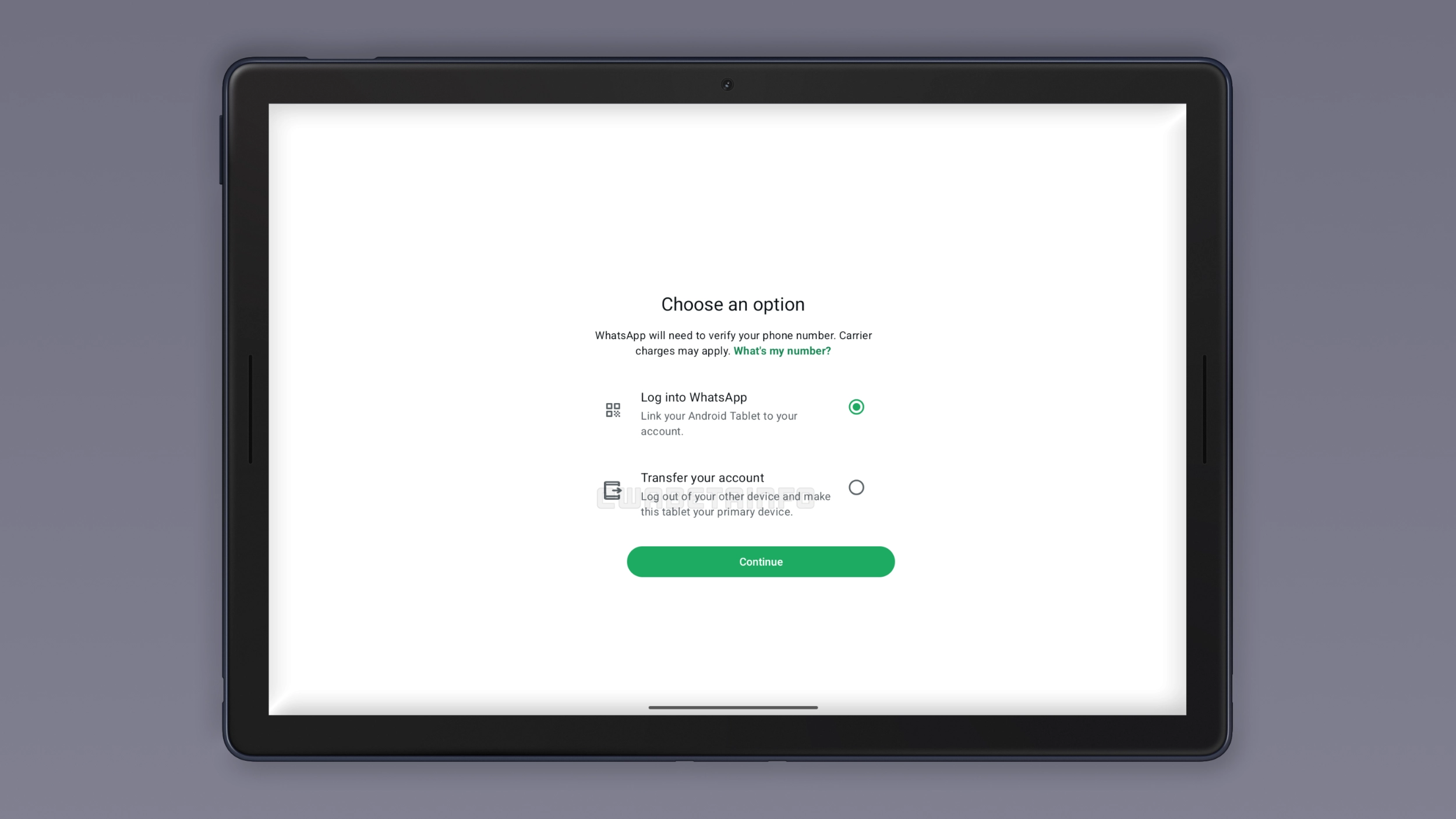
How to transfer your account to an Android tablet
If you see the "Transfer your account" option when you open WhatsApp on your Android tablet for the first time, tap it and follow the steps that appear. WhatsApp will ask for your country code and phone number, then send a 6-digit code to verify your identity. Once you enter that code, the Android tablet takes over as the primary device. The whole thing takes about a minute, and you don't need to touch your phone at all during the process. As usual, you can restore your chat history from Google Drive to get all your previous conversations back on the tablet.
What happens to the previous primary device
When the Android tablet becomes the primary device from this screen, WhatsApp logs out the previous primary device automatically. Since an account can only have one primary device at a time, the old phone loses its primary status. If users still want to use it, they can link it back as a secondary device by scanning the QR code. Users can also transfer the account back to the phone at any time if they change their mind.
Android tablet offers a full experience as the primary device
As the primary device, the Android tablet gets the same WhatsApp experience as any phone. There are no features locked behind companion mode restrictions, and the 14-day logout rule simply does not exist for a primary device. This means that users with an Android tablet as their primary device get the same experience as others who use WhatsApp on their phone. Nothing more, nothing less.
WhatsApp for iPad also supports the same feature
WhatsApp already rolled out a similar option for iPad users with the WhatsApp Messenger 26.25.74 update. But on iPad, the standalone mode is totally new. Users can see a similar setup when they install WhatsApp for iPad. Specifically, they can link the device as a companion, or register it as the primary device. The Android tablet version works the same way, just with different wording, and with a revamped setup screen.
Your Android tablet can handle WhatsApp when you no longer have a phone
Let's say your phone breaks and you decide to wait a few weeks for a new one, maybe because a new model is just around the corner. Without a working phone, companion mode stops after 14 days and you lose access to WhatsApp on the tablet too. That's exactly what the primary device option is for. The Android tablet handles everything until you get a new phone.
Companion mode is still available on Android tablets
Users who want to keep using the Android tablet as a linked device can still do so. The "Log into WhatsApp" option on the setup screen works exactly as before, making it simpler for users to link the tablet to an existing account. Nothing about the companion mode changed. This is just a new interface where users can pick which option fits their situation.
WhatsApp is rolling out the new interface to Android beta testers
The feature to quickly transfer your account to your Android tablet through a new interface is available to some beta testers. Note that this screen is still under testing. This means that not all users can see it when they install WhatsApp on their tablets. At the moment, WhatsApp has not announced when this dedicated section will be available to the stable version.
Connect with WABetaInfo
Follow WABetaInfo on X and visit our About page to learn more about what we do. We always appreciate your feedback on posts like this one.