WhatsApp is testing a native location status update on Android
WhatsApp is working on a new feature that lets users quickly share a location as a status update. WhatsApp will add a new option to share a location to the status composer. This update makes the process faster since users will no longer need to use the location sticker.
| Key Points | Details |
|---|---|
| Feature: | Native location status update |
| Status: | Under development |
| Availability info: | This feature is currently in development and not yet available for beta testing. |
| Previous news: | WhatsApp is rolling out view-once text messages on Android! |
WhatsApp released double speed for status updates on Android
In the post about the WhatsApp beta for Android 2.26.40.4 update, we announced a new double speed option for status updates. With this feature, users can watch a status update at double speed by pressing and holding the right side of the screen. WhatsApp keeps the double speed active until the user lifts their finger. This gesture is already available on other platforms like Instagram and TikTok, so many users already know how to use it.
WhatsApp is working on a native location status update on Android
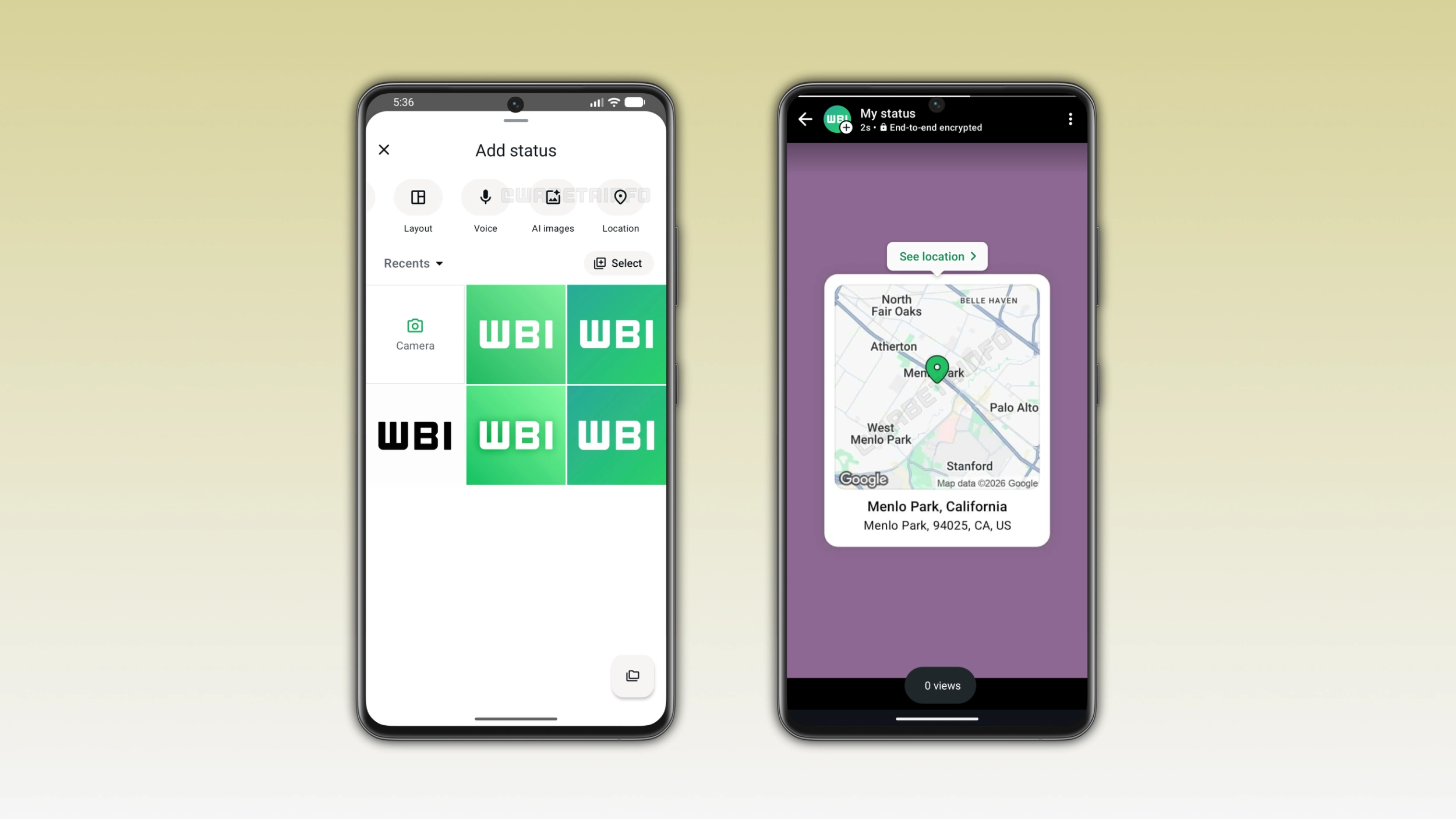
WhatsApp is working on other improvements for status updates. In the future, users will be able to share their location as a status update without selecting a photo or video first. We discovered this with the WhatsApp beta for Android 2.26.45.8 update, which is available on the Google Play Store. With this update, WhatsApp is testing a new Location option in the status composer. This feature will let users share their location as a native status update.
How users currently share their location in a status update
WhatsApp already lets users share their location in a status update. However, the current process requires more steps. Users need to select a photo or video from their gallery and add a location sticker over the item. This means that every time users want to share their location as a status update, they need a photo or video as a background. In addition, the recipient will have to tap the sticker to get more details about the location.
How the new Location option will work
In a future update, WhatsApp will finally remove the requirement to select the sticker to share a location. Instead of choosing the sticker from the drawing editor, users will be able to use a new feature from the status composer. Once users open the bottom sheet in the Updates tab, they will be able to select the option to share the location as a status. After they tap the option to share a location and the app has permission to access it, WhatsApp will show the current position automatically. Users will have to confirm to share the location as a status update.
How WhatsApp handles location permissions
WhatsApp needs access to the device location to let users share a location status update. Users can also share an approximate location from the device settings if they do not want to share their precise position. After granting the permission, users can still choose to share their current location or type a different one manually. Users cannot skip this step since WhatsApp needs at least the approximate location access to suggest the current position.
How the location appears in the status update
WhatsApp won't show the location as a sticker over the photo or the video. Instead, WhatsApp will display it as a map card in the status interface. The card will show the map with a green pin on the selected location, the place name, and the full address. When someone views the status update, they can tap the button to see the location at the top of the screen to expand the map and get a closer look. This will make the location easier to read and more interactive than a sticker placed on a photo.
WhatsApp is developing the native location status update for a future Android update
The native location status update is currently under development on Android. Since this feature in development, it's not available yet. WhatsApp will release it to the public in a future update. At the moment, WhatsApp has not announced when this feature will be available.
Connect with WABetaInfo
Follow WABetaInfo on X and visit our About page to learn more about what we do. We always appreciate your feedback on posts like this one.