WhatsApp is rolling out new text sticker designs on Android
WhatsApp is introducing a new entry point to create text stickers from the sticker keyboard. The update adds an option to generate text stickers from the sticker bottom sheet, making it easier for users to discover and use the feature. WhatsApp is also expanding the number of text stickers from 5 to 10.
| Key Points | Details |
|---|---|
| Feature: | New text stickers |
| Status: | Rolling out |
| Compatibility: | WhatsApp beta for Android 2.26.46.1 is a compatible update. |
| Availability info: | This feature is available to some beta testers, and it's rolling out to more people over the coming weeks. |
| Thanks: | shw_9876, for testing and reporting. |
| Previous news: | WhatsApp is testing Instants to share live photos and videos! |
WhatsApp released text stickers on Android
In the post about the WhatsApp beta for Android 2.26.1.18 update, we announced a feature that lets users create custom text stickers. With this feature, users can type any text to automatically generate five sticker styles. However, users couldn't easily create text stickers since the app didn't explain how to generate one. As a result, this made the feature harder to discover for users who were not already familiar with it.
WhatsApp is introducing new text stickers on Android
WhatsApp is making text stickers easier to find and use now. Specifically, WhatsApp is introducing an option to create text stickers in the sticker keyboard. We discovered this with the WhatsApp beta for Android 2.26.46.1 update, which is available on the Google Play Store. With this update, WhatsApp is rolling out a new entry point to create text stickers to some beta testers. WhatsApp is also rolling out more text stickers, making the experience more expressive.
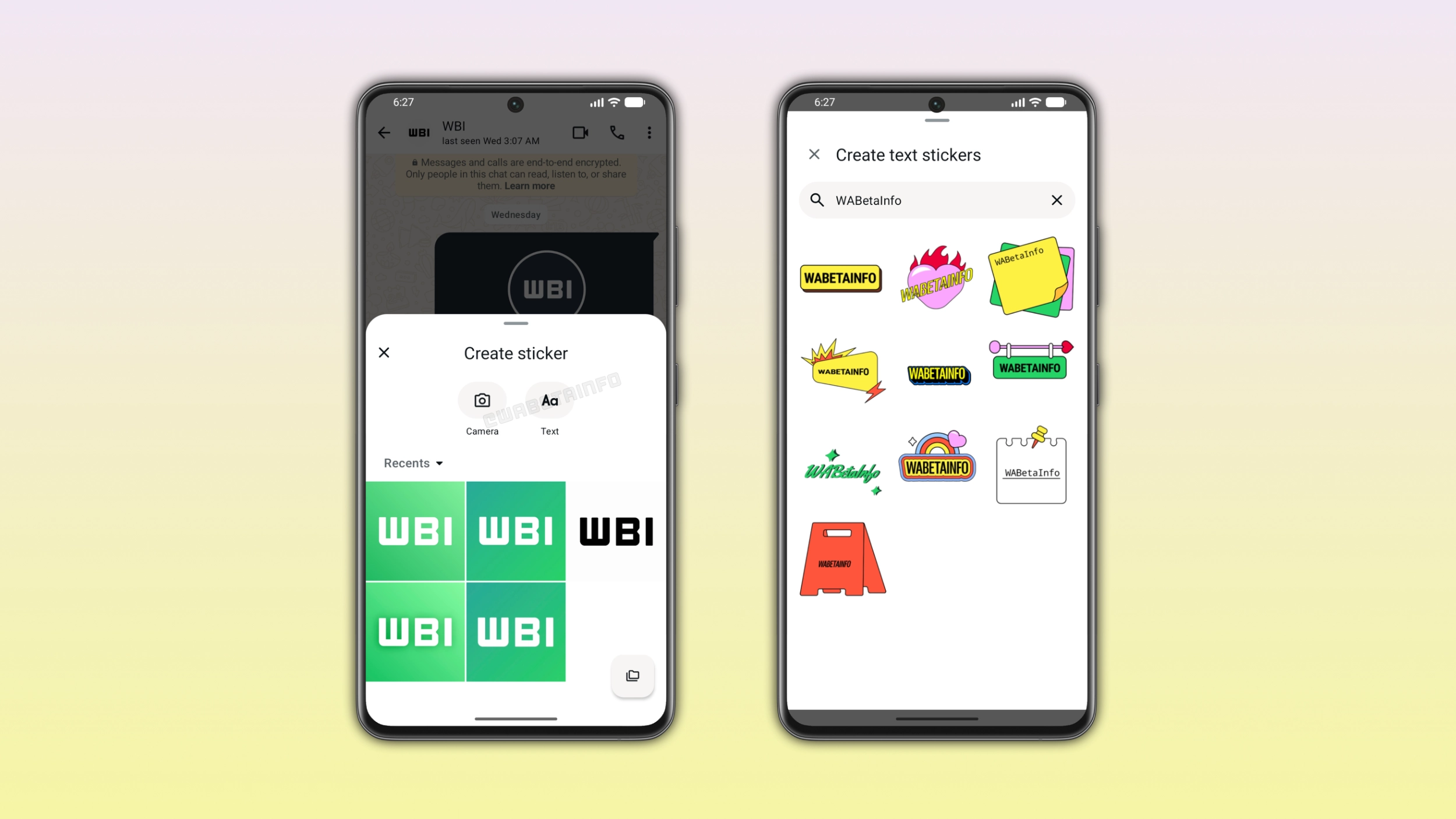
How to create a text sticker with the new entry point
Users can create a text sticker by opening the sticker keyboard. Here, they need to tap the option to create a generic sticker. WhatsApp will present a bottom sheet where users can choose between creating a sticker from a photo or creating a text sticker. Once users select the option to create a text sticker, WhatsApp will display a new section with a search field at the top of the interface. As users type, WhatsApp generates 10 text stickers in real time. They present the same text with a different design. Users can tap any style to send it immediately or keep typing to refine their text before choosing a sticker.
How the new entry point differs from the previous one
Before this update, users could create a text sticker by typing the text into the search field within the sticker keyboard. This entry point was easy to miss since most users may not use the search field to look for existing stickers. With the new option to create text stickers, WhatsApp is making the feature more visible. This means that users can easily find it in the same place where they create a sticker from a photo or video.
What the new text sticker design look like
WhatsApp now offers up to 10 text stickers. They present the same text in a different style. The full set now includes styles like a yellow label, a pink heart with flames, a post-it note, and a handwritten calligraphy style. Other options include a dark background with lightning bolts, a sticker with a shadow, a bright green design, a colorful sticker, a plain white frame, and a red A-frame sign. The full text sticker set makes it easier for users to find one that matches the tone of their message.
Why more text sticker styles make conversations more expressive
With ten styles instead of five, users have more stickers to find the design they prefer. With five styles, users would quickly see the same designs every time they created a text sticker. Over time, users could stop using this feature since the results would always look familiar. With ten styles, WhatsApp offers users new text stickers that keep the feature worth using over time.
WhatsApp is rolling out the new text stickers to Android beta testers
This feature is available to some users who install the latest update from the Google Play Store. WhatsApp is rolling the feature out gradually, so not every beta tester will see it immediately. If the option to create text stickers does not appear yet, it should become available to more accounts over the coming weeks. WhatsApp has not announced when this feature will be available to everyone.
Connect with WABetaInfo
Follow WABetaInfo on X and visit our About page to learn more about what we do. We always appreciate your feedback on posts like this one.