WhatsApp is bringing an added layer of privacy to disappearing messages with a new timer. It allows users to make messages disappear after they are read instead of after a fixed amount of time from sending.
| Key points | Details |
|---|---|
| Name of the feature: | After reading for disappearing messages |
| Feature availability: | Some features may be under development, and they are not available to beta testers. Others may become available to users over time. If you're unable to access a certain feature, you will need to wait for a future update. Keep reading to learn more. |
| News shared last week: | WhatsApp to align reaction tray with Liquid Glass interface! |
| Previous article: | WhatsApp beta for Android 2.26.19.11: what's new? WhatsApp is rolling out a feature that makes new messages disappear after the recipient reads them! |
Weekly WhatsApp Beta Updates: New Features and Improvements
This new weekly roundup brings together all the latest updates about WhatsApp beta shared this week. As a result, you can finally catch up on everything you might have missed from our past announcements. You can consider this summary as a way to keep up new features, improvements, and fixes. This week's highlight focuses on an update for disappearing messages, which now offer at the new After Reading timer. See what else has been announced this week.
WhatsApp is rolling out the After reading timer for disappearing messages on iOS
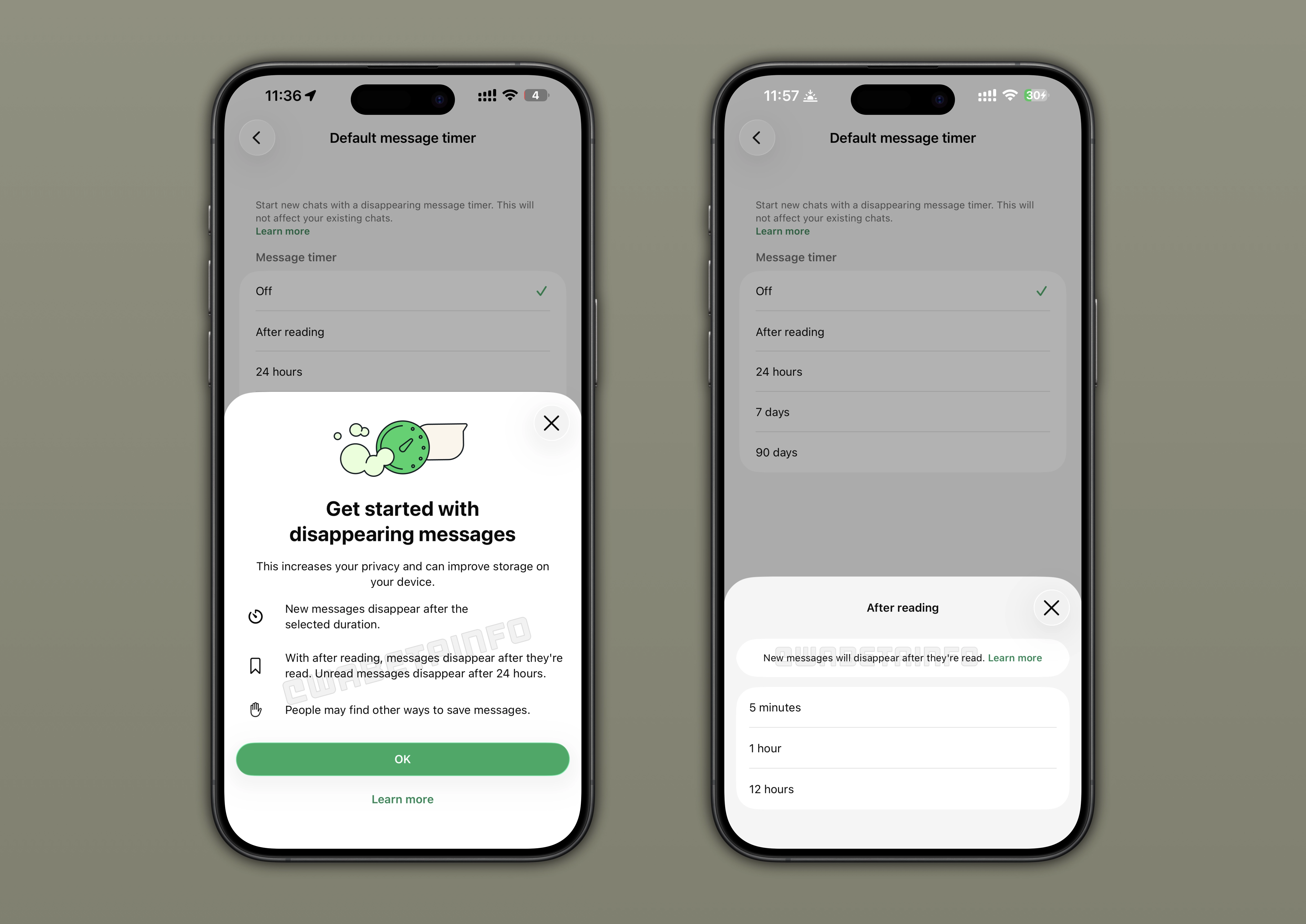
Some beta testers can choose After reading as a new option for disappearing messages. With the new "After reading" timer, WhatsApp is bringing a new layer of privacy to disappearing messages. When users configure the message timer, they can choose to make their messages disappearing once they're read. This means the message will disappear from the sender's device a certain amount of time after it is sent. Instead, it will disappear from the recipient's device only after the recipient opens the conversation and the selected countdown expires.
WhatsApp is rolling out the After reading timer for disappearing messages on Android
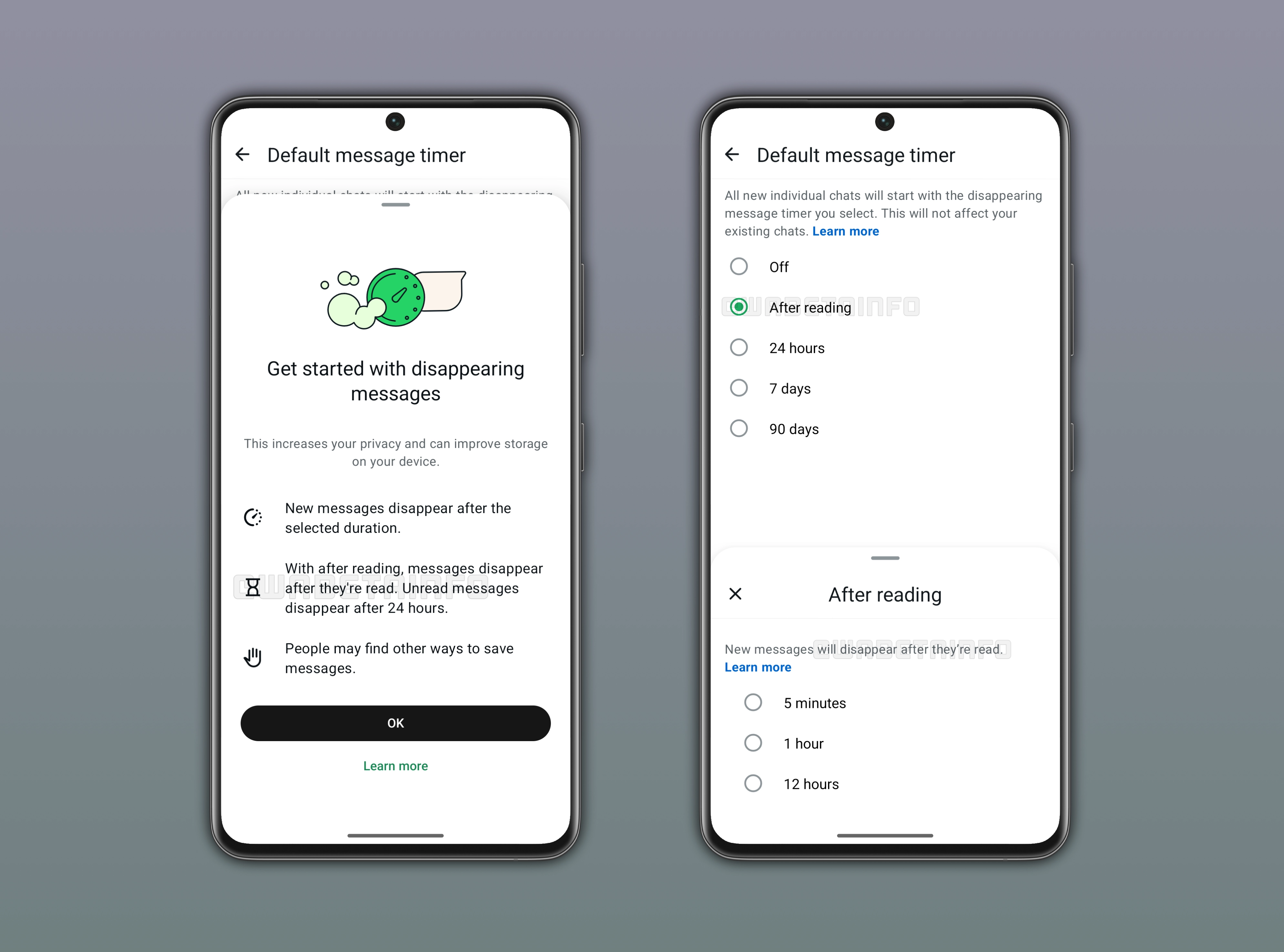
The same update regarding disappearing messages is also available on Android. Users can enable disappearing messages to automatically deletes messages after a set period of time. With After reading, users can control when the message disappears after the recipient reads it. The available options for the "After reading" timer are 5 minutes, 1 hour, and 12 hours. After that time expires, WhatsApp automatically removes the message from the chat. If the recipient never opens the message, it will disappear after 24 hours.
WhatsApp is working on new chat themes on the Web
WhatsApp keeps working on bringing chat themes to the web client. The initial plan involved introducing 49 chat themes for the web client. WhatsApp is now focusing more on quality rather than quantity, as the total number of chat themes currently available in development has been reduced to 39. Eight themes will include wallpapers that differ from the usual default background style. These wallpapers will give conversations a more vibrant appearance compared to the standard look of other themes.
WhatsApp tweaks the business app icon on iOS
The WhatsApp Business beta for iOS 26.19.10.72 update introduces a new app icon. It follows the same design language as the refreshed WhatsApp Messenger icon. It is available only in the beta version on TestFlight, as it has not yet released it to the general public. The next release on the App Store will be available soon, and it brings the new icon to all users.
WhatsApp to test automatic greeting messages for group chats
The post about the WhatsApp beta for Android 2.26.19.2 update includes some insights regarding greeting messages. This feature will help newcomers immediately understand the purpose of the chat and feel welcomed by the community. In the group chat info screen, admins will be able to configure a welcome greeting for new members. However, this feature will be optional. This means that it's up to admin to decide whether to configure a greeting message or not.
Meta launches Incognito Chat with Meta AI
Mark Zuckerberg announced Incognito Chat, a new way to interact with Meta AI with a stronger focus on privacy. With Incognito Chat, your interaction with Meta AI are private since there is no conversation log saved and your messages are protected by Private Processing. This makes Meta AI with Incognito Chat the first AI system to deliver truly private AI. Private Processing is secure and independent third parties confirmed that the confidential computing architecture meets strong privacy and security standards.
WhatsApp introduces three emojis to quickly react to status updates
The WhatsApp beta for Android 2.26.19.8 update allows some beta testers to quickly react to status updates. This feature places three emojis in the reply bar for quicker selection. These include Smiling Face with Heart-Eyes, Face with Tears of Joy, and Face with Open Mouth. This placement makes it more likely that users will pick these emojis when replying to status updates.
WhatsApp is rolling out channel replies on Android
The WhatsApp beta for Android 22.6.19.9 update allows channel admins to reply to their updates. A channel reply lets channel admins respond directly to one of their previously shared updates. With the introduction of the ability to reply to channel updates, channel admins can finally make their communication more structured and easier for followers to understand. WhatsApp Channels keep history for only 30 days, so admins can still quote older updates even after they disappear from the channel history. However, followers who joined after the original update expired may see the reply reference but won’t be able to open or view the quoted message.
WhatsApp to let users remove media from their followed channels
In the post about the WhatsApp beta for Android 2.26.19.4 update, we announced a feature to clean up storage in channels. With this feature, users will be able to manage and remove media within specific channels. Users will be able to filter content by type, such as images, videos, or documents, before deleting them. This will make it easier for users to free up space on their device.
WhatsApp is redesigning chat bubbles on iOS
WhatsApp is testing a refreshed design for message bubbles. The new design will focus on a softer, more modern aesthetic with increased corner radius. This means that chat bubbles will be significantly more rounded than the current ones. The update will also impact shared media files in chats, as they appear without the traditional message bubble borders. As a result, media content will be more integrated into the conversation.
Connect with WABetaInfo
Follow WABetaInfo on X to learn more about new features and updates. We love hearing your feedback, so please let us know what you think! You can also visit our About page to explore all our services and keep up with the latest announcements.