WhatsApp is refreshing the business app icon on iOS
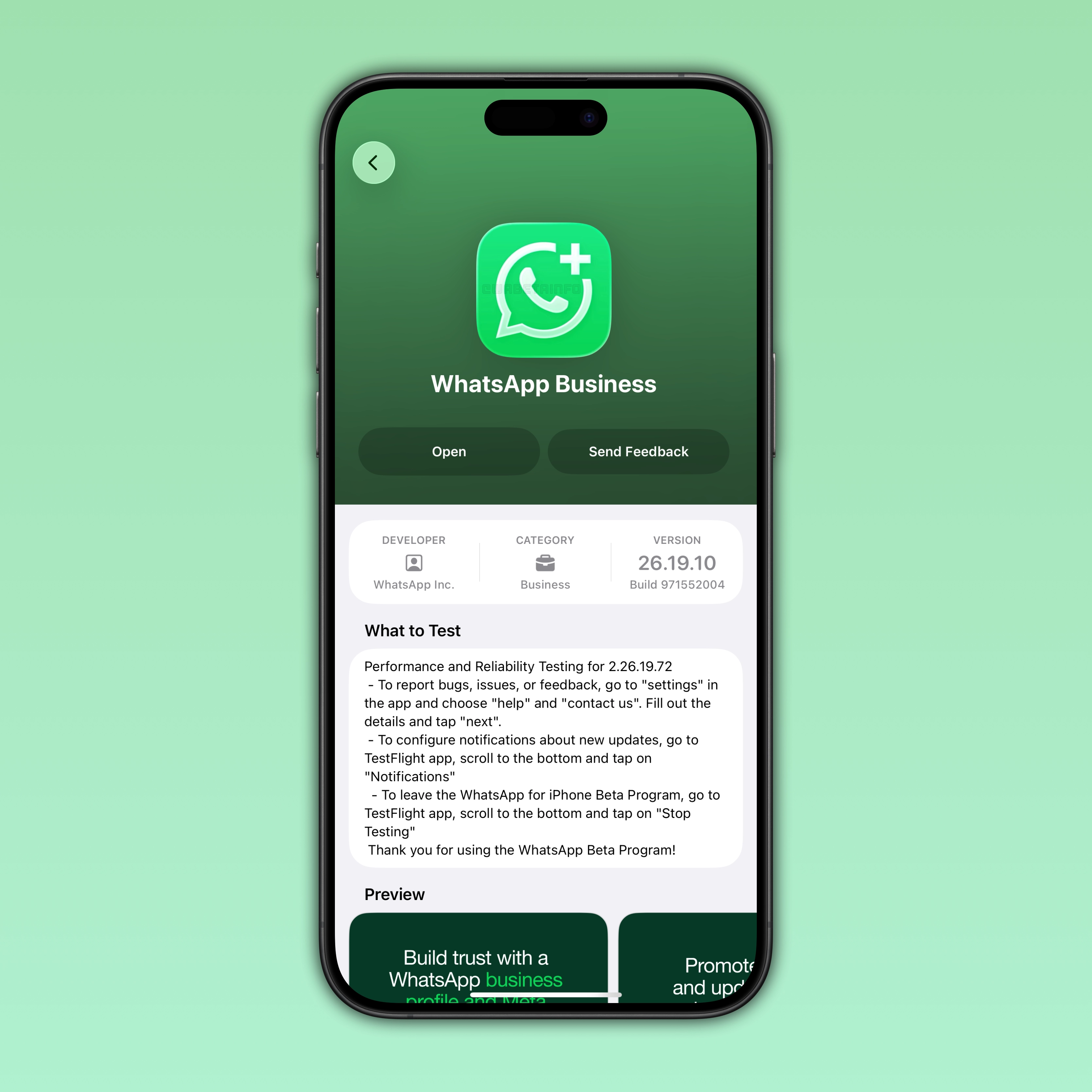
With the latest WhatsApp beta for iOS 26.19.10.72 update available on TestFlight, WhatsApp is tweaking the app icon for the business app. This update aligns the logo with the recent Liquid Glass-inspired design introduced for the WhatsApp Messenger icon.
| Key Points | Details |
|---|---|
| Name of the feature: | New app icon |
| Status: | Available |
| Compatibility: | WhatsApp beta for iOS 26.19.10.72 is a compatible update. |
| Availability info: | The new app icon is available after installing the latest WhatsApp Business update from TestFlight. |
| Thanks: | IgnacioAF, for testing and reporting. |
| Previous news: | WhatsApp beta for iOS 26.19.10.72: what's new? WhatsApp is rolling out a feature that makes new messages disappear after they're read! |
WhatsApp updates the app icon on iOS and Android
With the WhatsApp beta for iOS 26.11.10.70 update, WhatsApp has updated the app icon for WhatsApp Messenger. The update affected both iOS and Android, and it brings a flat design to the icon. Specifically, the new design looked flatter and more minimal, with softer gradients and a cleaner green tone. So the icon was not radically different, as WhatsApp keeps the green color identity, the white phone symbol, and the speech bubble shape.
WhatsApp updates the business app icons on Android without refreshing the design on iOS
On Android, WhatsApp had already updated the app icons for both WhatsApp Messenger and WhatsApp Business. Both icons share the same refreshed design, and they differ only by the small "+" symbol that has distinguished the WhatsApp Business app since last year. However, the WhatsApp Business icon had not yet received the same update on iOS at that time.
WhatsApp Business refreshes its iOS app icon while keeping its distinct identity
The latest WhatsApp Business beta for iOS 26.19.10.72 update introduces the new app icon. It follows the same design language as the refreshed WhatsApp Messenger icon. This means the app icon looks more modern now, and it features a simplified look that aligns the branding for both apps. The app icon still retains the "+" symbol that distinguishes the Business version from the standard WhatsApp Messenger app. As a result, both icons now appear more consistent and they are clearly distinguishable at a glance.
WhatsApp Business beta users can preview the new icon directly in TestFlight
Since WhatsApp currently limits the refreshed app icon to beta testers and has not yet released it to the general public, it is available only in the beta version. To check whether the app logo has received the update, those users who are enrolled in the WhatsApp Business beta program on iOS can simply open TestFlight. Users can notice the new icon directly on the WhatsApp Business page within TestFlight. After updating WhatsApp Business beta, the new icon should immediately appear on the Home Screen. This confirms that the latest visual changes have been applied to the beta version.
WhatsApp's new icon divides opinions over its design inspiration and purpose
The reasons behind this icon update are not officially known, and WhatsApp has not commented on it publicly. Some users have associated the change with Apple's Liquid Glass design trend. So this update may be part of a visual refresh aligned with the Liquid Glass interface. Instead, other users claim that the icon looks too flat and minimal to truly reflect a Liquid Glass-inspired redesign. In the end, the interpretation remains open, but it is clear that WhatsApp has brought a long-awaited refresh to its app icon after several years.
WhatsApp Business rolls out its new app icon to beta users ahead of the official release
The new app icon for WhatsApp Business is available to beta testers who install the latest update from TestFlight. At the moment, the updated icon is limited to beta users. The next release on the App Store is expected soon, and it should bring the new icon to all users.
Connect with WABetaInfo
Follow WABetaInfo on X to learn more about new features and updates. We love hearing your feedback, so please let us know what you think! You can also visit our About page to explore all our services and keep up with the latest announcements.