WhatsApp beta for iOS 26.19.10.72: what's new?
WhatsApp has released a new iOS update through the TestFlight beta Program, bringing the version up to 26.19.10.72.
What's new in this update? WhatsApp is rolling out a feature that makes new messages disappear after they're read, and it's available to some beta testers!
| Key Points | Details |
|---|---|
| Name of the feature: | After reading for disappearing messages |
| Status: | Rolling out |
| Compatibility: | WhatsApp beta for iOS 26.19.10.72 is a compatible update. |
| Availability info: | This feature is available to some beta testers, and it is rolling out to more users over the coming weeks. |
| Thanks: | Akan and SiLent, for testing and reporting. |
| Previous news: | WhatsApp beta for Android 2.26.19.9: what's new? WhatsApp is rolling out a feature that allows channel admins to reply to their updates! |
WhatsApp is testing new options for disappearing messages
In the post about the WhatsApp beta for Android 2.26.15.11 update, we announced a feature that gives users more control over disappearing messages. The tool lets users make their messages disappears once the recipient reads them. This means that messages will not just disappear after a fixed timer from when they are sent, but an additional countdown starts when the recipient actually reads them. So it combines a read-based expiry with more flexible timing options. The sender can choose how quickly a message should vanish after the recipient sees it, rather than simply after they receive it.
WhatsApp expands the new timer to WhatsApp for iOS
When we announced this feature, WhatsApp was working on the new timer for the Android app. Now, WhatsApp is making it available to some beta testers on iOS. Following the release of the latest WhatsApp beta for iOS 26.19.10.72 update, which is available on the TestFlight app, we discovered that WhatsApp is rolling out a feature that makes new messages disappear after they're read.
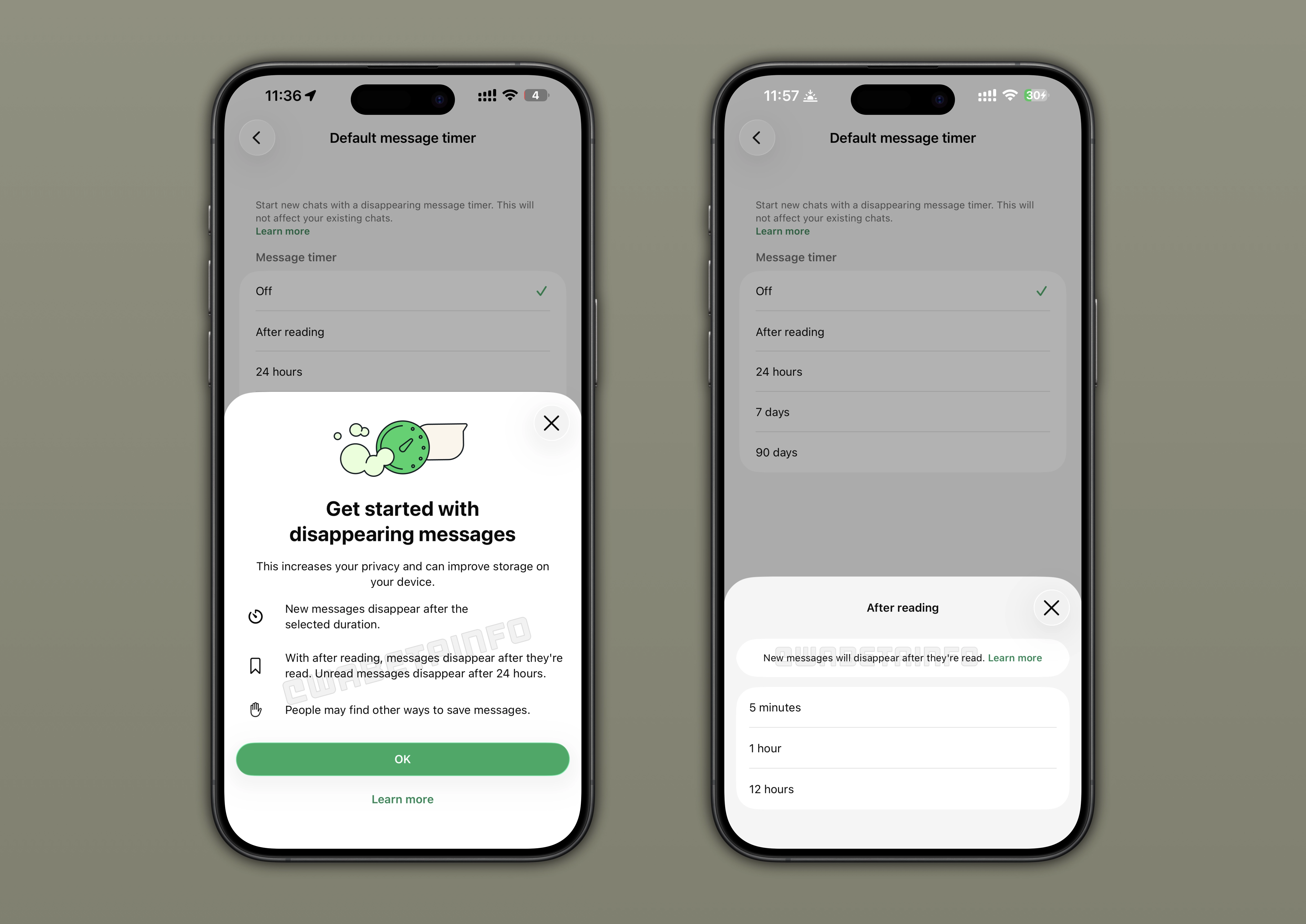
How disappearing messages work on WhatsApp
Disappearing messages allows users to send messages that WhatsApp automatically deletes after a set period of time. Once enabled, WhatsApp will remove new messages in the chat after the chosen duration. Users can choose between three timer options: 24 hours, 7 days, or 90 days. Users can enable disappearing messages to specific chats or globally. With disappearing messages, users can keep their conversations more private and reduce long-term message storage.
WhatsApp introduces the After Reading timer for disappearing messages
With the new "After reading" option, WhatsApp is bringing a new layer of privacy to disappearing messages. When users configure the message timer, they can choose to make their messages disappearing once they're read. However, unread messages always disappear after 24 hours by default. Users who choose this option can also configure a timer for "After reading". Specifically, they can choose whether their messages disappear 5 minutes, 1 hour, or 12 hours after the recipient reads them.
How the After Reading timer work for disappearing messages on WhatsApp
Let's suppose I send a message to Thiago and set it to disappear after reading with a 5-minute timer. On my device, WhatsApp will automatically delete the message 5 minutes after I send it. So it does not matter when Thiago opens the conversation. On Thiago's side, the message is available even if he opens it much later, so even after several hours. Once he views the message, a 5-minute countdown starts on his device. After those 5 minutes, WhatsApp removes the message from his chat as well. However, if he does not open the message within 24 hours, it will disappear anyway.
The new After Reading feature as a message timer is optional
Like disappearing messages, the "After reading" option is also optional. Only users who want their messages to vanish after the recipient reads them will have to enable it. The timer is not active on by default, so your conversations remain unchanged unless you manually enable this feature. Note that the new timer can also be applied on a per-chat basis. This means that it can be enabled in specific chats rather than all conversations. As a result, users gain more flexibility and can enable this option for greater privacy.
WhatsApp is rolling out the After Reading option for disappearing messages on iOS
The feature that makes new messages disappear after they're read is available to some beta testers who install the latest WhatsApp beta for iOS update from TestFlight. Note that a limited number of users may also be able to test the feature even through the version available on the App Store. Over the coming weeks, WhatsApp will expand access to more users. This will give more users access to a new layer of privacy for disappearing messages.
Connect with WABetaInfo
Follow WABetaInfo on X to learn more about new features and updates. We love hearing your feedback, so please let us know what you think! You can also visit our About page to explore all our services and keep up with the latest announcements.