WhatsApp is rolling out a feature that offers some users more control over their status updates. The feature lets users create custom audience lists for status updates, so they can choose exactly who sees their updates.
| Key points | Details |
|---|---|
| Name of the feature: | Close friends and custom lists for status updates |
| Feature availability: | Some features may be under development, and they are not available to beta testers. Others may become available to users over time. If you're unable to access a certain feature, you will need to wait for a future update. Keep reading to learn more. |
| News shared last week: | WhatsApp makes new messages disappear after they're read! |
| Previous article: | WhatsApp beta for Android 2.26.20.7: what's new? WhatsApp is rolling out a new navigation system for the group chat info screen! |
Weekly WhatsApp Beta Updates: New Features and Improvements
This new weekly roundup brings together all the latest updates about WhatsApp beta shared this week. As a result, you can finally catch up on everything you might have missed from our past announcements. You can consider this summary as a way to keep up new features, improvements, and fixes. This week's highlight focuses on status lists, a new feature that allows users to decide who can see their updates. See what else has been announced this week.
WhatsApp is rolling out custom lists to control who sees status updates
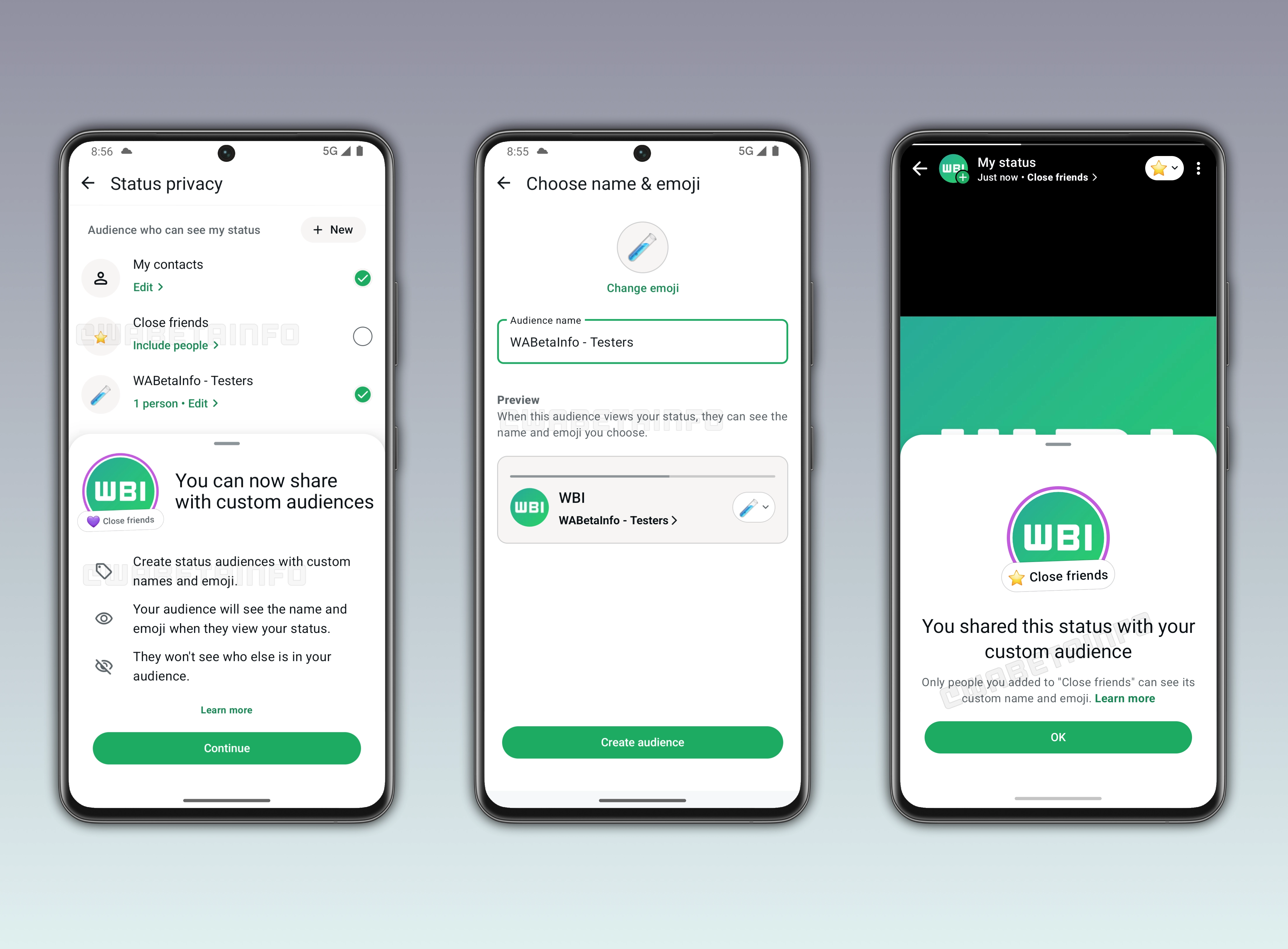
WhatsApp is rolling out a feature that lets iOS and Android users choose who can see their status updates with more control. To provide users with greater control over their updates, WhatsApp is introducing the ability to create new lists. A list is a custom group of contacts that users can define manually. It allows users to quickly select specific audiences when sharing a status update. As a result, users won't need to adjust the "Only share with" privacy settings when posting an update. Instead, they can select a custom list to instantly control who can view their updates.
WhatsApp adds a "Close Friends" list for private status sharing
WhatsApp automatically creates a list called "Close Friends". This list helps users quickly share status updates with a more personal group of contacts. Users can edit this list at any time by adding or removing people based on their preferences. WhatsApp does not notify others when users edit their lists. This ensures that changes remain private and do not affect how users manage their sharing preferences. It works as a shortcut for sharing updates without manually selecting their contacts. This feature is especially useful for sharing updates with a more private group instead of all contacts.
WhatsApp highlights status updates shared with custom lists using a purple ring
Status updates shared with custom lists and close friends are visually distinguished from standard ones through a clear indicator. When a user posts a status update using a selected list, it appears with a purple ring around it. This color helps recipients immediately recognize that the content was shared with a specific audience rather than all contacts. Additionally, the audience sees the name of the list and the emoji, making it clear why they are seeing that particular update.
WhatsApp is rolling out a new system to view chat lists on Android
The WhatsApp beta for Android 2.26.20.2 update lets users better manage their Chats tab. Specifically, WhatsApp is introducing a new system to view their chat lists. It makes navigation easier by separating the most important lists from the less frequently used ones. So users can access their preferred filters more quickly. Users can also remove some mandatory filters, such as the Favorites list.
WhatsApp introduces media within the chat attachment sheet on iOS
The WhatsApp for iOS 26.19.75 update introduces a feature to send media from the chat attachment sheet. It allows users to access their recent photos and videos without opening the full gallery interface. This makes selection faster and more immediate. It also keeps the conversation visible while choosing which media to send. Additionally, it is compatible with the Liquid Glass design language.
WhatsApp is working on sticker reactions on Android
Since there are situations where emojis may not fully capture what a user wants to express, WhatsApp wants to introduce an additional way to react to messages and media. In particular, WhatsApp plans to let users react to messages using both stickers and emojis. With sticker reactions, users will be able to respond to messages using a new range of expressions beyond standard emojis. Reacting to a message with a sticker will work in the same way as reacting with an emoji. Users will have to long-press a message and select a sticker from the keyboard.
WhatsApp improves navigation by introducing a contact-grid on iOS
The WhatsApp for iOS 26.19.76 update adds a contact grid to the forward picker screen. The change is available to some users and it's designed to improve navigation within the forwarding interface. The contact grid is arranged into two rows, and it shows a total of 6 contacts at a time. However, WhatsApp does not plan to introduce this grid structure to other sections of the forward picker at the moment.
WhatsApp to bring status updates into Manage Storage
In a future update, users will be able to manage storage for their status updates. In the "Manage Storage" scree, WhatsApp will allow users to view the contacts who have shared status updates. Here, they can filter updates by sorting them to identify which ones take up the most storage. Instead of deleting media from their chats, users could start by focusing on status updates. Although WhatsApp automatically removes status updates after 24 hours, someone may have shared many updates in a short period of time. As a result, it may be useful to manually delete status updates without waiting for the automatic expiration.
WhatsApp is rolling out a new message credits system for broadcasts
The WhatsApp for iOS 26.19.77 update introduces a new feature to manage broadcast lists. The system involves a new message credits system for broadcasts. This change applies to both customers and businesses, and it introduces a new usage cap. Users will have a defined limit on how many messages can be delivered through broadcast lists within the free plan. Once users reach the available quota, additional broadcast messages will no longer be included in the free plan.
WhatsApp to show who is online in a new contacts hub on iOS
WhatsApp is working on a feature to make users see who is currently online on WhatsApp. The feature will offer a centralized hub where online contacts (and recently active ones) are listed. They are displayed in chronological order. In addition, the section will offer easier access to favorite contacts.
WhatsApp is rolling out a new navigation system for the group chat info screen
The WhatsApp beta for Android 2.26.20.7 update improves usability in the group chat info screen by bringing a new navigation system. It introduces three new tabs to make it easier for users to locate settings. When the user taps on one of the tabs, the interface automatically scrolls to the corresponding section. This system offers a more structured layout that reduces this effort.
Connect with WABetaInfo
Follow WABetaInfo on X to learn more about new features and updates. We love hearing your feedback, so please let us know what you think! You can also visit our About page to explore all our services and keep up with the latest announcements.