WhatsApp beta for Android 2.26.20.6: what's new?
WhatsApp has released a new Android update through the Google Play Beta Program, bringing the version up to 2.26.20.6.
What's new in this update? WhatsApp is working on a feature to manage storage for status updates, and it will be available in the future!
| Key Points | Details |
|---|---|
| Name of the feature: | Manage storage for status updates |
| Status: | Under development |
| Availability info: | This feature is currently in development, and it is not available for beta testing. In the meantime, you can read this article for a sneak peek. |
| Previous news: | WhatsApp for iOS 26.19.76: what's new? WhatsApp is rolling out a feature that adds a contact grid to the forward picker screen! |
WhatsApp to simplify channel storage cleanup with bulk media management
In the post about the WhatsApp beta for Android 2.26.19.4 update, we announced a feature that allows users to clean up storage in their channels. With this feature, users will be able to filter media by category before deciding what to delete. In particular, users will be able to delete files in bulk without selecting every single item. This feature will significantly speed up the cleanup process by helping users free up storage space easily.
WhatsApp to improve storage control by extending management tools to status updates
It appears that WhatsApp is also committed to improving how users can free up storage space related to status updates. Since status updates can contribute to storage issues on some devices, WhatsApp will introduce new tools to manage this content. Following the release of the latest WhatsApp beta for Android 2.26.20.6 update, which is available on the Google Play Store, we discovered that WhatsApp is working on a feature to manage storage for status updates.
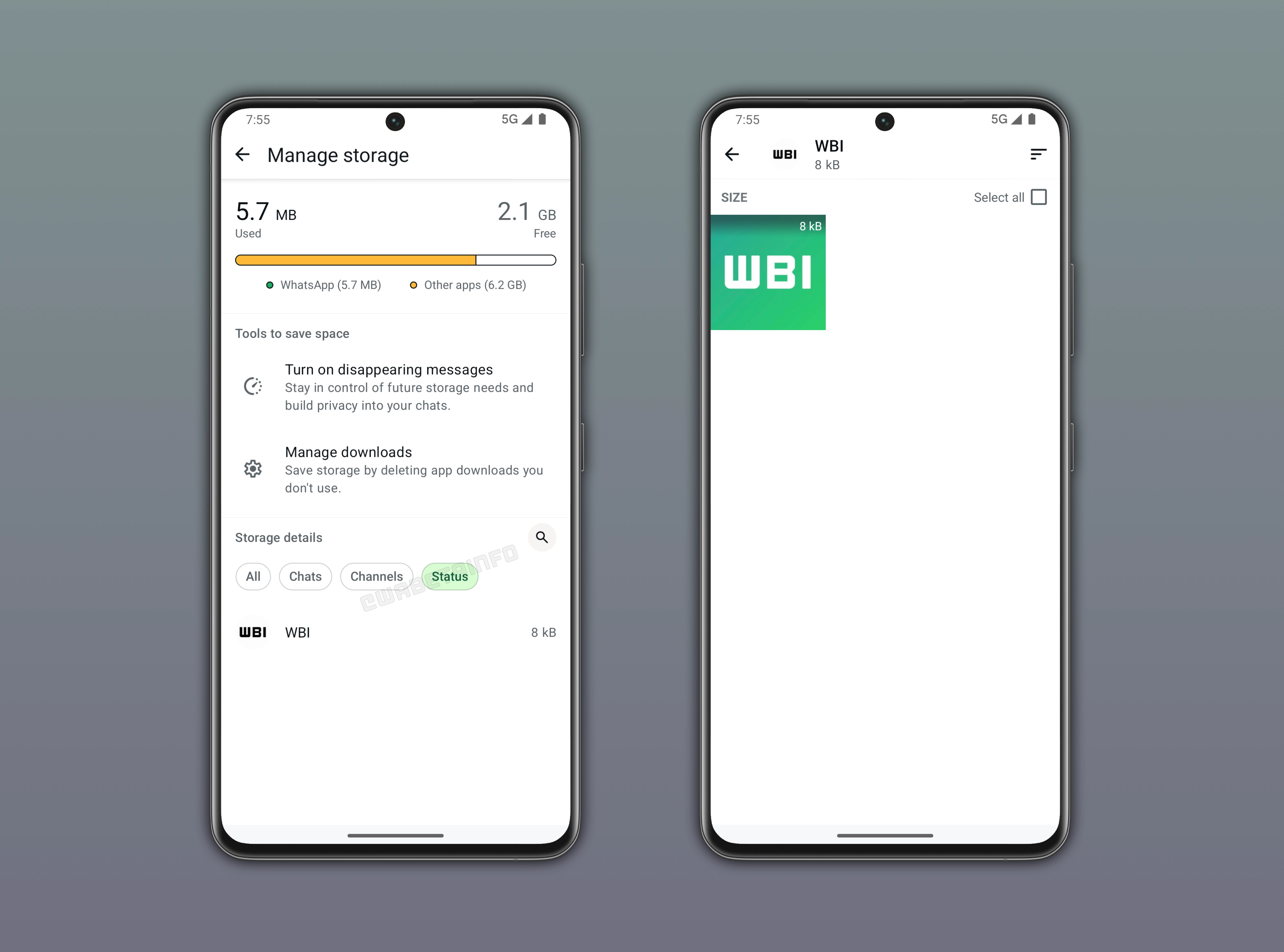
WhatsApp centralizes storage insights and smart cleanup tools in Manage Storage
Users can manage storage directly from the app settings through the "Manage Storage" section. At the top of the screen, WhatsApp displays a bar indicator to offer a clear overview of the device storage. This overview includes the space used by WhatsApp, the space occupied by other apps, and the remaining free space. This indicator helps users quickly understand how much storage is being consumed. The section also includes useful suggestions to help free up space more efficiently. For example, WhatsApp may recommend enabling disappearing messages to automatically reduce media accumulation over time. Users can also receive suggestions to remove unnecessary language packs, as they may take up storage space even if they are no longer actively used within the app.
WhatsApp helps users pinpoint storage-heavy chats and media for quick cleanup
This section also provides an overview of all chats, groups, and channels. It helps users quickly identify which ones consume the most storage space. WhatsApp displays a complete list of conversations sorted by the amount of storage they consume. Users can also filter this list to view only chats or only channels. When users select a specific chat or channel, all shared media such as photos, videos, and documents become visible. The list can be further sorted so that the largest files appear first, making it easier to spot space-heavy content. As a result, this section allows users to quickly understand which media files take up the most storage and remove them when needed.
WhatsApp will bring status updates into Manage Storage
In a future update, WhatsApp will also allow users to view the contacts who have shared status updates. The "Manage Storage" section will include a dedicated filter for status updates, making them easier to browse and manage. When users select a specific contact, WhatsApp will display their shared status updates in one place. Users will also be able to sort these updates to identify which ones take up the most storage. They will be able to delete them if they want to free up space.
WhatsApp to let users recover storage faster by prioritizing status cleanup
If a device is running low on available storage, the user will need to free up space quickly. Instead of deleting media from their chats, users could start by focusing on status updates. Although these updates are automatically removed after 24 hours, someone may have shared many updates in a short period of time. This is especially true for videos, as they can quickly accumulate storage usage. In such cases, it becomes useful to manually delete status updates without waiting for the automatic expiration. This will let users recover space faster and preserve media files from their conversations.
The manage storage feature for status updates is under development on Android
The feature to manage storage for status updates is currently under development, and it is planned for release in a future update. At the moment, WhatsApp is refining how the app can filter status updates. Once testing is complete, this feature will be gradually introduced to users, making it easier to quickly identify and remove unnecessary updates to free up storage space.
Connect with WABetaInfo
Follow WABetaInfo on X to learn more about new features and updates. We love hearing your feedback, so please let us know what you think! You can also visit our About page to explore all our services and keep up with the latest announcements.