WhatsApp beta for Android 2.26.20.7: what's new?
WhatsApp has released a new Android update through the Google Play Beta Program, bringing the version up to 2.26.20.7.
What's new in this update? WhatsApp is rolling out a new navigation system for the group chat info screen, and it's available to some beta testers!
| Key Points | Details |
|---|---|
| Name of the feature: | New navigation system - group chat info screen |
| Status: | Rolling out |
| Compatibility: | WhatsApp beta for Android 2.26.20.7 is a compatible update. |
| Availability info: | This feature is available to some beta testers, and it is rolling out to more users over the coming weeks. |
| Thanks: | Sc and Akan, for testing and reporting. |
| Previous news: | WhatsApp beta for iOS 26.20.10.70: what's new? WhatsApp is working on a feature that lets users see which of their contacts are currently online! |
WhatsApp improves chat list navigation with a more structured layout
In the post about the WhatsApp beta for Android 2.26.20.2 update, we announced a feature that brings a new system to chat lists. This functionality improves the way users organize and access their conversations by introducing a more flexible experience. Users can manage chat categories more efficiently and quickly switch between their conversations. Specifically, the update separates the most important chat lists from less frequently used ones. Instead of displaying every list in a long horizontal row, WhatsApp now places additional lists inside a dedicated "More" section. This means that WhatsApp finally reduces clutter and improve navigation in the Chats tab.
WhatsApp brings a new navigation system to the group chat info screen
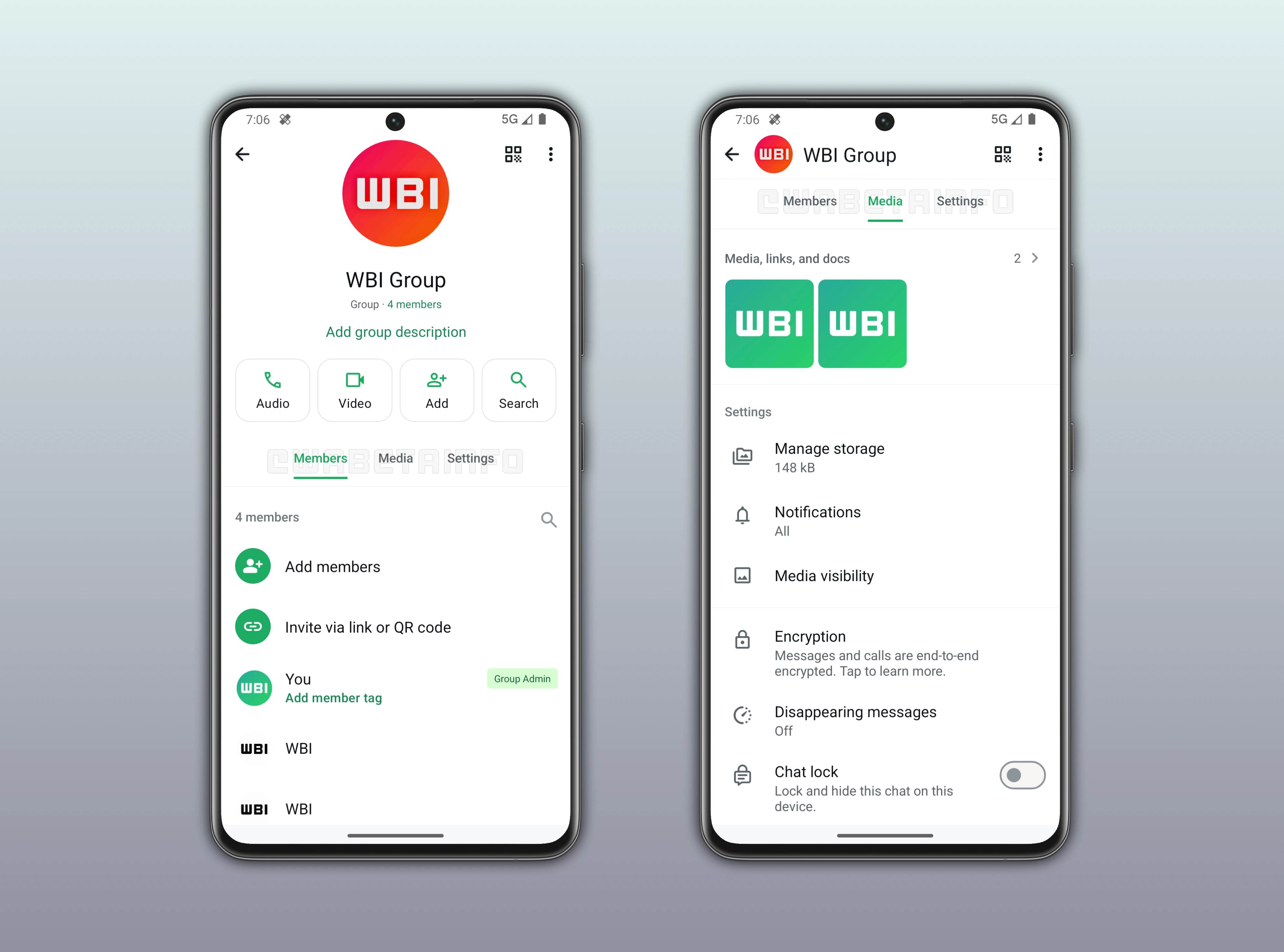
WhatsApp is committed to improving navigation in other sections of the app to make the experience more organized. Following the release of the latest WhatsApp beta for Android 2.26.20.7 update, which is available on the Google Play Store, we discovered that WhatsApp is rolling out a new navigation system for the group chat info screen.
WhatsApp organizes group chat info into dedicated sections
The group chat info screen is organized into different sections that help users manage group settings and shared content. At the top, it shows basic group details such as the group name, icon, and the participant list. The group chat info screen also includes a media section where all photos, videos, links, and documents shared in the group are collected for quick access. The screen also offers the ability to manage notification settings to mute the group or customize alerts. Another section is Media Visibility, which controls whether downloaded media from the group is saved to the device gallery. Further down, users can enable Disappearing Messages to make new messages automatically delete after a set time, and Chat Lock to add an extra layer of privacy protection to the conversation.
The group chat info screen is becoming and harder to navigate
As you can see, the group chat info screen contains a lot of options and settings. While these features are useful on their own, the growing number of controls makes the section feel increasingly dense. This can make it harder for users to quickly find specific settings without scrolling or searching through the section. As a result, the page is starting to feel less structured and more cluttered.
WhatsApp introduces tab-based navigation within the group chat info screen
With the recent update, WhatsApp is addressing this issue with usability in the group chat info screen by introducing a new navigation system. This system organizes the page into three main tabs: Members, Media, and Settings. WhatsApp is not moving these sections in three separate pages, but they remain within the same screen. When the user taps on one of the tabs, the interface automatically scrolls to the corresponding section. This makes it easier to access specific content since users can find the relevant section without manually searching the option they're looking for.
Tabs improve navigation in the group chat info screen
Previously, users had to manually scroll through the group chat info screen to find specific sections. This often made navigation slower and less efficient. With the new system, WhatsApp introduces a more structured layout that reduces this effort. Instead of continuous scrolling, users can now tap a tab to instantly jump to the relevant section. The interface then automatically scrolls to that area, making the experience faster.
WhatsApp is rolling out the navigation system within the group chat info screen
The new navigation system for the group chat info screen is available to some beta testers who install the latest WhatsApp beta for Android updates from the Google Play Store. WhatsApp is currently testing this feature to a limited number of users. This means that this feature is not available to everyone. Over the next few weeks, more beta testers will be able to take advantage of the new navigation system in the group chat info screen.
Connect with WABetaInfo
Follow WABetaInfo on X to learn more about new features and updates. We love hearing your feedback, so please let us know what you think! You can also visit our About page to explore all our services and keep up with the latest announcements.