WhatsApp is introducing a feature that replaces the two-step verification PIN with an account password. A password with letters and numbers is far harder to guess than a 6-digit code. This makes two-step verification more robust for anyone who already uses it.
| Key Points | Details |
|---|---|
| Feature: | Account password for two-step verification |
| Status: | Rolling out |
| Compatibility: | If you install the latest version available on the App Store and Play Store, you're already using a compatible update. |
| Availability info: | This feature is available to some users, and it's rolling out to more people over the coming weeks. |
| Thanks: | shw_9876, kingcyrious, and Youssef Salem, for testing and reporting. |
| Previous news: | WhatsApp launches three new account security updates! |
WhatsApp planned to upgrade two-step verification with a password
In the post about the WhatsApp beta for Android 2.26.29.4 update, we announced a feature that protects accounts using a password. This functionality would replace the current 6-digit PIN used for two-step verification with a password. The update would ask users to set a password instead of a PIN for two-step verification. The change would make the verification code harder to guess, since a password can combine letters and numbers while a numeric PIN cannot.
WhatsApp is introducing a stronger two-step verification feature
Today, WhatsApp announced three new security updates. In the blog post, WhatsApp also announced that two-step verification is getting stronger with a password. Now, WhatsApp is finally making the account password available on Android and iOS. Specifically, WhatsApp is rolling out the same account password announced in the official blog post. The feature replaces the 6-digit PIN with a full password, adding a stronger layer of security to the account.
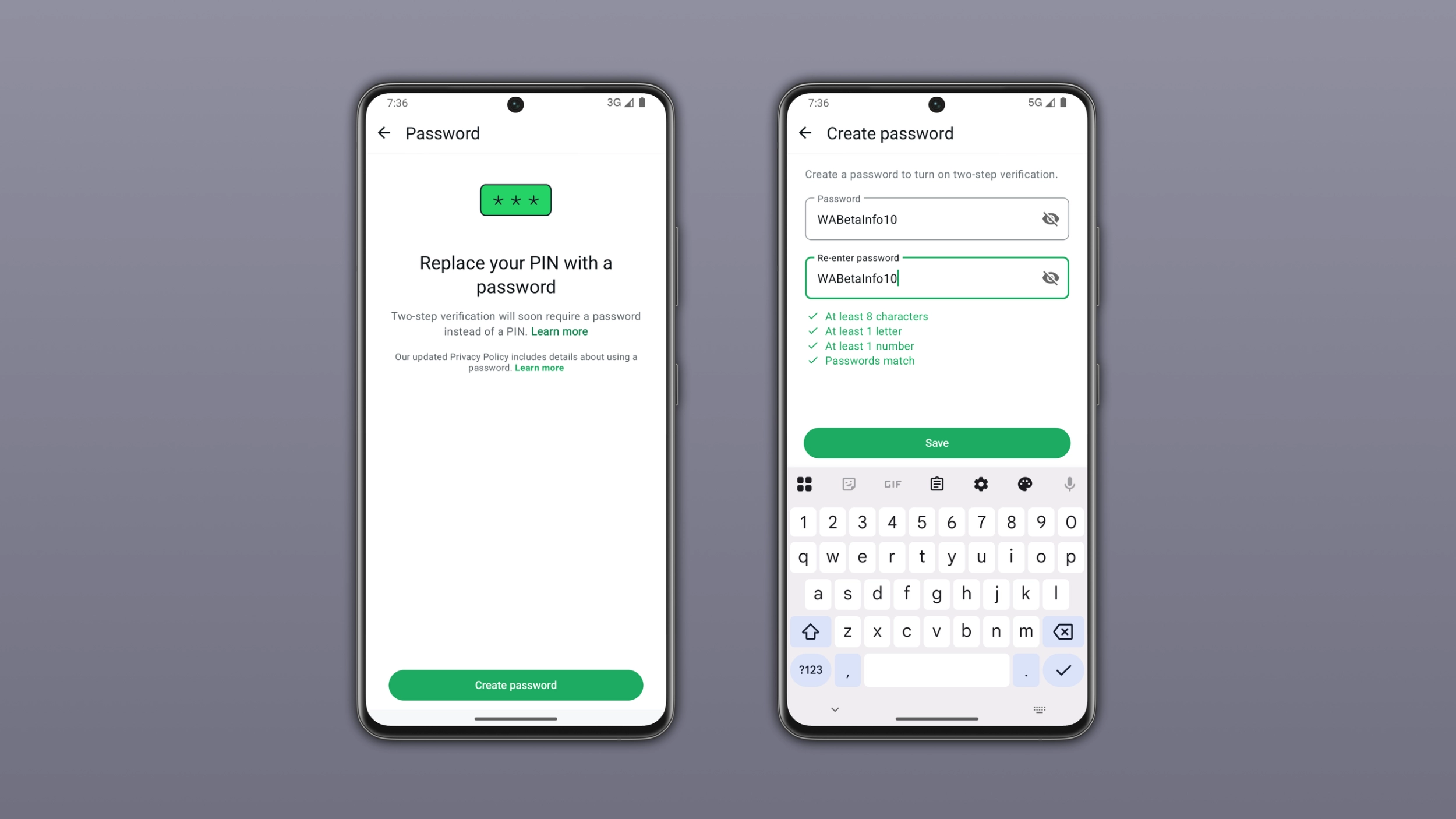
What the account password feature is and where to find it
The account password is a new security code that users can set directly from the app settings. Users can find it under Settings > Account. Here, WhatsApp added a dedicated option to let users set up their account password. The password works as a replacement for the current PIN that two-step verification uses. This means that WhatsApp will ask for a password after entering the 6-digit code received via SMS. Users who already have two-step verification enabled may need to update their PIN with a password when they can use the feature.
What the password requirements look like
The account password has specific requirements that a numeric PIN does not. Users need to set a password with at least eight characters, at least one letter, and at least one number. These requirements ensure that the password is not too simple to guess. A combination of letters and numbers also gives users far more possibilities than a 6-digit numeric PIN.
Why a password is harder to guess than a PIN
A 6-digit numeric PIN has a limited number of possible combinations. For example, a PIN based on a birthday or a repeated number is not hard to guess. Instead, a password with letters and numbers opens up far more possibilities, and there is no obvious pattern to follow. Nobody gets past the SMS code without SIM swapping or physical access to the device. But even in that scenario, a password is a much stronger second layer than a PIN. As a result, this feature will make two-step verification more robust without changing how it works for the user.
What to do if you forget your account password
If you forget your account password, you can reset it at any time using your email address. When you request a reset link, WhatsApp sends it to your email address. Users can follow the link to create a new password. For this reason, you should add a recovery mail if you didn't save it in the past. You can add or update your email address right within the account settings. Without a recovery email, you will have to verify your account through the phone number to reset the password.
WhatsApp is rolling out the account password feature on iOS and Android
This feature is available to some users who install the latest WhatsApp update. Note that it is not available to everyone. WhatsApp is rolling out this functionality gradually, so not every user will see it immediately. If the feature does not work yet, it should become available to more accounts over the coming weeks. WhatsApp has not announced when this feature will be available to everyone.
Connect with WABetaInfo
Follow WABetaInfo on X and visit our About page to learn more about what we do. We always appreciate your feedback on posts like this one.