WhatsApp is rolling out Status Archive to preserve your updates
WhatsApp launched a new feature that helps Android users keep their expired status updates in a private archive. The feature introduces a simple way to automatically store and manage status updates after they disappear. The update improves the way users can access and navigate their status history.
| Key Points | Details |
|---|---|
| Name of the feature: | Status Archive |
| Status: | Rolling out |
| Compatibility: | WhatsApp beta for Android 2.26.23.6 is a compatible update. |
| Availability info: | This feature is available to some beta testers, and it is rolling out to more users over the coming weeks. |
| Thanks: | Kingcyrious and Black Code, for testing and reporting. |
| Previous news: | Europe orders Meta to open WhatsApp to rival AI assistants for free! |
WhatsApp introduces a way to preserve expired status updates in a private archive
In the post about the WhatsApp beta for Android 2.26.18.1 update, we announced a feature that lets users archive their status updates after they expire. With this feature, WhatsApp will offer a tool that helps users preserve their expired updates. Once a status update reaches its 24-hour limit, WhatsApp will automatically save it in a private archive on the device instead of permanently delete it. This will make it easier for users to revisit, organize, and reshare their expired status updates whenever they want.
WhatsApp refines the Status Archive feature before bringing it to beta testers
When we announced this feature, it was still under development and not yet ready for beta testing. In these weeks, WhatsApp refined and improved the feature ahead of the official release. But now, the feature is finally ready to make its debut. That's what we discovered with the latest WhatsApp beta for Android 2.26.23.6 update, which is available on the Google Play Store. Specifically, WhatsApp is rolling out the feature that lets users keep their expired updates in a separate archive.
WhatsApp keeps status updates visible only for 24 hours before they disappear automatically
When users share a status update, it is visible to their selected contacts for a limited time. Status updates automatically disappear after 24 hours from the moment users share them. Since status updates are intended to capture daily moments rather than permanent content, they are temporary by nature. Once the 24-hour period ends, the status update is no longer accessible to either the person who posted it or the viewers.
WhatsApp looks for ways to prevent loss of important status updates after expiry
Once WhatsApp deletes status updates after 24 hours, there is no built-in way to restore them. This can be especially frustrating when the update was captured directly through WhatsApp or removed from the device after being shared. Users may lose their updates when they reshare a status that includes content where they were mentioned by their contacts. So users can easily lose access to the updates they might want to keep. For this reason, WhatsApp has been working on new solutions that help users retain or recover their expired status updates.
WhatsApp beta introduces Status Archive to let users save expired updates automatically
With the latest update, WhatsApp is finally addressing this issue by introducing Status Archive. This feature makes it easier for users to automatically save their expired status updates in a private archive. Instead of being permanently lost after 24 hours, status updates can now be stored securely in a separate section of the app. Users can revisit their archived updates whenever they want, without manually saving them beforehand. The archive is private, so only the account owner can view their expired updates. This solution provides a simple way to preserve status updates, and it keeps their temporary nature intact.
WhatsApp lets users enable Status Archive from Storage and Data settings
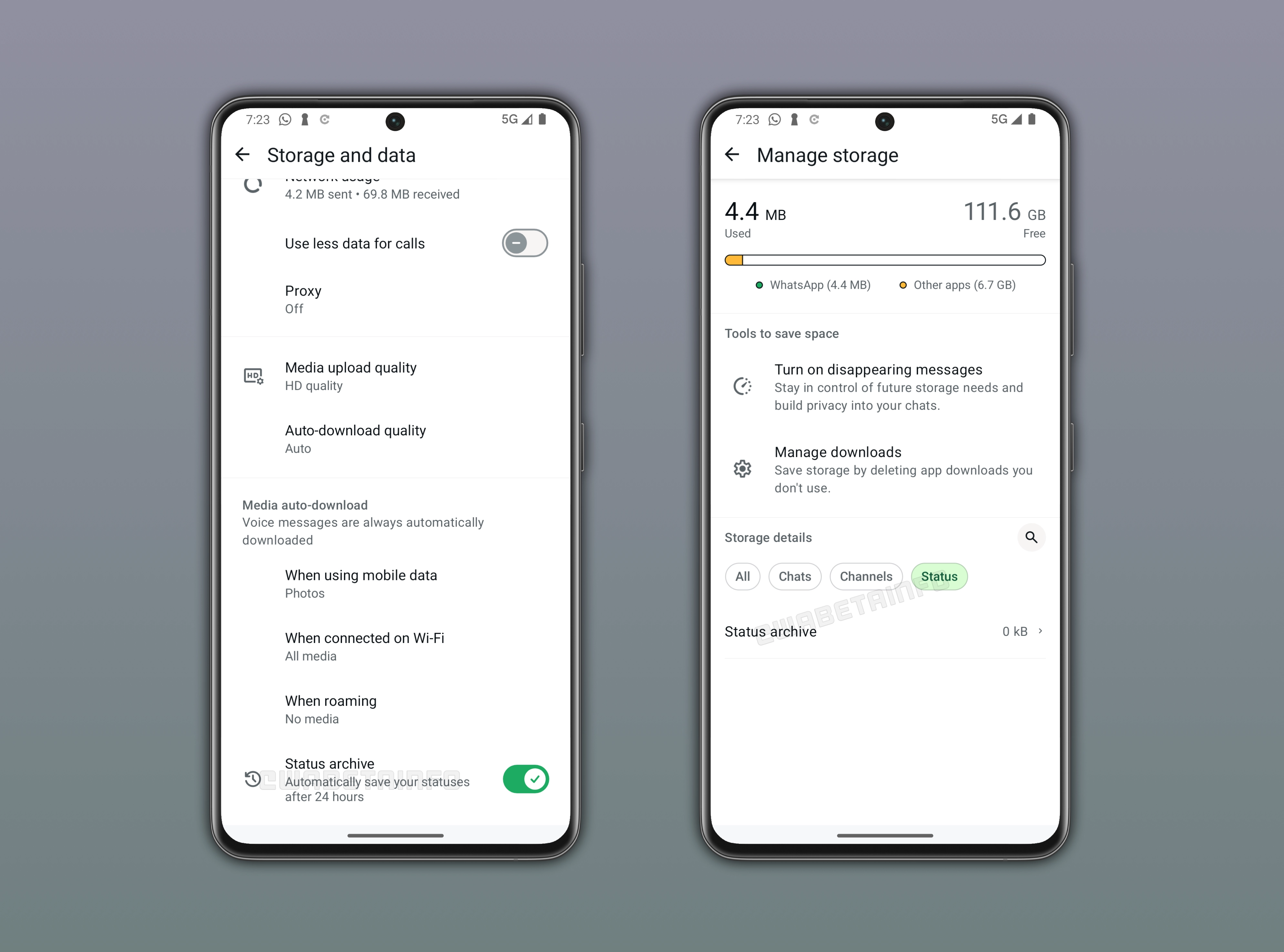
Users can find a new option called "Status Archive" right within the "Storage and data" section. Once they enable the feature, WhatsApp will automatically archive all status updates that expire after 24 hours. These saved updates can be accessed from the Updates tab by selecting the option "Status Archive" in the overflow menu. Users can also view their archived status updates within the section that displays the user's own shared status updates. In addition, WhatsApp added a new entry point to view their archive in the "Manage Storage" screen. Here, users need to filter the results specifically for status updates. This makes it simpler to locate and manage archived updates from multiple entry points.
WhatsApp is rolling out Status Archive to a limited group of Android beta testers
Status Archive is available to some beta testers who install the latest WhatsApp beta for Android update from the Google Play Store. WhatsApp is currently testing this functionality with a limited number of users. As a result, it is still not available to everyone. If you do not see this feature after installing the latest update, it may become available in the future. WhatsApp has not announced an official timeline for the stable version. However, we expect the feature to reach more users over the coming weeks.
Connect with WABetaInfo
Follow WABetaInfo on X and visit our About page to learn more about what we do. We always appreciate your feedback. Let us know what you think: your opinion helps us improve our posts.